site-kit-wp: GA4 property select potentially shows wrong measurement ID for property
Bug Description
The GA4 module’s property select component is unique in that it combines the selection of the property ID and measurement ID into a single choice. Since properties can have multiple web data streams (entity associated with the measurement ID), the corresponding web data stream for the current site needs to be identified to include in the list of choices.
We recently changed the property select to include the measurement ID (see #5145) in the choice to select from instead of the numeric property ID as the measurement ID is what the user will be more familiar with, and is somewhat equivalent to the property ID for Universal Analytics as it is what is included in the tag on the front end.
Due to an internal flaw, the measurement ID shown in the choice for a given property may not be the correct web data stream for the current site. While the choice is still applied properly, it makes for a very confusing experience for the end user as they may be attempting to select one measurement ID, only to see another in the settings view.
This only applies to properties with more than one measurement ID, and where the matching web data stream for a site is not the first.
Steps to reproduce
- Set up SK on a new site
- Set up Analytics, and during setup choose an existing GA4 property from the list
- Finish setup – you should be prompted to grant scopes to create the new web data stream for the chosen property
- Navigate back to Analytics settings
- Note the GA4 measurement ID in the settings view
- Edit the settings
- Note the selected GA4 property includes a different measurement ID than shown previously
Screenshots
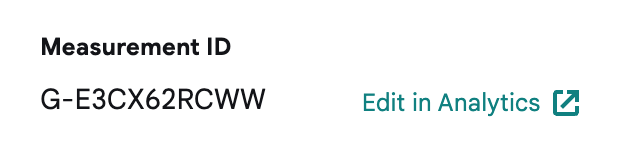
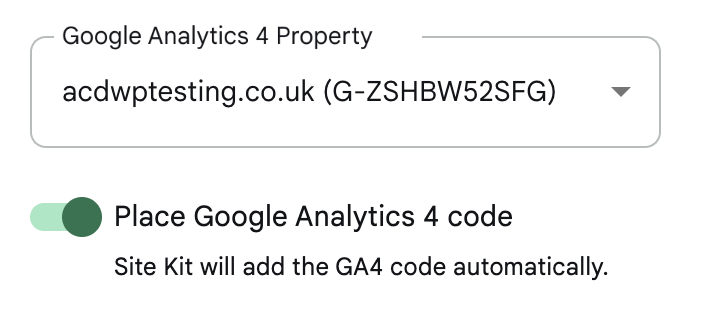
Do not alter or remove anything below. The following sections will be managed by moderators only.
Acceptance criteria
- The measurement ID shown in the GA4 property select’s choices should always match a web data stream that has the same URL as the current site (see
getMatchingWebDataStream)- For properties in the list that do not have a matching web data stream, the measurement ID should be omitted from the option’s text, including wrapping characters/parentheses
- The property select should remain in a loading state until related measurement IDs and matching are completed
Note: this applies to all placements of the GA4 property select (i.e. in settings, setup, and activation banner)
Implementation Brief
- In
assets/js/modules/analytics-4/datastore/webdatastreams.js:- Rename the
getMatchingWebDataStreamselector togetMatchingWebDataStreamByPropertyID. Update all its usages across the codebase. - Create
getMatchingWebDataStreamas a new selector which should accept an array of web data streams and return a web data stream that matches with the current site. This selector:- Should accept parameter named
datastreamswhich is an array of web data steams. - Return
undefinedif thedatastreamsparameter is invalid (undefined, or not an array). - Copy over the logic for determining the matching web data stream from the
getMatchingWebDataStreamByPropertyIDselector.
- Should accept parameter named
- In the
getMatchingWebDataStreamByPropertyID:- To ensure a “DRY” implementation, re-use the new
getMatchingWebDataStreamselector replacing the copied over logic, passing the value of thedatastreamsvariable to it.
- To ensure a “DRY” implementation, re-use the new
- Update the
getMatchedMeasurementIDsByPropertyIDsselector:- We want to update this selector so that only measurement IDs that correspond to web data streams matching the current site are returned.
- Before assigning the
measurementIDvariable, create a new variable namedmatchingDataStreamwhich should call thegetMatchingWebDataStreamselector from themodules/analytics-4store, passingdataStream[ currentPropertyID ]to it. - Return the accumulator (
acc) (eg. don’t add the measurement ID to theacc) ifmatchingDataStreamisfalsey. - Re-assign
matchingDataStream.webStreamData.measurementIdto themeasurementIDvariable.
- Rename the
- In
assets/js/modules/analytics-4/components/common/PropertySelect.js:- In the unconditional
returnstatement, inside the<Option />component, displaymeasurementIDs?.[ _id ]inside parentheses only ifmeasurementIDs?.[ _id ]is truthy. - Before assigning the
isLoadingvariable, create a new variable namedpropertyIDswhich shouldmapover thepropertiesarray and create a new array containing each property ID (property[ '_id' ]). - Update the
isLoadingvariable by adding a new condition besides the current condition. The new condition should call thehasFinishedResolutionselector from themodules/analytics-4store, passinggetWebDataStreamsBatchand an array containing thepropertyIDsvariable as parameters.
- In the unconditional
- In
assets/js/modules/analytics/components/settings/GA4SettingsControls.js:- Inside the
<Option />component inside the<Select />component shown ifisDisabledis truthy, displaymeasurementIDs?.[ matchedProperty._id ]inside parentheses only ifmeasurementIDs?.[ matchedProperty._id ]is truthy.
- Inside the
Test Coverage
- In
assets/js/modules/analytics-4/datastore/webdatastreams.test.js:- Update test cases for
getMatchingWebDataStreamByPropertyIDto reflect the naming change. - Add test cases for the new
getMatchingWebDataStreamselector. - Update test cases for
getMatchedMeasurementIDsByPropertyIDsto reflect the above changes.
- Update test cases for
- Fix any other failing tests.
QA Brief
- Follow the
Steps to reproducein the bug description and verify that the measurement ID displayed during property selection (in Settings Edit) and after saving (in Settings View) are identical. - During property selection (in Settings Edit), if a certain GA4 property doesn’t have a matching measurement ID, only the property name should be displayed omitting the parentheses.
- At no point should an empty parentheses be shown beside a property name. When the measurement IDs are being loaded, the loading progress bar should be shown.
- Go through the Analytics setup flow and verify that there are no other UI/UX regressions except for the ones mentioned above. Also, verify that there are no console errors.
Changelog entry
- Fix presentation of measurement ID within options of the Analytics 4 property select.
About this issue
- Original URL
- State: closed
- Created 2 years ago
- Comments: 16 (6 by maintainers)
Commits related to this issue
- Merge branch 'main' into fix/#6293-ga4-property-select. — committed to google/site-kit-wp by aaemnnosttv 2 years ago
- Merge pull request #6320 from google/fix/#6293-ga4-property-select — committed to google/site-kit-wp by aaemnnosttv 2 years ago
@nfmohit Once I looked in the code I got it, but for the IB, I couldn’t quite find what this refers to:
That bit of the IB seems a bit out-of-place/without context. But once I looked at the file it made sense. I updated the IB to just give a bit more context there.
IB ✅
Yes that’s what I mean. 😃