site-kit-wp: Error message in wp admin does not contain plugin name.
Bug Description
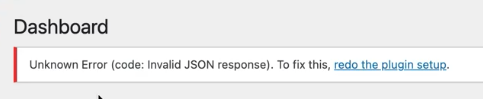
Today I ran into this message in my admin screen:
Unknown Error (code: Invalid JSON response). To fix this, redo the plugin setup.
Please include which plugin name in the error message, because the only way I could figure out that this was related to Site Kit was to view the source.
Do not alter or remove anything below. The following sections will be managed by moderators only.
Acceptance criteria
- All notices added to non-Site Kit screens should clearly identify as originating from the Site Kit plugin by prefixing the message with the plugin name
E.g.Site Kit by Google: Unknown Error (code: Invalid JSON response). To fix this, redo the plugin setup.
Implementation Brief
- Update all notices in the
AuthenticationandIdea_Hubclasses to haveSite Kit by Google:prefix before the content of the notice: https://github.com/google/site-kit-wp/blob/14e8604318a29a7dfc928029f992c2ad8a6df60c/includes/Core/Authentication/Authentication.php#L1051-L1053 https://github.com/google/site-kit-wp/blob/14e8604318a29a7dfc928029f992c2ad8a6df60c/includes/Core/Authentication/Authentication.php#L1101-L1103 https://github.com/google/site-kit-wp/blob/14e8604318a29a7dfc928029f992c2ad8a6df60c/includes/Core/Authentication/Authentication.php#L1154-L1156 https://github.com/google/site-kit-wp/blob/14e8604318a29a7dfc928029f992c2ad8a6df60c/includes/Modules/Idea_Hub.php#L310-L312 https://github.com/google/site-kit-wp/blob/14e8604318a29a7dfc928029f992c2ad8a6df60c/includes/Modules/Idea_Hub.php#L346-L348 (If possible this should be localized.)
Test Coverage
- N/A
QA Brief
- QAing this would require checking all notices from Site Kit that are displayed in non Site Kit pages of the WordPress Dashboard.
- The following notices can be checked:
- URL mismatch notice: Try changing the Site URL and Home URL of the installation (I changed from
httptohttps) and see a notice show up. - Authentication notice: From your Google account, revoke Site Kit’s access to your Google account. This should make Site Kit show an authentication error (this sometimes require clearing the local and session storage).
- OAuth error: While setting up Site Kit, cancel instead of continuing to give Site Kit access to Google account. This will trigger a setup interruption error.
- Idea Hub notices: Set up Idea Hub (enable
ideaHubModulefeature flag from Tester Settings) and see notices from Idea Hub in your WordPress Dashboard.
- URL mismatch notice: Try changing the Site URL and Home URL of the installation (I changed from
Changelog entry
- Update admin notice messages to have
Site Kit by Google:prefixes.
About this issue
- Original URL
- State: closed
- Created 2 years ago
- Reactions: 2
- Comments: 15
⚠️ Review
@nfmohit please see my comment on your PR https://github.com/google/site-kit-wp/pull/5223#pullrequestreview-979454605.
Would you please open a follow-up PR to address it?
@aaemnnosttv SG, adding the name right at the beginning of that text string should help people figure out what the error is referencing.