site-kit-wp: Enhance presentation of internal server errors in widgets with Site Kit specific guidance
Bug Description
For errors that come from WordPress core, which we output in the Site Kit widgets consider including any HTML markup. At present errors such as the below can appear, which don’t contain a link and have unusual formatting, with no space between the sentences.
"There has been a critical error on this website.Learn more about troubleshooting WordPress"
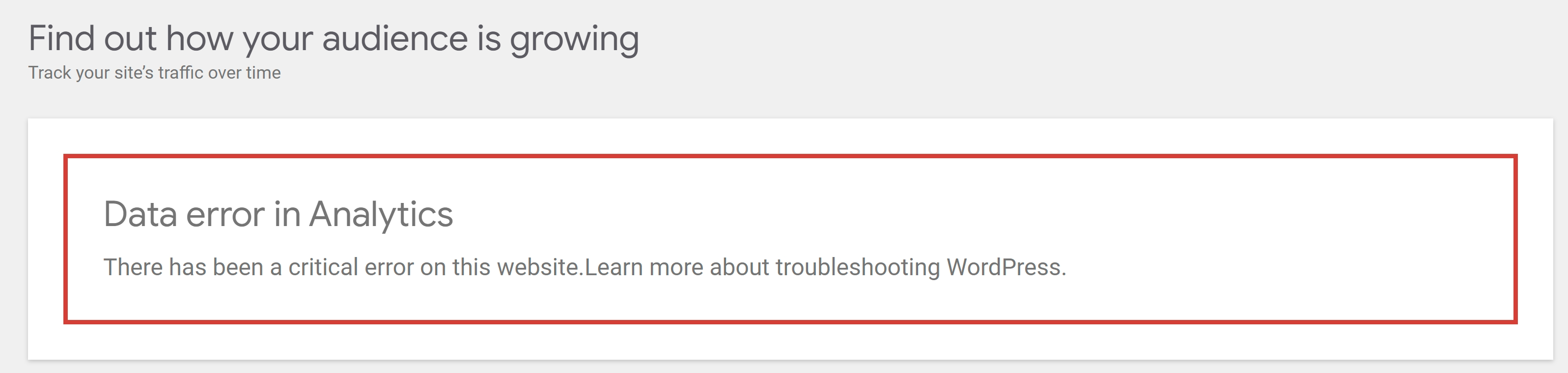
Steps to reproduce
- Set up Site Kit
- Open a new tab and navigate to the Site Kit dashboard
- Click on your user profile icon in the header and select “Manage Sites” from the dropdown
- Click the button to “Remove access” for the site you are using
- Close the browser tab - do not click “Back” to go back to your site as this will trigger a disconnect
- Wait 1 hour for the cached content to expire
- Revisit your Site Kit dashboard
Additional Context
- We did decide to strip html comments previously. See https://github.com/google/site-kit-wp/issues/4169
Do not alter or remove anything below. The following sections will be managed by moderators only.
Acceptance criteria
- The
ReportErrorcomponent should be updated to display a custom error message for errors with acodeofinternal_server_error:- The content of the new error message should be: There was a critical error on this website while fetching data.
- The
ReportErrorcomponent should be updated to display a custom error message for errors with acodeofinvalid_json:- The content of the new error message should be: The server provided an invalid response.
- This logic to alter the error messages conditionally should be implemented in a reusable way so that it does not only work in the
ReportErrorcomponent, but it should also be used in the custom error notices used in the PageSpeed Insights widget (seeLabReportMetricsandFieldReportMetricscomponents).- Those two components should be altered to also have the message accompanied by the “Retry” button and “Get help” link (using similar markup and copy as this combination of button/link uses elsewhere in the plugin already).
- In both cases, it should be ensured that the usual “Retry” button and following “Get help” link are present. This may already be the case based on current logic, but should be double checked, and added if not already present.
Implementation Brief
- Create a new function,
getReportErrorMessage(or any proper name), which accepts anerrorobject and returns the message according to the AC when theerror.codeisinternal_server_errorandinvalid_json, falling back toerror.message. - Use this new function to determine the error messages within the
ReportError,LabReportMetrics, andFieldReportMetricscomponents. - Create a new reusable component,
ReportErrorActions(or any proper name).- It takes
moduleSlug(string) anderror(object|array<object>) as arguments. - Extract the
Request accessandRetrybuttons and theGet helplink from theReportErrorcomponent, including thehandleRetrycallback and associated code, and render them in the new component.
- It takes
- Update the
ReportError,LabReportMetrics, andFieldReportMetricscomponents to render the newReportErrorActionscomponent.
Test Coverage
- Add test cases for the
getReportErrorMessageutility function. - Add test cases for the
ReportErrorActionscomponent. - Add stories for the
ReportErrorActionscomponent. - In
assets/js/components/ReportError.stories.js, add stories for theinternal_server_errorandinvalid_jsonerrors. - In
stories/module-pagespeed-insights-components.stories.js, add error stories for theLabReportMetricsandFieldReportMetricscomponents.
QA Brief
- Check the steps to reproduce section to reproduce the bug.
- Ensure that the wording in the error message is now as per the AC.
- Stories can be verified here:
- https://google.github.io/site-kit-wp/storybook/pull/6322/?path=/story/modules-pagespeed-insights-widgets-dashboardpagespeedwidget--error
- https://google.github.io/site-kit-wp/storybook/pull/6322/?path=/story/components-reporterror--report-error-with-custom-internal-server-error-message
- https://google.github.io/site-kit-wp/storybook/pull/6322/?path=/story/components-reporterror--report-error-with-custom-invalid-json-message
QA Eng Brief
- Simulate the internal_server_error and invalid_json error messages for a specific module, for e.g for the ‘GET:report’ Analytics endpoint. Ensure the messages are displayed as per the AC.
Changelog entry
- Improve error messages when encountering an internal server error in WordPress.
About this issue
- Original URL
- State: closed
- Created 2 years ago
- Comments: 22 (5 by maintainers)
@mohitwp I had quite some trouble recreating the bug as well following the steps to reproduce in the ticket description. I thought I was missing something and then I manually triggered the error by changing the PHP code. That’s why I also added a QA:Eng label to the ticket since we need to manually trigger the issue. I think you can check the stories on your end and then have an engineer QA the rest.
Hey @hussain-t, yes sorry if I wasn’t clear there - I meant that the utility function could be used directly in
ReportErroretc, and the reusable component would not attempt to display the message/description, just the other bits.@aaemnnosttv Makes sense, updated!
@aaemnnosttv Updated the ACs here to use the new support endpoint, and send the
internal_server_errorerror ID. This will for now lead to the troubleshooting URL, and a dedicated article could be added later if it is worth it.