site-kit-wp: Chip doesn't do anything when in the section
Bug Description
As per bug bash tickets: https://app.asana.com/0/1201438453642602/1201478352201031 https://app.asana.com/0/1201438453642602/1201453960164093 https://app.asana.com/0/1201438453642602/1201479361460033
Upon initial dashboard load, clicking the ‘Traffic’ chip doesn’t do anything because the user is already in the Traffic section. If you scroll down the page after initial load and then click the Traffic chip, it does work. Perhaps the issue here is that the Traffic chip appears like it isn’t working because the user is already at that anchor on the page.
Potential suggestion to make the chips active when scrolling to make it clear to users what section they are in on the dashboard.
Do not alter or remove anything below. The following sections will be managed by moderators only.
Acceptance criteria
- The
DashboardNavigationcomponent is updated to use a custom implementation of chips instead of using the functionality from the@material/react-chipspackage. The updated component works as following:- The selected chip can’t be unselected
- When the user clicks on a non-selected chip, the page scrolls to the correct location, the clicked chip becomes selected instead of the previously selected one, and the current URL hash changes to the newly selected chip anchor.
- When the user scrolls the page, an appropriate chip becomes selected and the URL hash changes to the new anchor if the top of the corresponding area reaches the upper visible position of the widgets area (below the navigation bar).
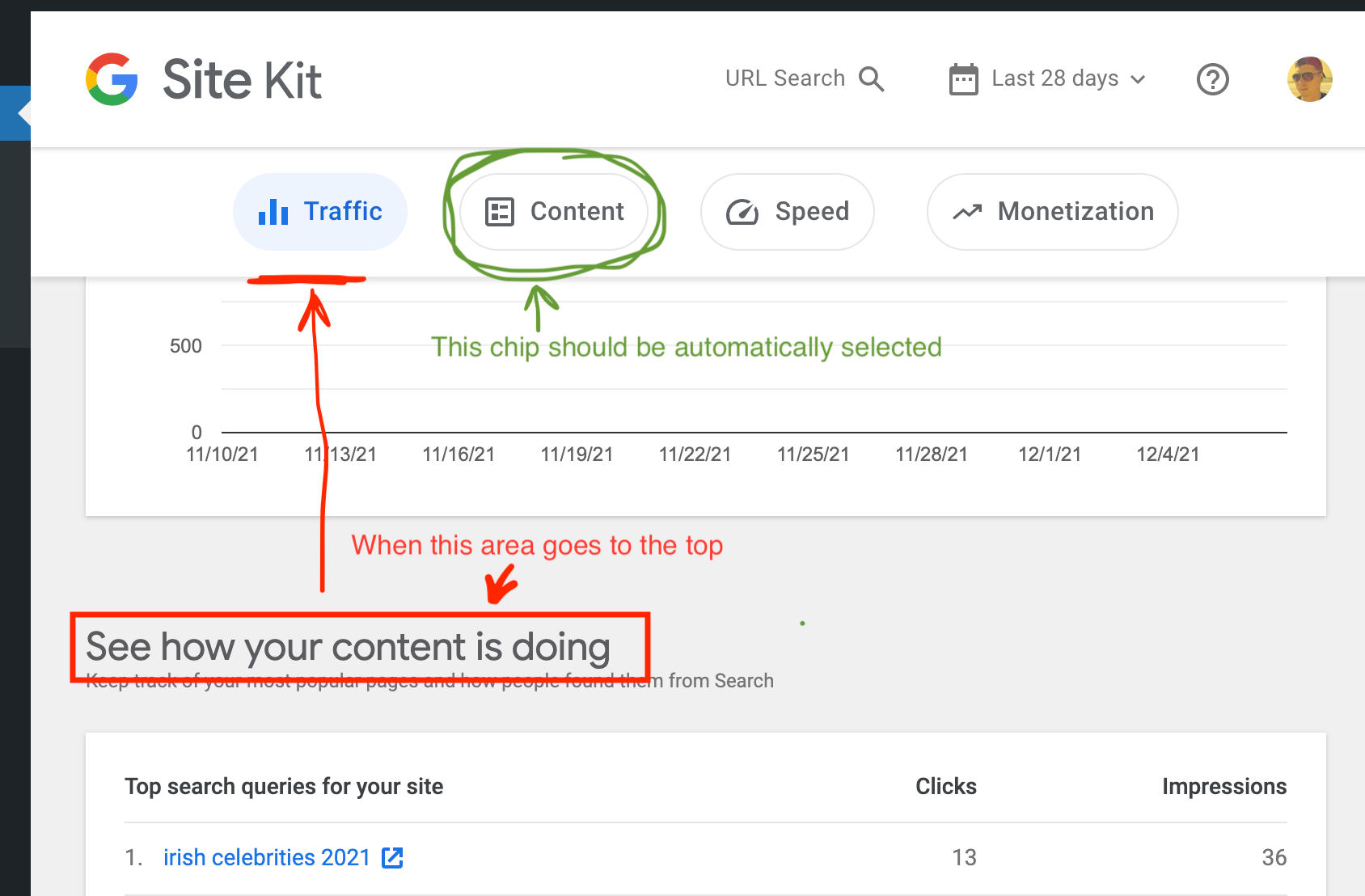
- When the user has scrolled to the very top of the page and the first area is still behind due to a notification banner, the first chip is selected anyway. In other words, if the first widget area is lower than the navigation chips, the first chip should be selected.
Implementation Brief
- Edit the
DashboardNavigationcomponent:- Update the
selectedIdsstate variable to be a single string instead of an array and rename the variable to be justselectedId. Rename the companionsetSelectedIdsfunction tosetSelectedId. - Update the
handleSelectcallback that should get “hash” from the.target.idproperty of theeventargument passed to the callback function instead of theselections. - Replace the
ChipSetelement with a simple<div>using the same class name. - Update all
Chipelements:- Add
onClick={ handleSelect }property. - Add
selected={ selectedId === ... }property.
- Add
- Add a new
useEffecthook that does the following:- Defines a new throttled function
onScrollthat finds the closest widget context area to the top and selects its id using thesetSelectedIdfunction.- To find the closes widget context area, loop through each area and get their top positions. The closest will be the one with the biggest negative value (closest to
0).
Also, don’t forget to subtract the height of all sticky elements in the header to make sure that chips update their position when their top borders go under sticky elements.let closest = undefined; let closestId = ANCHOR_ID_TRAFFIC; for ( const areaId of [ ANCHOR_ID_TRAFFIC, ANCHOR_ID_CONTENT, ... ] ) { const top = document.getElementById( areaId ).getBoundingClientRect().top; if ( top < 0 && ( closes === undefined || closest < top ) ) { closest = top; closestId = areadId; } }- Or as an alternative, find the closest area whose top position is the closest to the bottom position of the
DashboardNavigationelement.
- Or as an alternative, find the closest area whose top position is the closest to the bottom position of the
- If there are no areas with a negative top position, then select the first area which is
ANCHOR_ID_TRAFFIC. - Use the
_.throttlefunction from thelodashlibrary with50ms timeout to wrap the function:import throttle from 'lodash/throttle'; const onScoll = throttle( () => { ... }, 50 );
- To find the closes widget context area, loop through each area and get their top positions. The closest will be the one with the biggest negative value (closest to
- Adds a new event listener for the
scrollevent using theonScrollfunction. - Returns an anonymous function that removes the previously defined scroll event listener.
- Defines a new throttled function
- Update the
- Edit
assets/sass/components/global/_googlesitekit-dashboard-navigation.scss:- Set
display: flexfor the.googlesitekit-navigationclass. - Update chip styles to display correctly after removing the
ChipSetelement.
- Set
Test Coverage
- Fix any failing tests.
QA Brief
- Go to the Site Kit dashboard
- Scroll the page to each section from top to bottom (Traffic, Content, Speed, and Monetization)
- Verify the appropriate chip is selected and the URL is updated with the hash
- Click the chips and verify the same
- Make sure everything works as expected
Changelog entry
- Update unified dashboard to update the active navigation chip on scroll.
About this issue
- Original URL
- State: closed
- Created 3 years ago
- Comments: 20 (2 by maintainers)
@wpdarren, this is how the
@material/react-chipslibrary works. I think this is out of scope and it would be better if we create a separate ticket for it.The AC needs tweaking to reflect the latest changes. I noticed there are a few older points that were
stricken through, please remove these instead – we can always dig back into the edit history if needed.In this case I believe
0would be the top of the viewport, correct? Can use the bottom of theDashboardNavigationelement instead as that would be the top visually?@wordpress/composehas auseThrottlehook which has some benefits overthrottleby itself like cancelling scheduled callbacks if the dependencies change. The downside is our version of compose doesn’t include this yet. We copied overuseDebouncea while back, maybe we could do the same here since it’s such a simple hook. Take a look and see what you think though – maybe it’s not needed.The IB LGTM otherwise unless there’s anything from @felixarntz 👍
@eugene-manuilov @kuasha420 @tofumatt I just revisited this one with @aaemnnosttv, and we came to the conclusion that the decision to remove the
@material/react-chipswas made a bit preliminarily. At a minimum that part should not be in the ACs since that is more IB material, but we also think it would be better to keep the package, for the following reasons:Chipcomponent from there comes with all the styles and behavior we need. It may seem that that is trivial, but there’s a lot of small visual and accessibility tweaks here or there, which would make it tedious to manually recreate the component.@material/react-chipsagain for dashboard sharing anyway, for the UI to modify shared roles - and for that even theChipsetcomponent would likely be the right use-case.The
Chipcomponent from the package can be controlled via props, so I’d suggest we keep using them, but only implement a custom version ofChipset. Maybe something like aScrollNavigationChipsetcomponent. So while we would not useChipsetfor this issue at all, I think theChipcomponent still provides enough benefit for us to keep the package.Thanks, @felixarntz. AC is updated.
@eugene-manuilov Thanks, ACs look good, just one thing:
It would be good to include an additional point to also do the same when scrolled to the very top. In other words, if you’re scrolled to the very top and the first area isn’t even visible (e.g. could happen on mobile with a notification present), the first chip should be automatically selected anyway.
In other words, it should never be the case that no chip is selected.