deepvariant: 'CUDA_ERROR_UNKNOWN' error using DeepVariant GPU version.
**Have you checked the FAQ? https://github.com/google/deepvariant/blob/r1.5/docs/FAQ.md**: Yes
Describe the issue: ‘CUDA_ERROR_UNKNOWN’ using DeepVariant GPU version.
Setup
- Operating system: CentOS Linux release 7.4.1708 (Core), Linux 5.10.150-1.el7.x86_64
- DeepVariant version: 1.4.0
- Installation method (Docker, built from source, etc.): singularity image build from dockerhub
- Type of data: nothing special that is unlike the case studies
Steps to reproduce:
- Command: /opt/deepvariant/bin/run_deepvariant --version
- Error trace: (if applicable)
tensorflow/stream_executor/cuda/cuda_driver.cc:271] failed call to cuInit: CUDA_ERROR_UNKNOWN: unknown error
tensorflow/stream_executor/cuda/cuda_diagnostics.cc:169] retrieving CUDA diagnostic information for host:
tensorflow/stream_executor/cuda/cuda_diagnostics.cc:176] hostname:
tensorflow/stream_executor/cuda/cuda_diagnostics.cc:200] libcuda reported version is: INVALID_ARGUMENT: expected %d.%d, %d.%d.%d, or %d.%d.%d.%d form for driver version; got "1"
tensorflow/stream_executor/cuda/cuda_diagnostics.cc:204] kernel reported version is: 520.61.5
DeepVariant version 1.4.0
The hostname is privacy.
Does the quick start test work on your system?: No
Any additional context:
The GPU is NVIDIA GeForce 3090
The GPU Driver Version: 520.61.05
The CUDA version in the host is V11.8.89 as followings:
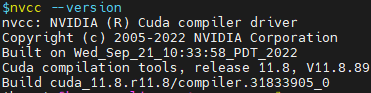 It seems that the Deepvariant v1.4.0 in the singularity image has already installed CUDA v11.3.

I don’t know whether it causes the program crash.
About this issue
- Original URL
- State: closed
- Created a year ago
- Comments: 21
Great. @sen1019san glad to hear that it works now! And thanks for @pgrosu and @pbtrial 's help!
Hi @sen1019san ,
Are you starting a fresh instance everytime? In my experience singularity fails to load all the modules for GPUs to be detected. So you can try this before your singularity command:
nvidia-modprobe -u -c=0This will load all the required modules for singularity to see the GPUs. Otherwise, you can run one of the CUDA samples before running the singularity command. Let me know if this helps.
Hi @pichuan,
Try dropping first via a shell like this, and check the LD_LIBRARY_PATH inside the container match with the CUDA libraries location there as would be seen by the applications:
singularity shell --nv -B /usr/lib/locale/:/usr/lib/locale/ docker://google/deepvariant:“${BIN_VERSION}-gpu”
Paul