go: x/tools/gopls: confusing behavior when using a `go.work` with duplicate module paths
What version of Go, VS Code & VS Code Go extension are you using?
Version Information
- Run
go versionto get version of Go from the VS Code integrated terminal.- go version go1.18.3 linux/amd64
- Run
gopls -v versionto get version of Gopls from the VS Code integrated terminal.- golang.org/x/tools/gopls v0.9.0
- Run
code -vorcode-insiders -vto get version of VS Code or VS Code Insiders.- 1.69.0
GO111MODULE=""
GOARCH="amd64"
GOBIN=""
GOCACHE="/home/esimo/.cache/go-build"
GOENV="/home/esimo/.config/go/env"
GOEXE=""
GOEXPERIMENT=""
GOFLAGS=""
GOHOSTARCH="amd64"
GOHOSTOS="linux"
GOINSECURE=""
GOMODCACHE="/home/esimo/projects/Go/pkg/mod"
GONOPROXY=""
GONOSUMDB=""
GOOS="linux"
GOPATH="/home/esimo/projects/Go"
GOPRIVATE=""
GOPROXY="https://proxy.golang.org,direct"
GOROOT="/usr/local/go"
GOSUMDB="sum.golang.org"
GOTMPDIR=""
GOTOOLDIR="/usr/local/go/pkg/tool/linux_amd64"
GOVCS=""
GOVERSION="go1.18.3"
GCCGO="gccgo"
GOAMD64="v1"
AR="ar"
CC="gcc"
CXX="g++"
CGO_ENABLED="1"
GOMOD="/home/esimo/projects/Go/src/esimov/go-generics/go.mod"
GOWORK="/home/esimo/projects/Go/src/esimov/go.work"
CGO_CFLAGS="-g -O2"
CGO_CPPFLAGS=""
CGO_CXXFLAGS="-g -O2"
CGO_FFLAGS="-g -O2"
CGO_LDFLAGS="-g -O2"
PKG_CONFIG="pkg-config"
GOGCCFLAGS="-fPIC -m64 -pthread -fmessage-length=0 -fdebug-prefix-map=/tmp/go-build1041229074=/tmp/go-build -gno-record-gcc-switches"
Share the Go related settings you have added/edited
"go.toolsManagement.autoUpdate": true,
"go.alternateTools": {},
"go.formatTool":"goimports",
"go.useLanguageServer": true,
"[go]": {
    "editor.tabSize": 8,
    "editor.insertSpaces": false,
    "editor.detectIndentation": true
}
Describe the bug
I’m working on a WSL environment and Vscode suddenly stopped showing the suggestions and the code autocompletion functionality has stopped working too. I’ve tried reinstalling the Go tools by pressing CTRL+Shift+P and selecting Go: Install/Update Tools. I ran also the go mod tidy command to update the required packages. Another attempt was to execute go work use -r ./, because this helped in this case golang/vscode-go#2259, but didn’t helped here. Instead I was getting something like in the snapshot below:
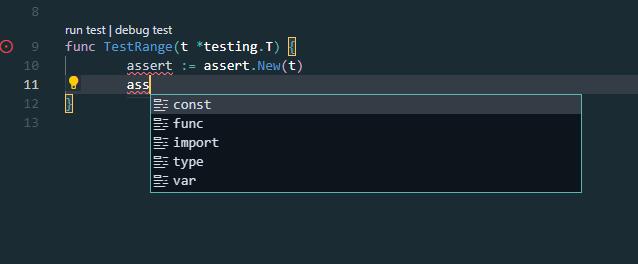
The package autoimport also is not working anymore. I’m out of ideas what else could I try.
About this issue
- Original URL
- State: closed
- Created 2 years ago
- Reactions: 1
- Comments: 35 (17 by maintainers)
I have the same issue, no auto suggestion anymore. golang.org/x/tools/gopls v0.9.1 go1.18.4 darwin/amd64 gotta jump back to the previous version gopls 0.8.4.
My understanding is that vendored modules aren’t complete copies of the original modules. They contain only packages required for the main module. When a workspace containing module
AandB, and bothAandBhave dependency on a moduleC, there is no guarantee that theCunderA’s andB’s vendor directories have compatible contents. Some packages required forBmay not exist inCvendored forA. I think a better approach is to check out the complete copy ofCmodule somewhere and load that in the workspace.@esimov there can only be one module per module path in a
go.workfile. This is true both for gopls and for the go command: the fact that the go command was not returning errors for you is a bug (#54048): the go command was using whichever vendored copy appeared last in thego.workfile.As a corollary: vendoring does not work as expected when using go.work. In the future, the
gocommand will not add vendored modules viago work -r: #51710.To work on two different copies of a module, open two separate VS Code workspace folders using different
go.workfiles.This is a confusing UX. We’ll use this issue to track improving that experience in gopls.
I have already tried it, but the issue didn’t went away. As it might help you in identifying the problem the gorilla websocket module is saved into the vendor folder, so it’s not imported directly, it’s loaded from the vendor folder, so this package is showing in two places, but in different vendor folders.
Note: I have replaced the actual project names.