go: x/tools/cmd/guru: referrers doesn't return references if used on the definition of the method
What version of Go are you using (go version)?
go version go1.9.2 windows/amd64
Does this issue reproduce with the latest release?
The latest stable, yes. I haven’t tried the beta.
What operating system and processor architecture are you using (go env)?
PS C:\code\go\bin> go env set GOARCH=amd64 set GOBIN= set GOEXE=.exe set GOHOSTARCH=amd64 set GOHOSTOS=windows set GOOS=windows set GOPATH=c:\code\go set GORACE= set GOROOT=C:\Go set GOTOOLDIR=C:\Go\pkg\tool\windows_amd64 set GCCGO=gccgo set CC=gcc set GOGCCFLAGS=-m64 -mthreads -fmessage-length=0 set CXX=g++ set CGO_ENABLED=1 set CGO_CFLAGS=-g -O2 set CGO_CPPFLAGS= set CGO_CXXFLAGS=-g -O2 set CGO_FFLAGS=-g -O2 set CGO_LDFLAGS=-g -O2 set PKG_CONFIG=pkg-config
What did you do?
Example project: config.zip
- Open the attached project in Visual Studio Code, or using guru directly in the CLI.
- Go to the file
config.goinpkg/config - Use “Find all references” on the function
GetConfig. Get zero results.
What did you expect to see?
All the references to the function GetConfig, in this case 2.
What did you see instead?
Zero references are returned, when it should actually return 2.
The strange thing is that a colleague doesn’t have this issue, and the only difference is that he’s running VS Code on Mac, and I’m running it on Windows. There are other colleagues that have the same issue and they’re running Windows as well.
Reference to issue that has already been opened but could not be solved on the vscode-go repo: https://github.com/Microsoft/vscode-go/issues/1415
About this issue
- Original URL
- State: closed
- Created 6 years ago
- Reactions: 1
- Comments: 19 (2 by maintainers)
The problem still exists with go1.9.4. This issue is pretty severe, not being able to trust Find All References makes guru unusable.
I am on Mac OS 10.14.2 (latest) and the patch for Windows is NOT working for me. I am seeing the exact same issue @eparziale is illustrating in his first screenshot.
Vscode is Version 1.30.2 (1.30.2), Go Extension is 0.8.0. go1.11.2 darwin/amd64.
My project is outside GOPATH and uses GO111MODULES.
This problem is pretty annoying, so any help is greatly appreciated!
@martinrode It’s possible that guru doesn’t currently support Go Modules, which is much larger problem. The patch for Windows is purely to fix incorrect slashes in module paths.
Thanks @doxxx for the fix, and @tuhlmann for the inspiration on how to get this patched and working locally for now!
FYI - For others who want to test the patch on Windows VSCode, I followed these steps
First confirm that find all references command is actually broken in your local Windows VSCode using Guru
Now make the local patch and confirm that find all references now works
First back up the broken copy of guru
cd $GOPATH\bin -> rename guru.exe to guru_old.exe
Now let’s create patched guru.exe and use it in VS Code
cd $GOPATH\src\golang.org\x\tools\cmd\guru
Open what.go in your favorite text editor and change lines 13 and 206 per the commit here: https://github.com/golang/tools/pull/56/commits/f15f5b603d5a9adfa5eedf9c06de9ac2c625580f
Open VS code -> Ctrl +Shift + P. -> Search "Go: Install/Update Tools -> Check the box next to guru -> click ok
Console should say Installing golang.org/x/tools/cmd/guru SUCCEEDED
In VS Code open the file config.go in pkg/config
Right click on the function GetConfig and click “Find all references”
VS Code should now correctly display all three references (See screenshot)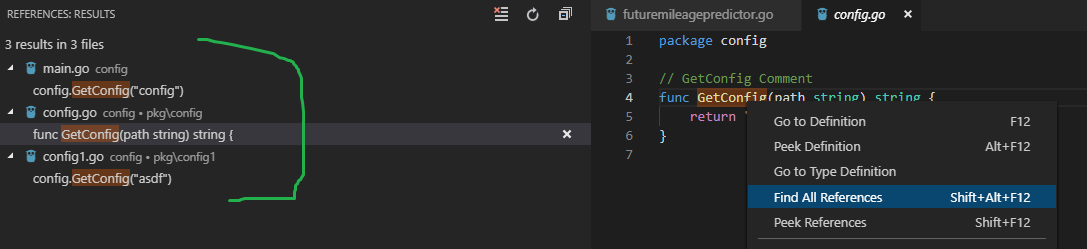
Note here that if you were to rename $GOPATH\bin\guru_old back to guru and retry find all references, the original problem will re-appear
@jltjohanlindqvist Can you please confirm that these steps work for you?
One important note - When you select GetConfig function in VS Code, don’t double click on the function name then click find all references (For some reason double click causes VS code to never return results). Instead hover over the method, then simply right click find all references. Then VS code will actually return references.