godot: Godot 4: Autocompletion for relative nodes ($ selector) doesn't work
Godot version
4.0.alpha11
System information
MBP M1, MacOS Monterey
Issue description
Autocomplete doesn’t work for relative nodes. When using the dollar sign selector ($MyNode), the resolved type of any node is always Node, which makes type-specific variables and methods not show up in autocomplete.
Example: Take this Sprite2D node (called Sprite):
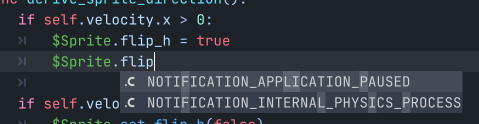
The variable flip_h is not shown in the autocomplete dropdown (but does work in runtime).
If we explicitly create a Sprite2D variable, it works:

But if we assign a node to this variable, it goes back to not working:
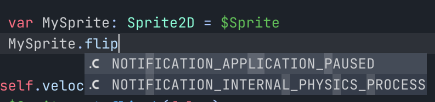
Therefore, my conclusion is:
- Relative nodes are not assigned the correct type
- In general, the types themselves do work (if used explicitly)
- But for some reason, selecting a relative node overrides the explicit type and reverts the variable type to
Node
Steps to reproduce
- Create any scene with two nodes (parent and child)
- Create a script for the parent
- Try to access the child via dollar sign selector
- Try to access a well known variable \ method of the child from the parent’s script
- Autocomplete will not show the desired variable \ method (but they will work in runtime)
Minimal reproduction project
No response
About this issue
- Original URL
- State: closed
- Created 2 years ago
- Reactions: 11
- Comments: 20 (12 by maintainers)
Resurfaced for me in 4.1.1, while I was doing the “Creeps” tutorial. $AnimatedSprite2D does not autocomplete the “play” method, see attached screenshot. Using MBA M1 2020, Mac OS X Ventura 13.5
It’s not fully fixed. Autocompletion does not work on $nodepaths directly.
This bug still occurs in v.4.2.1. Autocompletion works works only when using

askeyword.Ah, I simply missed the email notification about this issue, I can take a look to fix it now.
Of course 😸 thank you