godot: GLES2 crash with errors 502/506 on iOS [iPhone 5s, 6 and iPad Pro]
Godot version: 3.1 (tested beta 7 through beta 9)
OS/device including version: iPhone 5s - iOS 11.4
Issue description: Simple 2D projects crash instantly right after the launch image is shown. Screen turns dark grey. Does not occur when exporting as a GLES3 project.
XCode output:
2019-03-01 18:15:27.556089+0100 GLES2_TEST[295:13172] [DYMTLInitPlatform] platform initialization successful
*********** main.m
running app main
after init super 0x102bd0450
******** screen size 640, 1136
after init gles 0x102bd0450
******** adding observer for sound routing changes
******** adding observer for keyboard show/hide
glview is 0x102bd0450
Path: /var/containers/Bundle/Application/7DF1E009-FFCA-4227-B882-763032EF57A2/GLES2_TEST.app
godot_iphone /var/containers/Bundle/Application/7DF1E009-FFCA-4227-B882-763032EF57A2/GLES2_TEST.app/GLES2_TEST
cwd /private/var/containers/Bundle/Application/7DF1E009-FFCA-4227-B882-763032EF57A2/GLES2_TEST.app
os created
setting data dir to /var/mobile/Containers/Data/Application/CF445435-3FD3-4F46-89FC-A286B2707960/Documents from /var/mobile/Containers/Data/Application/CF445435-3FD3-4F46-89FC-A286B2707960/Documents
setup 0
cadisaplylink: 1start animation!
******** screen size 640, 1136
2019-03-01 18:15:28.211989+0100 GLES2_TEST[295:12957] [App] UIWindow->__registeredPreCommitHandler was abandoned !!!! this would have caused a cascade of blown fences - proactively clearing but a bug exists here somewhere between UIKit and CoreAnimation
2019-03-01 18:15:28.212285+0100 GLES2_TEST[295:12957] +[CATransaction synchronize] called within transaction
2019-03-01 18:15:28.218528+0100 GLES2_TEST[295:12957] +[CATransaction synchronize] called within transaction
2019-03-01 18:15:28.263400+0100 GLES2_TEST[295:12957] +[CATransaction synchronize] called within transaction
2019-03-01 18:15:28.322041+0100 GLES2_TEST[295:12957] OpenGL ES 2.0 Renderer: Apple A7 GPU
OpenGL ES 2.0 Renderer: Apple A7 GPU
2019-03-01 18:15:28.370377+0100 GLES2_TEST[295:12957] **ERROR**: Directional shadow framebuffer status invalid
2019-03-01 18:15:28.370805+0100 GLES2_TEST[295:12957]    At: drivers/gles2/rasterizer_scene_gles2.cpp:3330:initialize() - Directional shadow framebuffer status invalid
**ERROR**: Directional shadow framebuffer status invalid
   At: drivers/gles2/rasterizer_scene_gles2.cpp:3330:initialize() - Directional shadow framebuffer status invalid
2019-03-01 18:15:28.539121+0100 GLES2_TEST[295:12957] [MC] System group container for systemgroup.com.apple.configurationprofiles path is /private/var/containers/Shared/SystemGroup/systemgroup.com.apple.configurationprofiles
2019-03-01 18:15:28.539908+0100 GLES2_TEST[295:12957] [MC] Reading from public effective user settings.
2019-03-01 18:15:29.165566+0100 GLES2_TEST[295:12957] 502 error
2019-03-01 18:15:29.203475+0100 GLES2_TEST[295:12957] **WARNING**: Could not create framebuffer!!
2019-03-01 18:15:29.203574+0100 GLES2_TEST[295:12957]    At: drivers/gles2/rasterizer_storage_gles2.cpp:4333:_render_target_allocate() - Could not create framebuffer!!
**WARNING**: Could not create framebuffer!!
   At: drivers/gles2/rasterizer_storage_gles2.cpp:4333:_render_target_allocate() - Could not create framebuffer!!
2019-03-01 18:15:29.231660+0100 GLES2_TEST[295:12957] 502 error
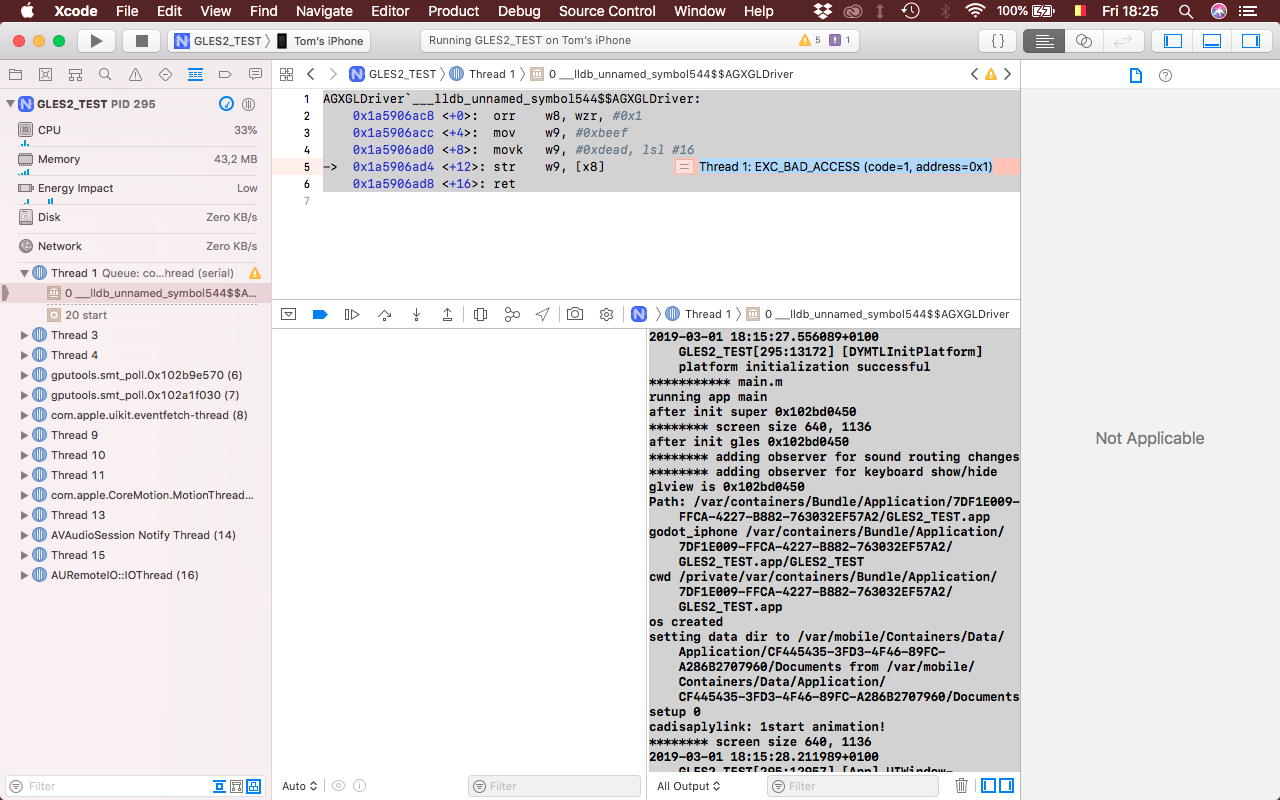
AGXGLDriver`___lldb_unnamed_symbol544$$AGXGLDriver:
    0x1a5906ac8 <+0>:  orr    w8, wzr, #0x1
    0x1a5906acc <+4>:  mov    w9, #0xbeef
    0x1a5906ad0 <+8>:  movk   w9, #0xdead, lsl #16
->  0x1a5906ad4 <+12>: str    w9, [x8]
    0x1a5906ad8 <+16>: ret
The second one is marked ‘Thread 1: EXC_BAD_ACCESS (code=1, address=0x1)’ where the arrow is (see screenshot).
Steps to reproduce: Make a new GLES2 project -> add Node2D -> export for iOS -> run on device
Minimal reproduction project: GLES2_TEST.zip (Included basic Images.xcassets with valid images to replace the xcassets Godot generates)
XCode screenshot:
About this issue
- Original URL
- State: closed
- Created 5 years ago
- Comments: 56 (44 by maintainers)
I’ll take a look. Is it curious to anyone else that the driver crash says
deadbeef?I have finally resolved this issue. After all this debugging it turns out that the export template was incorrectly coded and was always creating OpenGL ES 3 contexts on devices that supported it. That explains the weirdness that we saw in the table above. The export template will function correctly on devices that only support OpenGL ES 2 and not 3.
Fix coming soon. Should be very small, hopefully we can make the release @akien-mga
Sorry should have stated that my iPad Pro is 9.7” with A9X chip