react-native-dotenv: Error: Unable to resolve module `@env` from `src/utils.ts`: @env could not be found within the project.
I’m using yarn.
React Native info
System: OS: macOS 10.15.4 CPU: (8) x64 Intel® Core™ i5-8279U CPU @ 2.40GHz Memory: 116.45 MB / 8.00 GB Shell: 5.7.1 - /bin/zsh Binaries: Node: 12.16.3 - /usr/local/bin/node Yarn: 1.22.4 - /usr/local/bin/yarn npm: 6.14.4 - /usr/local/bin/npm Watchman: 4.9.0 - /usr/local/bin/watchman Managers: CocoaPods: 1.9.3 - /usr/local/bin/pod SDKs: iOS SDK: Platforms: iOS 13.5, DriverKit 19.0, macOS 10.15, tvOS 13.4, watchOS 6.2 Android SDK: API Levels: 23, 27, 28, 29 Build Tools: 28.0.3, 29.0.2, 29.0.3, 30.0.0 System Images: android-28 | Intel x86 Atom_64, android-28 | Google Play Intel x86 Atom_64 Android NDK: Not Found IDEs: Android Studio: 3.6 AI-192.7142.36.36.6392135 Xcode: 11.5/11E608c - /usr/bin/xcodebuild Languages: Java: 1.8.0_252 - /usr/bin/javac Python: 2.7.16 - /usr/bin/python npmPackages: @react-native-community/cli: Not Found react: 16.13.1 => 16.13.1 react-native: 0.63.0 => 0.63.0 npmGlobalPackages: react-native: Not Found
My import statement
import { FIXER_KEY } from '@env';
Typescript complains about this with
Cannot find module ‘@env’ or its corresponding type declarations
My .babelrc contents
{ "plugins": [ [ "module:react-native-dotenv", { "moduleName": "@env", "path": ".env", "blacklist": null, "whitelist": null, "safe": true, "allowUndefined": true } ] ] }
I’m using version
“react-native-dotenv”: “^2.3.0”,
When I run the app I get
Error: Unable to resolve module
@envfromsrc/utils.ts: @env could not be found within the project.
About this issue
- Original URL
- State: closed
- Created 4 years ago
- Reactions: 49
- Comments: 66 (18 by maintainers)
I am using typescript and I’ve encountered the same issue after upgrading to
2.x. Here is a workaround for it:typesfolder in your project*.d.tsfile, say,env.d.tsYou should add all of your .env variables inside this module.
typeRootsfield in yourtsconfig.jsonfile:@goatandsheep This is happening to me too. I don’t think it’s a duplicate issue. The other issue #38 seems to only affect production builds but I can’t even get it working in dev / metro and Typescript complains about the import in vs code (same as with the OP).
I have also done everything @mylonasg88 mentioned.
Here is my config file:
My js file
import { PUBLIC_KEY } from 'react-native-dotenv';My babel file
It’s works for me 😃
Same here. I followed instructions:
I tried to install the
fsmodule byyarn add fsbut it kept failing with more errors.Close all the windows and restart the laptop.
For me it was a caching issue. I’m using NPM instead of Yarn. Thanks to @f4z3k4s for pointing me to the right direction:
npm cache clean --forceto clean the cache folder for your packagesexpo start --clear. This will also clean the Metro bundler cacheMy config:
For me, the solution was to properly clear the cache. Note that I am using npm not yarn. In my case it took:
npm cache clean --forcenpm start -- --reset-cachewhich in my setup (standard Expo setup) is equivalent toreact-native start "--reset-cache"changing the import module name worked for me
change from
to
react-native-dotenv:And now it is working for me…
babel.config.js:
https://github.com/goatandsheep/react-native-dotenv/issues/141#issuecomment-864414284
After updating your babel.config.js file ensure to reset your cache with
yarn start --reset-cachefor the changes to take place.this fixed my issue, and i’m able to use this package properly now
Was able to resolve this. So realised that my rebuild was not happening successfully even after the clearing commands. The only way the rebuild was successful, was when I made some edit to the code.
Try it but then also change
@envin the document toreact-native-dotenv. Basically you can rename your module whatever you want. I have a feeling this may reduce issuesI used this configuration and it worked for me.
env.d.ts
babel.config.js
index.ts
Not sure if it’s good or not (security-wise) but it is working for me.
Only dependency which is needed is react-native-dotenv, not even the @types/react-native-dotenv is needed.
thanks. this worked for me.
same to me, and need to build again.
This worked for me too! thx
Just to clarify, my project is running fine, I’m just dealing with the VS Code errors below. I upgraded, and spent a while trying various things. I am able to get the module to load successfully without the IDE error sometimes, but honestly I can’t tell you why. Doesn’t seem to matter because whenever I close and reopen the file it will display the error again.
<kbd>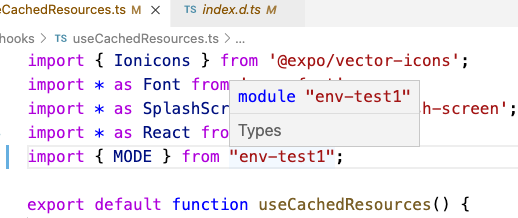 </kbd>
<kbd> </kbd>
I’m able to run the project, but the VS Code errors are a bit annoying. I’m silencing them with @ts-ignore for now.
👋 Hi there - I’m having a similar issue as well in my TypeScript project. When I added the
env.d.tsfile, with these contents:I no longer have any TypeScript errors. But when I try to build my app using
react-native bundle --reset-cache --entry-file='index.js' --bundle-output='./ios/TestApp/main.jsbundle' --dev false --platform ios, I get this error:I’ve tried clearing watchman watches, node_modules, etc. but no luck. My
babel.config.jsfile looks like this:Basically, I have no TypeScript import errors now, but I do get a
Unable to resolve module @env from config.ts: @env could not be found within the project.error when trying to build. Any ideas?Did what @jilvanx suggested and it worked perfectly. Thanks for the solution! Since I am using typescript I just had to add an
env.d.tsfile withdeclare module 'react-native-dotenv';Solved my issue.
Hi, i was struggling 1 hour with this problem, nothing worked, finally some miracle happened when i changed in .env from
API_KEY=xxtoAPI_KEY = xxxand saved…if your
babel.config.jshas the lineapi.cache(true)try rerunning and changing the line toapi.cache(false). If this works you can go back toapi.cache(true)and change it when you update the file.in my case, @ajaxjiang96’s solution works well. thank you. 😃
For others that encounter this issue, even in TS projects #38 can happen and we finally solved it with this solution: https://github.com/facebook/react-native/issues/29351#issuecomment-657929014
I’m still facing this issue with version 2.4.2 Have also added the plugin in babel.config.js.
Anybody having any luck resolving this. Note I’m not using TS
@goatandsheep Seems to be the same. https://github.com/JanithaR/image-finder/blob/react-native-dotenv-update/package.json#L19
If it’s an example repo you are asking for, here it is. https://github.com/JanithaR/image-finder/blob/master/src/api.ts