gitea: Can't clone a repository via ssh: Repository does not exist or you do not have access

  • Gitea version (or commit ref): Gitea version 1.1.0+8-gd9bdf7a built with: bindata, sqlite
  • Git version: git version 2.7.4
  • Operating system: Ubuntu 16.04.2 LTS
  • Database (use [x]):
    • PostgreSQL
    • MySQL
    • MSSQL
    • SQLite
  • Can you reproduce the bug at https://try.gitea.io:
    • Yes (provide example URL)
    • No
    • Not relevant
  • Log gist:
2017/04/06 20:29:44 [T] SSH: Handshaking for 5.198.65.153:42250
2017/04/06 20:29:44 [T] SSH: Connection from 5.198.65.153:42250 (SSH-2.0-OpenSSH_7.3p1 Ubuntu-1)
2017/04/06 20:29:44 [T] SSH: Payload: git-upload-pack 'sbrl/alatael.git'
2017/04/06 20:29:44 [T] SSH: Arguments: [serv key-10 --config=/srv/git/gitea/custom/conf/app.ini]
2017/04/06 20:29:44 [...a/modules/ssh/ssh.go:103 func1()] [E] SSH: Wait: exit status 1

Description

If I create a new repository and then attempt to clone it, it doesn’t let me. See the screenshot below.

Note that I’ve recently undergone a rather (painful) migration from gogs to gitea.

Screenshots

selection_007

If this issue involves the Web Interface, please include a screenshot

About this issue

  • Original URL
  • State: closed
  • Created 7 years ago
  • Reactions: 3
  • Comments: 82 (21 by maintainers)

Most upvoted comments

TL;DR: I manually typed in my url to git remote set-url origin <urlhere>, instead of copying from the hosting website, and it fixed my permission denied issue. Probably not an issue the OP faced, but thought I should post it here anyway since this is the best-matching issue on the internet I could find in the last 5 hours I’ve spent searching.

For others experiencing similar issues, I wanted to post something that solved my issue that was almost identical to this main thread but seems to have different source (i.e., all git -v and git -T commands were returning successful authentication, and my SSH keys were properly setup). And I was getting “Permission denied (publickey).” on trying to push or clone my repository.

It turns out there must have been some strange whitespace character in my git url, because after typing in the url manually, I was able to clone and push successfully. I had been copying the clone url directly from GitHub, and reset the url using git remote set-url origin <urlhere> multiple times, but always copying directly from the website. You can see from my git config -l after my failed attempt, the url looks identical to the one that I changed it to. Yet, I can’t seem to reproduce the problem. I have since tried to go back and git remote set-url origin <url-directly-from-GitHub> again, yet pushing still works. That is the only command I ran that changed anything between my last fail and my first success. And on visual inspection, I see no differences between the output of git config -l before and after the fix. So I suspect either a whitespace/carriage return issue, or something else that I don’t understand that changed by me manually typing in my url.

Below you can see that my url before and what I changed it to look identical. If git captured revisions of the config file (maybe it does?), I would revert to the old version to find the issue. image
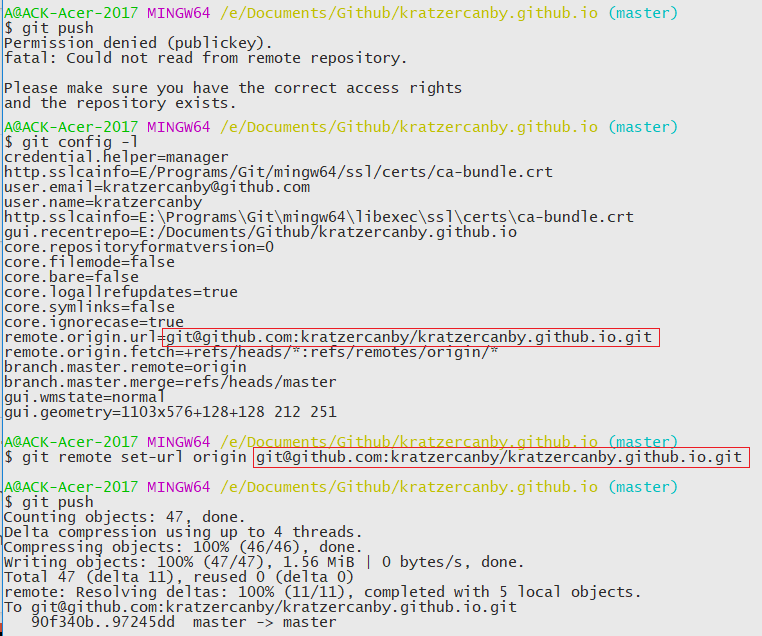
@kratzercanby Thank you so much for saving me A LOT of time. I have been trying to solve the problem for hours. Cheer~

Yes! I’ve finally fixed it. Turns out that I’ve I had a strange bug in my systemd configuration file whereby I gave it the old working directory during the migration. Updating that and cleaning up seems to have fixed the strange DB issues, so it all works as expected now 😄 😄 😄

Thanks for all your help, @lunny 😺

At the risk of adding more confusion to this long issue:

I had this issue as well using a default ssh install. I was unable to to clone sshUser@domain:giteaUser/repo.git. What worked instead is sshUser@domain:~/pathToGiteaRepos/giteaUser/repo.git.

I then “fixed” the issue by clicking “Rewrite ‘.ssh/authorized_keys’ file (for Gitea SSH keys).” in the admin panel of gitea. ssh clones with the advertised URL worked then. Hoewever, #2046 happened then, so beware.

Also seeing this issue using system ssh server (built in disabled). Can clone via http but not ssh. ssh logs indicate gitea user authenticates successfully but git reports:

fatal: Could not read from remote repository.

Please make sure you have the correct access rights
and the repository exists.

As for others. Cycling the authorized_keys file in the admin section makes no difference (backup is identical). authorized_keys points to correct binary and app.ini. The authorized_key listed is the one I uploaded to my user account.

Here’s debug output from ssh -T -vvv gitea@my.gitea.server

debug1: Authentication succeeded (publickey).
Authenticated to [REDACTED]
debug1: channel 0: new [client-session]
debug3: ssh_session2_open: channel_new: 0
debug2: channel 0: send open
debug3: send packet: type 90
debug1: Requesting no-more-sessions@openssh.com
debug3: send packet: type 80
debug1: Entering interactive session.
debug1: pledge: network
debug3: receive packet: type 80
debug1: client_input_global_request: rtype hostkeys-00@openssh.com want_reply 0
debug3: receive packet: type 4
debug1: Remote: Forced command.
debug3: receive packet: type 4
debug1: Remote: Port forwarding disabled.
debug3: receive packet: type 4
debug1: Remote: X11 forwarding disabled.
debug3: receive packet: type 4
debug1: Remote: Agent forwarding disabled.
debug3: receive packet: type 4
debug1: Remote: PTY allocation disabled.
debug3: receive packet: type 4
debug1: Remote: Forced command.
debug3: receive packet: type 4
debug1: Remote: Port forwarding disabled.
debug3: receive packet: type 4
debug1: Remote: X11 forwarding disabled.
debug3: receive packet: type 4
debug1: Remote: Agent forwarding disabled.
debug3: receive packet: type 4
debug1: Remote: PTY allocation disabled.
debug3: receive packet: type 91
debug2: channel_input_open_confirmation: channel 0: callback start
debug2: fd 3 setting TCP_NODELAY
debug3: ssh_packet_set_tos: set IP_TOS 0x08
debug2: client_session2_setup: id 0
debug1: Sending environment.
debug3: Ignored env XDG_CURRENT_DESKTOP
debug3: Ignored env DBUS_STARTER_ADDRESS
debug1: Sending env LANG = en_GB.UTF-8
debug2: channel 0: request env confirm 0
debug3: send packet: type 98
debug3: Ignored env DISPLAY
debug3: Ignored env PWD
debug3: Ignored env LOGNAME
debug3: Ignored env SHLVL
debug3: Ignored env INVOCATION_ID
debug3: Ignored env MANDATORY_PATH
debug3: Ignored env XDG_VTNR
debug3: Ignored env XAUTHORITY
debug3: Ignored env JOURNAL_STREAM
debug3: Ignored env GTK_IM_MODULE
debug3: Ignored env COLORTERM
debug3: Ignored env XDG_SESSION_ID
debug3: Ignored env DESKTOP_SESSION
debug3: Ignored env IM_CONFIG_PHASE
debug3: Ignored env XDG_SESSION_DESKTOP
debug3: Ignored env GDMSESSION
debug3: Ignored env TEXTDOMAINDIR
debug3: Ignored env USERNAME
debug3: Ignored env WINDOWPATH
debug3: Ignored env TEXTDOMAIN
debug3: Ignored env GNOME_DESKTOP_SESSION_ID
debug3: Ignored env DBUS_SESSION_BUS_ADDRESS
debug3: Ignored env VTE_VERSION
debug3: Ignored env DBUS_STARTER_BUS_TYPE
debug3: Ignored env XDG_DATA_DIRS
debug3: Ignored env _
debug3: Ignored env QT4_IM_MODULE
debug3: Ignored env CLUTTER_IM_MODULE
debug3: Ignored env XDG_MENU_PREFIX
debug3: Ignored env QT_ACCESSIBILITY
debug3: Ignored env SHELL
debug3: Ignored env QT_IM_MODULE
debug3: Ignored env XDG_SESSION_TYPE
debug3: Ignored env XDG_CONFIG_DIRS
debug3: Ignored env MANAGERPID
debug3: Ignored env SSH_AGENT_PID
debug3: Ignored env GTK_MODULES
debug3: Ignored env SESSION_MANAGER
debug3: Ignored env SSH_AUTH_SOCK
debug3: Ignored env PATH
debug3: Ignored env LIBVIRT_DEFAULT_URI
debug3: Ignored env TERM
debug3: Ignored env HOME
debug3: Ignored env USER
debug3: Ignored env XMODIFIERS
debug3: Ignored env XDG_RUNTIME_DIR
debug3: Ignored env DEFAULTS_PATH
debug3: Ignored env GPG_AGENT_INFO
debug3: Ignored env XDG_SEAT
debug3: Ignored env TILIX_ID
debug3: Ignored env OLDPWD
debug3: Ignored env EDITOR
debug3: Ignored env VISUAL
debug3: Ignored env PAGER
debug3: Ignored env LESS
debug3: Ignored env LESSOPEN
debug3: Ignored env TMPDIR
debug3: Ignored env PYTHONPATH
debug3: Ignored env ANSIBLE_LIBRARY
debug3: Ignored env MANPATH
debug3: Ignored env GOPATH
debug3: Ignored env GOBIN
debug3: Ignored env LESS_TERMCAP_mb
debug3: Ignored env LESS_TERMCAP_md
debug3: Ignored env LESS_TERMCAP_me
debug3: Ignored env LESS_TERMCAP_se
debug3: Ignored env LESS_TERMCAP_so
debug3: Ignored env LESS_TERMCAP_ue
debug3: Ignored env LESS_TERMCAP_us
debug3: Ignored env LS_COLORS
debug3: Ignored env GREP_COLOR
debug3: Ignored env GREP_COLORS
debug3: Ignored env NVM_CD_FLAGS
debug3: Ignored env NVM_DIR
debug3: Ignored env NVM_BIN
debug2: channel 0: request shell confirm 1
debug3: send packet: type 98
debug2: channel_input_open_confirmation: channel 0: callback done
debug2: channel 0: open confirm rwindow 0 rmax 32768
debug2: channel 0: rcvd adjust 2097152
debug3: receive packet: type 99
debug2: channel_input_status_confirm: type 99 id 0
debug2: shell request accepted on channel 0
debug3: receive packet: type 96
debug2: channel 0: rcvd eof
debug2: channel 0: output open -> drain
debug2: channel 0: obuf empty
debug2: channel 0: close_write
debug2: channel 0: output drain -> closed
debug3: receive packet: type 98
debug1: client_input_channel_req: channel 0 rtype exit-status reply 0
debug3: receive packet: type 98
debug1: client_input_channel_req: channel 0 rtype eow@openssh.com reply 0
debug2: channel 0: rcvd eow
debug2: channel 0: close_read
debug2: channel 0: input open -> closed
debug3: receive packet: type 97
debug2: channel 0: rcvd close
debug3: channel 0: will not send data after close
debug2: channel 0: almost dead
debug2: channel 0: gc: notify user
debug2: channel 0: gc: user detached
debug2: channel 0: send close
debug3: send packet: type 97
debug2: channel 0: is dead
debug2: channel 0: garbage collecting
debug1: channel 0: free: client-session, nchannels 1
debug3: channel 0: status: The following connections are open:
  #0 client-session (t4 r0 i3/0 o3/0 fd -1/-1 cc -1)

debug3: send packet: type 1
Transferred: sent 2720, received 3004 bytes, in 1.0 seconds
Bytes per second: sent 2766.3, received 3055.1
debug1: Exit status 1

Hope this helps.

Yesterday I had similar issue. After setup server, I changed port to connect, and left only port 14222. But git tried pull using port 22, so this port was closed, git returned similar error: "fatal: Could not read from remote repository.

Please make sure you have the correct access rights and the repository exists."

Please check file /etc/ssh/ssh_config, maybe you also have open only one port, which different from 22.

for what it’s worth…here’s a work around – this issue seems to be specific to a user account that has admin privileges. I created a limited user named “git” and git pull and git push work just fine now.

So my guess would be there’s an issue in the code path related to an admin level user’s permissions.

I’ll keep an eye on this, but Gitea is effectively broken as of right now, as best as I can tell.

Exact same problem.

Created a repo in the web UI, but when I try to clone it locally – nada.

Cloning into 'XXXXX'...
fatal: 'user/XXXXX' does not appear to be a git repository
fatal: Could not read from remote repository.

Please make sure you have the correct access rights
and the repository exists.

cloning via HTTPS works fine (but isn’t ideal for obvious reasons). I can SSH to the server without issue – and the PUB key loaded into my profile on Gitea is the same PUB key I am using locally.

UPDATE –

GIT_CURL_VERBOSE=1 GIT_TRACE=1 git clone https://XXXX/USER/REPO.git
15:07:22.036099 git.c:371               trace: built-in: git 'clone' 'https://XXXX/USER/REPO'
Cloning into 'REPO'...
15:07:22.052383 run-command.c:350       trace: run_command: 'git-remote-https' 'origin' 'https://XXXX/USER/REPO'
* Couldn't find host XXXXX in the .netrc file; using defaults
*   Trying 104.223.12.155...
* TCP_NODELAY set
* Connected to XXXXXX (104.223.12.155) port 443 (#0)
* TLS 1.2 connection using TLS_ECDHE_RSA_WITH_AES_256_GCM_SHA384
* Server certificate: XXXXX
* Server certificate: Let's Encrypt Authority X3
* Server certificate: DST Root CA X3
> GET /USER/REPO.git/info/refs?service=git-upload-pack HTTP/1.1
Host: XXXXXX
User-Agent: git/2.11.0 (Apple Git-81)
Accept: */*
Accept-Encoding: gzip
Pragma: no-cache

< HTTP/1.1 401 Unauthorized
< Content-Length: 0
< Content-Type: text/plain; charset=utf-8
< Date: Mon, 17 Apr 2017 22:07:22 GMT
< Server: Caddy
< Set-Cookie: lang=en-US; Path=/; Max-Age=2147483647
< Set-Cookie: i_like_gogits=e5d298dd810d718d; Path=/; HttpOnly
< Set-Cookie: _csrf=QIfBDKxBwI__8WPAvvoJtyL-J4A6MTQ5MjQ2Njg0MjE1MzA0NTkxNQ%3D%3D; Path=/; Expires=Tue, 18 Apr 2017 22:07:22 GMT; HttpOnly
< Www-Authenticate: Basic realm="."
< X-Frame-Options: SAMEORIGIN
<
* Curl_http_done: called premature == 0
* Connection #0 to host XXXXX left intact

interestingly, the repo is set to be a public repo, and the SSH key is in place.

Oh dear. Now I’ve tried pushing via https, and although git says “everything up to date” when I push a second time, it isn’t showing up on the web interface.

Appropriate logs:

2017/04/06 20:57:32 [D] Session ID: f014da28a1472b00
2017/04/06 20:57:32 [D] CSRF Token: 0XpJiGPYJ-OziWHgaGZEANE233g6MTQ5MTUwNTA1MjIyMDYwOTg2MA==
2017/04/06 20:57:40 [D] Session ID: 5f3d2dce75cd87a0
2017/04/06 20:57:40 [D] CSRF Token: IcNEueAf3HeSrJdEA9_j1bom2XM6MTQ5MTUwNTA2MDU0NzYyMDc1OA==
2017/04/06 20:57:40 [D] Session ID: fcd24c369c8dc016
2017/04/06 20:57:40 [D] CSRF Token: 4GnzkgIhoxyUQNRWtUh78v-dF7s6MTQ5MTUwNTA2MDU3ODA4NzY5OA==
2017/04/06 20:57:40 [...routers/repo/http.go:137 HTTP()] [E] invalid token
2017/04/06 20:57:48 [D] Session ID: bc0c3c23890e364c
2017/04/06 20:57:48 [D] CSRF Token: s82CopP0TP3phEhBQ45tajFgbOA6MTQ5MTQ4MDQ4MjEyNTE0OTA3NA==
2017/04/06 20:57:48 [D] Bare repository: /sbrl/alatael
2017/04/06 20:57:48 [D] Template: repo/bare