Angular-Slickgrid: filterService's updateFilters doesn't work with tree data
I’m submitting a Bug report
Your Environment
| Software | Version(s) |
|---|---|
| Angular | 8.1.1 |
| Angular-Slickgrid | 2.20.1 |
| TypeScript | 3.5.3 |
Describe the Bug
Hello, I have a custom HTML form that uses filterService.updateFilters on columns with Filters.multipleSelect, but since I set enableTreeData: true in the grid configuration, it doesn’t work anymore - oddly it works fine using the header row built-in filter.
Steps to Reproduce
As described above, manually update the filters using the FilterService with a multipleSelect kind of filter, works just fine until I enabled TreeData in the grid configuration.
Expected Behavior
filterService.updateFilters should work as the header row built-in filter does.
Current Behavior
The updated filters doesn’t seem to apply on the grid data.
Possible Solution
I’ve noticed that the DOM filter relies on callbackSearchEvent.
Forcing triggerOnSearchChangeEvent on updateFilters (e.g. updateFilters(filters, true, true, true)) so that it calls callbackSearchEvent too fixes the issue.
So it might have to do with the way Slickgrid is notified from the filter change?
updateFilters uses this.emitFilterChanged(emitterType); while triggerOnSearchChangeEvent directly uses this._onSearchChange.notify.
Thanks a lot!
Code Sample
About this issue
- Original URL
- State: closed
- Created 3 years ago
- Comments: 20 (12 by maintainers)
Commits related to this issue
- refactor: updateFilters should trigger onSearch callback with Tree Data, closes #754 — committed to ghiscoding/Angular-Slickgrid by ghiscoding 3 years ago
- Merge pull request #753 from ghiscoding/bugfix/tree-data-initial-sort fix(tree): few issues found with Tree Data, fixes #754 — committed to ghiscoding/Angular-Slickgrid by ghiscoding 3 years ago
It took me longer than I expected but the new version is now out and there’s a few other features as well, so go check it out. Take a look at the new version 2.29.x
Cheers ⭐
no plans, the
addItemhas apositionoption for top/bottom but that’s all and that is always enough for me. You have 2 ways to deal with thispositionIndexthat could be an extra option to theaddItemSo as I mentioned in my first reply on top, Tree Data is a very different beast. You can’t just play with the data and DataView and expect it to work. For the Tree Data to work, it must be sorted every time and recalculate each element tree level indentation and for that sort to work it must be converted from a flat data structure to a hierarchical (tree) structure (and vice versa), then sort it and then reconvert to a flat data structure. If you play with the DataView directly then you’ll bypass any kind of sorting and it will probably also fall outside of the correct tree level indentation (unless you provide it maybe).
In the version I’m working now, I added some more functions that could be used from the outside as a user, but you’ll have to wait. I think it’s better if you just wait for the new version, unless you want to go and call yourself the
convertParentChildArrayToHierarchicalViewandconvertHierarchicalViewToParentChildArray. There’s a lot of code (a lot of recursive functions) I had to put in place for all of Tree Data to work… I’d suggest you wait until it’s ready.I’m doing yet another thing, the Export wasn’t exporting with the indentation, I’m adding a new TreeExportFormatter. I should be done today and then perhaps I can ship a version tomorrow. in the demo below, I had to add a dot “.” in front of an indented text because it seems Excel is trimming white space when it’s at beginning, oh well
I did also see that bug and and fixed the Add Item, you’ll have to change your code though because I fixed it by doing necessary calls in the Grid Service.
This way is much simpler since that service is one I’ve done and have control (I don’t have control on the one from dataview because that comes from the core lib).
Here’s the new code from my example.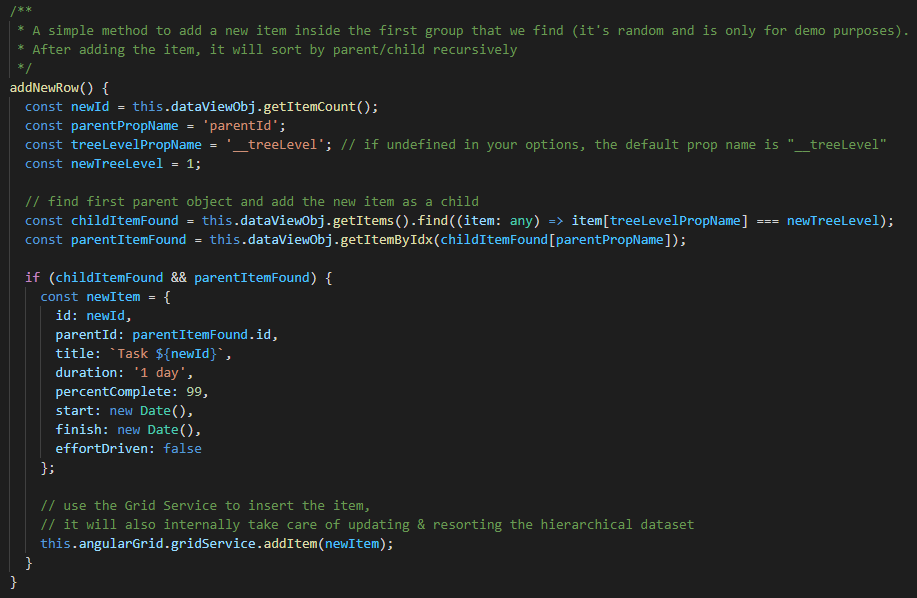
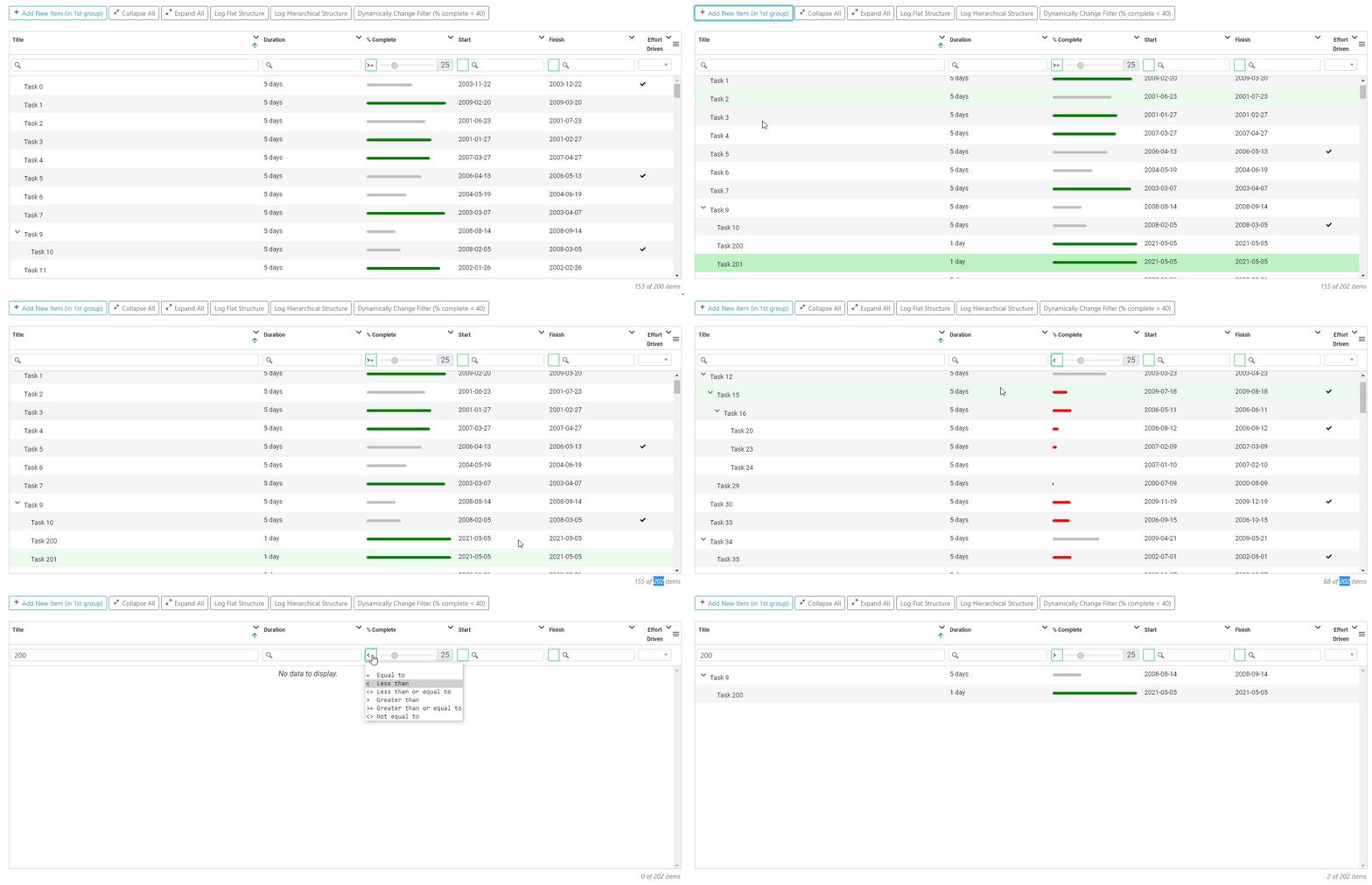
right, I actually found that problem when writing the unit test, I added an internal flag
forceOnSearchChangeEventto fix that in the commit I referenced earlier on this line, so in theupdateFilters()it will set that flag to true and it will work. You can userefreshTreeDataFiltersfor now but I would suggest to change it back once the new version is out.I’m still working on this and was facing some racing conditions but I think that I’m finally near the end of it. The new version should improve performances as well since I found that the grid was being rendered and resorted multiple times because of these racing conditions and other factors.
BTW, I’m just curious which type of Tree Data are you using? with Parent/Child relationship or a dataset that is already a hierarchical tree structure?
I did the change already in the 3c603a7 commit and it works, for now on your side you can just call the last argument as True and that should work. I made the change in the commit so that if it detects that it’s a Tree Data then it will trigger that onSearch callback that you found out about.
So basically the following 2 lines will be equivalent when using Tree Data
I have another thing to look into and add unit tests, I should have a new version by the end of the week. You’re actually lucky because I starting working on this last Friday 😉 So it’s a good timing, the PR will include a bunch of other fixes as well, you can see the list of fixes in the PR #753
Tree Data is a different beast altogether, it has a few recursive methods (converting from flat to hierarchical dataset) and those needs to be called after a sort, filter and when dataset changes. I’m currently working on fixing a few issues I found while going back on a project with tree data, you can see the current open PR #753 that is in WIP
You could maybe try to
refreshTreeDataFiltersfrom the Filter Service, I’m not sure if that will work but give it a try and let me knowthis.angularGrid.filterService.refreshTreeDataFilters(), if that works I’ll add it to the open PRand BTW forcing the ~
triggerOnSearchChangeEvent~ (that is actually the same as forcing the trigger event, they both work I just tried) will work because that is the same as running any filter and that already works with Tree Data, I just didn’t go further and test every other features likeupdateFilters,updateSingleFilter, … Just curious, how did you call that trigger? Can you provide it with all arguments you provided…ahh nevermind I re-read your message and see you just made the last argument true onupdateFilters(filters, true, true, true), good to knowEDIT Looking back at my comment, I did write the following for Tree Data 😉 and so I’ll simply force a trigger it if
enableTreeDatais set and I’ll add to the open PR #753