whisper.cpp: Not working on MacOS (ARM)
Hi, I’ve been trying to get this to work a few times, but it always fails with an illegal hardware instruction error.
E.g. for ./main -m models/ggml-small.bin -f samples/jfk.wav I get the following output:
whisper_model_load: loading model from 'models/ggml-small.bin'
whisper_model_load: n_vocab       = 51865
whisper_model_load: n_audio_ctx   = 1500
whisper_model_load: n_audio_state = 768
whisper_model_load: n_audio_head  = 12
whisper_model_load: n_audio_layer = 12
whisper_model_load: n_text_ctx    = 448
whisper_model_load: n_text_state  = 768
whisper_model_load: n_text_head   = 12
whisper_model_load: n_text_layer  = 12
whisper_model_load: n_mels        = 80
whisper_model_load: f16           = 1
whisper_model_load: type          = 3
whisper_model_load: mem_required  = 1048.00 MB
whisper_model_load: adding 1608 extra tokens
whisper_model_load: ggml ctx size = 533.05 MB
fish: Job 1, './main -m models/ggml-small.b...' terminated by signal SIGILL (Illegal instruction)
I’ve tried other models as well, but the result is always the same.
About this issue
- Original URL
- State: closed
- Created 2 years ago
- Comments: 23 (12 by maintainers)
Commits related to this issue
- ref #66 : update Makefile to handle M1 Max — committed to ggerganov/whisper.cpp by ggerganov 2 years ago
- Add CMakeLists.txt This is basically just automated output with a couple fixes: <div class=user> system> Let's do some Makefile refactoring into CMakeLists.txt! Are you ready to help translate betwe... — committed to mattsta/llama.cpp by mattsta a year ago
- Add CMakeLists.txt This is basically just automated output with a couple fixes: <div class=user> system> Let's do some Makefile refactoring into CMakeLists.txt! Are you ready to help translate betwe... — committed to mattsta/llama.cpp by mattsta a year ago
- Add CMakeLists.txt This is basically just automated output with a couple fixes: <div class=user> system> Let's do some Makefile refactoring into CMakeLists.txt! Are you ready to help translate betwe... — committed to mattsta/llama.cpp by mattsta a year ago
- Add CMakeLists.txt This is basically just automated output with a couple fixes: <div class=user> system> Let's do some Makefile refactoring into CMakeLists.txt! Are you ready to help translate betwe... — committed to mattsta/llama.cpp by mattsta a year ago
- Merge pull request #66 from artob/improve-readme Add instructions for running the examples — committed to KultivatorConsulting/whisper.cpp by tazz4843 a year ago
Because the
unamecontains two architectures. We need to usearchcommand to force it to use arm64 instead of x86_64.So all you need to do to compile an arm64 executable is to add
arch -arm64in front ofmakelike this:May this help you guys.
@xyx361100238 Yes, but it was too slow before fixing my terminal. So you probably need to fix this first (assuming you also have an ARM Mac).
So make sure you don’t have rosetta enabled (check box not ticked):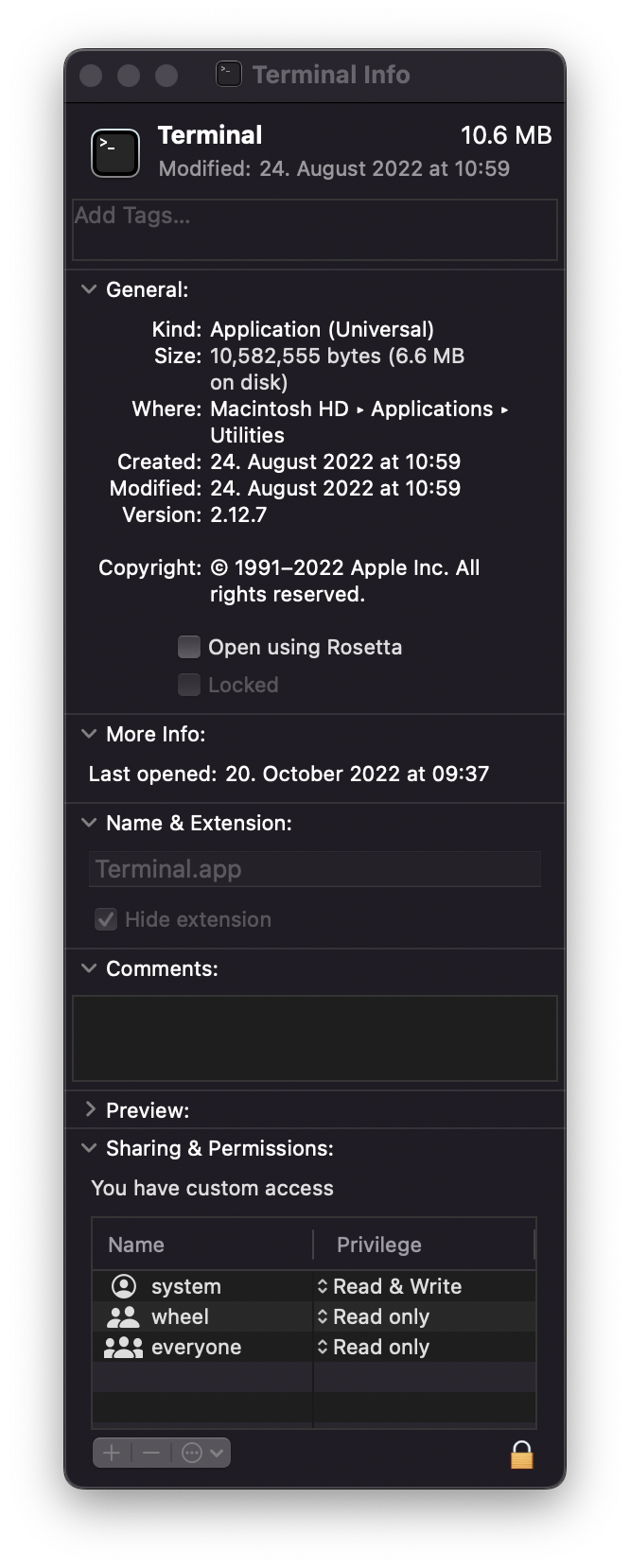
And if that’s not it you can check if you have a m1 compatible homebrew. If you have a m1 compatible homebrew, the folder
/opt/homebrew/should exist. Otherwise uninstall homebrew and reinstall it. Be aware that this means you will also have to reinstall all your homebrew packages, but imo it’s worth it. Many things are faster now.That’s unexpected.
In the meantime, if you just want to give
whisper.cppa try, you should be able to compile it properly like this:This is what I use on my MacBook M1 Pro and it works.
If you figure out why
unamereports this asx86_64please let me know, so I can somehow update the Makefile to support M1 Max.Interesting…
uname -mpsgives me:@undefdev item 选项不能点Rosetta 打开,否则第二张图就U _namep 显示为x86,m2 电脑正常显示应为arm ,执行make clean 在执行make 编辑即可成功
make cleanmake<img width=“253” alt=“Snipaste_2023-03-13_03-10-04” src=“https://user-images.githubusercontent.com/23565695/224567292-446342b0-b1c6-4acb-ae08-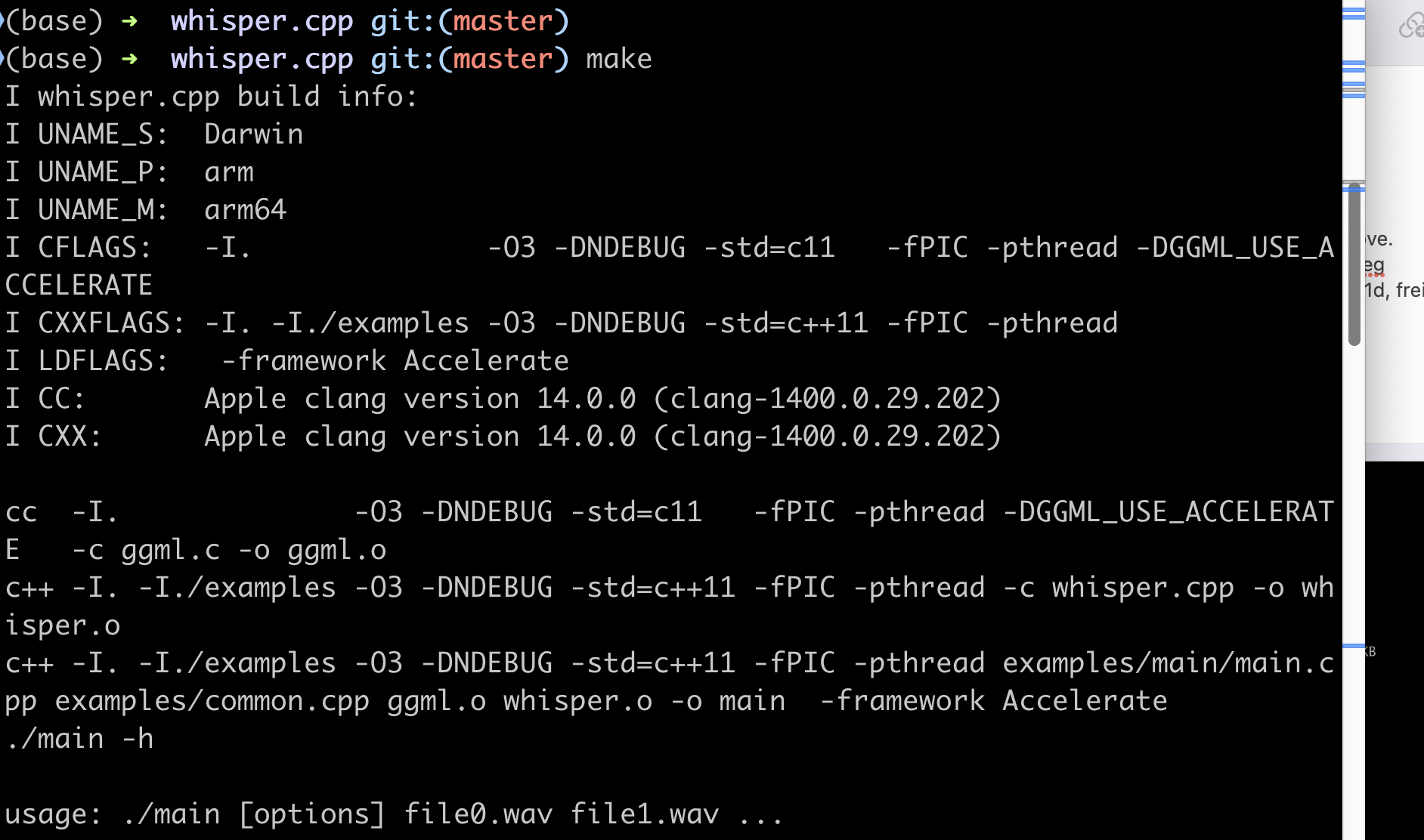 dd04ada0bd79.png”>
I was use whisper in macbook pro same system set:Darwin i386 x86_64 It works in ./main -m models/ggml-base.en.bin -f samples/jfk.wav But not work in ./stream -m models/ggml-base.en.bin -t 8 --step 500 --length 5000 Tips:
no content!
@undefdev Thanks for the investigation! I like the proposed change and have merged it into upstream.