sentry-react-native: 1.4.0 crashes if using initSentry from wrapper file
OS:
- Windows
- MacOS
- Linux
Platform:
- iOS
- Android
SDK:
-
@sentry/react-native(>= 1.0.0) -
react-native-sentry(<= 0.43.2)
Sentry version: 1.4.0 SDK version: 5.1.0
react-native version: 0.62.2
Are you using Expo?
- Yes
- No
Are you using sentry.io or on-premise?
- sentry.io (SaaS)
- on-premise
TypeError: RNSentry.startWithDsnString is not a function. (In ‘RNSentry.startWithDsnString(_options.dsn, _options)’, ‘RNSentry.startWithDsnString’ is undefined)
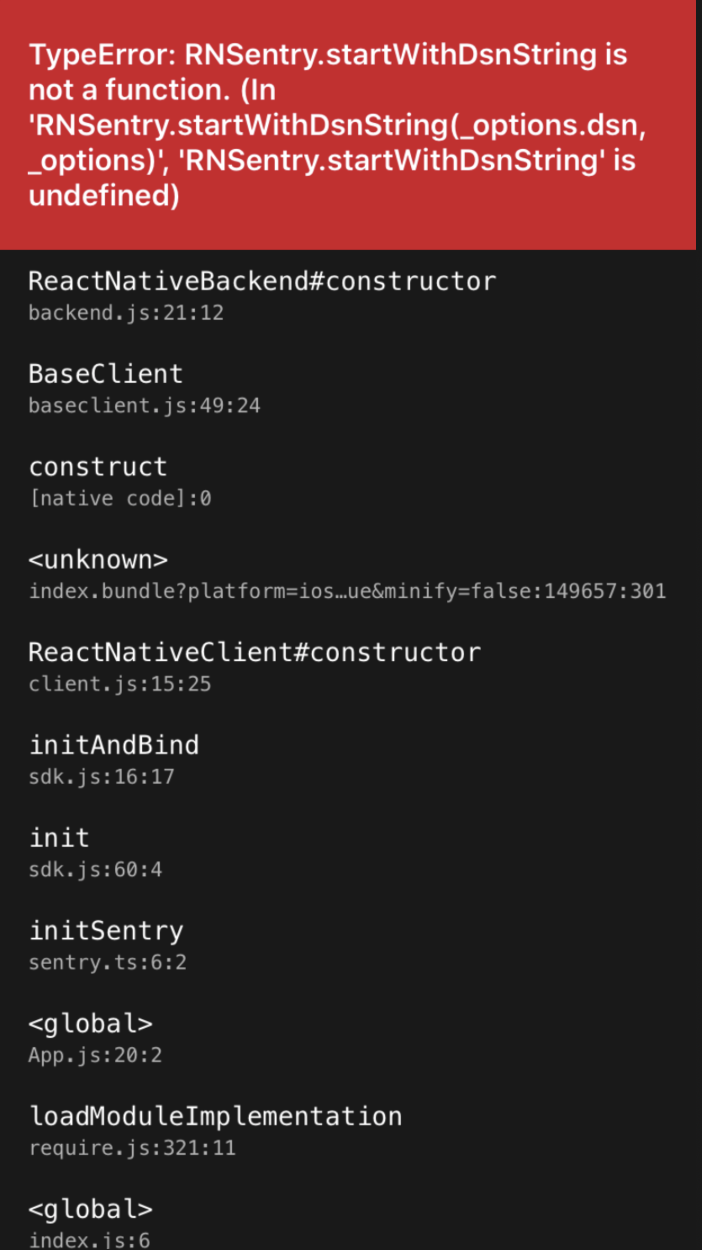
Configuration:
App.js
  require('src/sentryWrapper').initSentry({
    dsn: 'https://aa0b63d68a394bb48047553a5bc7c2aa@sentry.io/3134210',
    enableAutoSessionTracking: true,
  });
sentryWrapper.js
const initSentry = (initOptions: { dsn: string, enableAutoSessionTracking: boolean }) => {
  sentryEnabled = true;
  Sentry.init(initOptions);
};
I have following issue:
Once upgraded to 1.4.0, app crashes if I use my sentry initialization wrapper.
This didn’t happen in 1.3.x versions. Doesn’t matter if I pass enableAutoSessionTracking or not.
If I’m calling initSentry straight in App.js it doesn’t crash. Strange 😕
Steps to reproduce:
- Build the app.
- Open the app.
- Observe.
Actual result:
App crashes.
Expected result:
App shouldn’t crash as in 1.3.x
About this issue
- Original URL
- State: closed
- Created 4 years ago
- Reactions: 3
- Comments: 17 (5 by maintainers)
I found the issue. It was a really odd one to debug but ultimately nothing to do with Sentry. I am using Codepush. After uploading the version of sentry and cleaning everything locally, I was deploying. During the deploy testing on Google Pre-launch, CodePush was rolling back the JS portion of my code…
I thought I was going mad as I was 100% sure that the code didn’t exist locally. Anyway… I hope it helps anyone else who faces the same issue!
Thank you @alexpchin! This steered me in the right direction.
I was incrementing the versionCode in app/build.gradle after updating sentry. (E.g. 144 -> 145)
The problem is that code-push does not use versionCode , only versionName (which remained the same), and once the app launched, code-push would install an older JS bundle from code-push (which still has the older version of sentry in the JS bundle).
Code-push issue here: https://github.com/microsoft/react-native-code-push/issues/1521#issuecomment-465371200
I changed my versionName from 0.2.5 to 0.2.6 and since code-push did not have any bundles matching 0.2.6 and did not install an older JS bundle, and… it worked!
I suspect if would be the same for iOS with CFBundleShortVersionString CFBundleVersion.
Interesting the old method is present in my index.android.bundle.
bundleInDebug: falseis set to false, I’m going to manually run:to see if that clears the error? I’ll let you know…
Thanks for the help so far!
Turns out I’ve had a mixup of
1.3.xversion and1.4.0in mynode_modules. Looks like it’s working now. Case closed. :shipit: