sentry-javascript: Sourcemaps not showing correct file names in stack trace
Version
22.3.0
Steps to Reproduce
I have a typescript (4.1.2), react (17.0.2) web application using webpack (5.24.3). I have been following provided instructions to get source maps to work but have had no luck.
Our application uses a basename in our urls which i suspect is the complication here. We use the version (v1.0.4 for example) of the application like this:
http://localhost:8080/v1.0.4/index.html
Source maps work when running in the browser, I can open up dev tools and see the lines and the correct file names that everything happens. However, once i upload the source maps to Sentry the stack trace just says /v1.0.4/main.js.
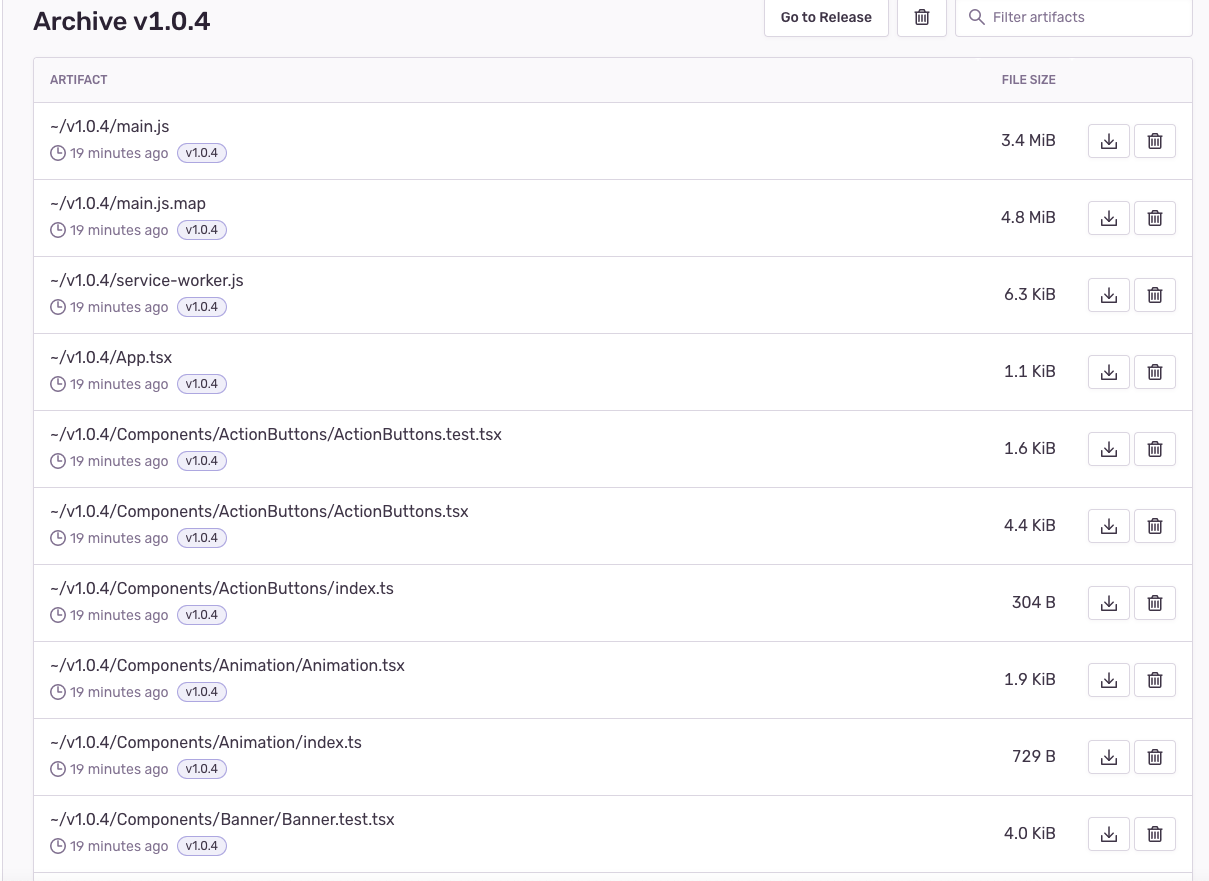
I am using the webpack plug (SentryWebpackPlugin). I am using the urlPrefix to try and solve the /v1.0.4 difference. I see the source maps stored in the releases archive. They are stored as ~/v1.0.4/main.js ~/v1.0.4/main.js.map etc. as i expected. Here is my webpack.config.js
/* eslint-disable @typescript-eslint/no-var-requires */
const HtmlWebpackPlugin = require("html-webpack-plugin");
const {
    ServiceWorkerBuilderPlugin,
} = require("./node_modules/@integrations/web-core/lib/ServiceWorkerBuilderPlugin.js");
const SentryWebpackPlugin = require("@sentry/webpack-plugin");

const path = require("path");
const webpack = require("webpack");

require("dotenv").config();

const defaultConfig = {
    entry: "./src/index.tsx",
    module: {
        rules: [
            {
                test: /\.(ts|tsx|js|jsx)?$/,
                exclude: [path.resolve(__dirname, "test")],
                loader: require.resolve("babel-loader"),
            },
            {
                test: /\.(scss|css)$/,
                use: ["style-loader", "css-loader", "sass-loader"],
            },
            {
                test: /\.(png|svg|jpg|gif|jpeg)$/,
                use: [
                    {
                        options: {
                            name: "[name].[ext]",
                            outputPath: "assets/img",
                        },
                        loader: "file-loader",
                    },
                ],
            },
            {
                test: /\.(ttf)$/,
                use: [
                    {
                        options: {
                            name: "[name].[ext]",
                            outputPath: "assets/fonts",
                        },
                        loader: "file-loader",
                    },
                ],
            },
            {
                test: /\.(mp3)$/,
                use: [
                    {
                        options: {
                            name: "[name].[ext]",
                            outputPath: "assets/tracks",
                        },
                        loader: "file-loader",
                    },
                ],
            },
        ],
    },

    output: {
        filename: "main.js",
        path: path.resolve(__dirname, "dist"),
        clean: true,
    },

    plugins: [
        new HtmlWebpackPlugin({
            template: "./src/index.html",
        }),
        new ServiceWorkerBuilderPlugin({
            inputFile: "./src/service-worker.js",
            outputFile: "service-worker.js",
        }),
        new webpack.EnvironmentPlugin({
            SENTRY_DSN: process.env.SENTRY_DSN ?? "",
            SENTRY_AUTH_TOKEN: process.env.SENTRY_AUTH_TOKEN ?? "",
            SENTRY_DISABLED: process.env.SENTRY_DISABLED ?? "",
            ANALYTICS_DISABLED: process.env.ANALYTICS_DISABLED ?? "",
        }),
    ],
    resolve: {
        modules: [__dirname, "src", "node_modules"],
        extensions: ["*", ".js", ".jsx", ".tsx", ".ts"],
        alias: {
            react: path.resolve("./node_modules/react"),
        },
    },
    devtool: "source-map",
};

const getSentryPlugin = (buildDir) => {
    const isSentryDisabled =
        !process.env.SENTRY_AUTH_TOKEN ||
        !process.env.SENTRY_DSN ||
        !process.env.SENTRY_DISABLED ||
        process.env.SENTRY_DISABLED?.toLowerCase() === "true";

    const release = process.env.RELEASE ?? "v1.0.4";

    // check release commit is tagged version, only then create release in Sentry
    const canCreateSentryRelease = validatedRelease(release);

    return !isSentryDisabled && canCreateSentryRelease
        ? [
              new SentryWebpackPlugin({
                  org: "org-name",
                  url: "https://sentry.org-name.com",
                  release,
                  authToken: process.env.SENTRY_AUTH_TOKEN,
                  project: "project-name",
                  include: [buildDir, "src"],
                  ext: [".js", ".jsx", ".tsx", ".ts", ".map"],
                  ignore: [
                      "node_modules",
                      "webpack.config.js",
                      "plopfile.js",
                      "output",
                      "test",
                  ],
                  dist: release,
                  urlPrefix: `~/${release}`,
              }),
          ]
        : [];
};

const generateConfig = (mode) => {
    return mode === "production"
        ? {
              ...defaultConfig,
              mode,
              plugins: defaultConfig.plugins.concat(
                  getSentryPlugin("dist_dev")
              ),
          }
        : {
              ...defaultConfig,
              mode,
              output: {
                  ...defaultConfig.output,
                  path: path.resolve(__dirname, "dist_dev"),
              },
              plugins: defaultConfig.plugins.concat(
                  getSentryPlugin("dist_dev")
              ),
              devServer: {
                  historyApiFallback: true,
                  publicPath: "/v1.0.4/",
                  openPage: "v1.0.4/index.html",
                  contentBase: path.resolve(__dirname, "dist_dev"),
                  hot: true,
                  open: true,
              },
          };
};

const createRegex = (regex) => new RegExp(regex);

const validatedRelease = (release) => {
    if (!release) {
        return false;
    }

    const commitTagRegex = createRegex("^v\\d+\\.\\d+\\.\\d+$");
    const abVersionRegex = createRegex("^@[a-z0-9_]+$");

    const isValidTaggedVersion = commitTagRegex.test(release);
    const isValidABVersion = abVersionRegex.test(release);

    return isValidTaggedVersion || isValidABVersion;
};

module.exports = (env, options) => generateConfig(options.mode);
Here is my simplified Sentry.init call:
Sentry.init({
                dsn: sentryDsn,
                integrations: [
                    new Integrations.BrowserTracing({
                        routingInstrumentation:
                            Sentry.reactRouterV5Instrumentation(this._history),
                    }),
                    new Offline(),
                ],
                release: version,
                environment,
                debug: environment === "development"
            });
Expected Result
To see in the “EXCEPTION” section of the issues, the correct file names and exact lines where the calls were made.
Actual Result
What I see in the issues Exception section:
 What i see in Archive for the release version:
About this issue
- Original URL
- State: closed
- Created 2 years ago
- Comments: 51 (25 by maintainers)
This issue has gone three weeks without activity. In another week, I will close it.
But! If you comment or otherwise update it, I will reset the clock, and if you label it
Status: BacklogorStatus: In Progress, I will leave it alone … forever!“A weed is but an unloved flower.” ― Ella Wheeler Wilcox 🥀
Hi @jacklovett, can you try using
sentry-cli sourcemaps explain --helpwith the newest version of the Sentry CLI to troubleshoot your issue?@AlastairTaft We have something in the works that will get rid of these whole pathmatching shenanigans for good. So you can also wait until then if this process is too annoying (which admittedly, it is).
Subscribe to this issue if you wanna get updates: https://github.com/getsentry/team-webplatform-meta/issues/17
hmm…every event i try cannot be retrieved giving 404 error. I am using the following command:
npx @sentry/cli sourcemaps explain d9205b144eb54e1783a3ce954cf4d1e6The event id is taken from the place that you showed in your screenshot. Error: