tiny-slider: The "next" button does not get the "disabled" attribute when the last slide is displayed.
Issue description:
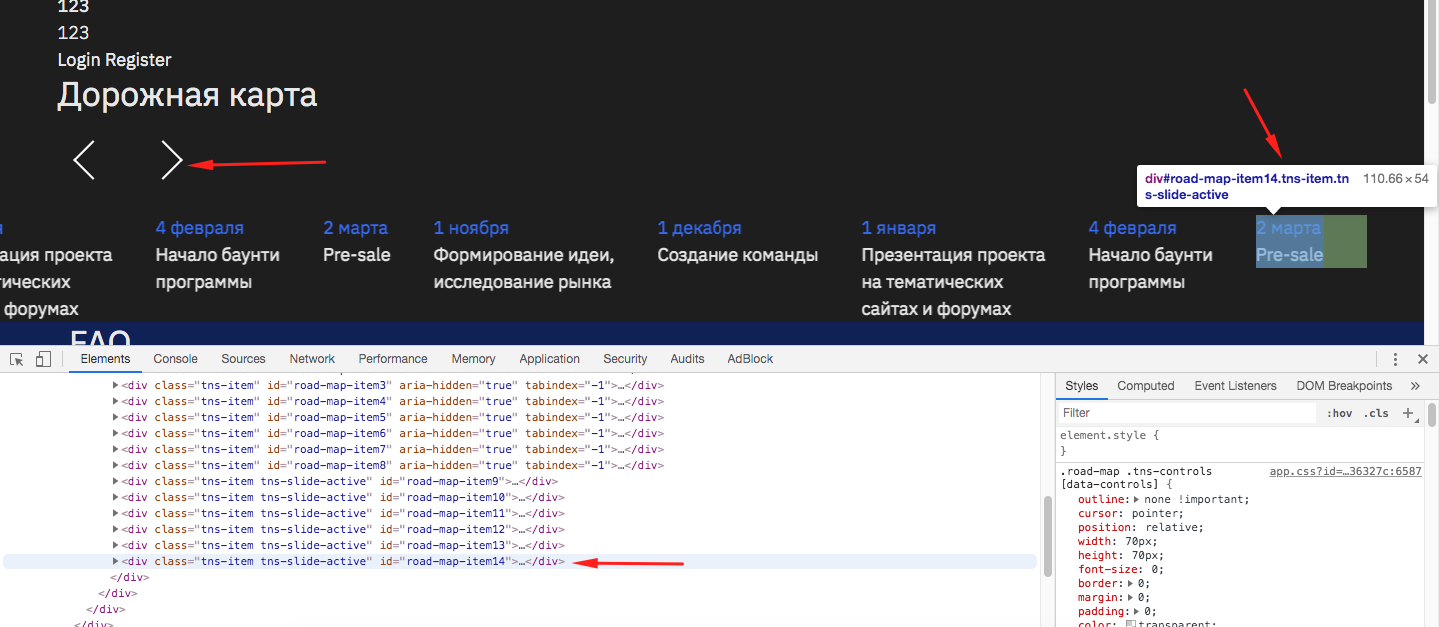
The next button does not get the disabled attribute when the last slide is displayed. The disabled attribute is assigned only after a few more clicks.
Demo link/slider setting:
https://codesandbox.io/s/dreamy-mahavira-lj0dm?fontsize=14
To reproduce the problem, click on the next button until the slider stops moving the slides, and you will see that the next button does not have the disabled attribute. The next button will get the disabled attribute only after a few more clicks.
`import { tns } from ‘tiny-slider/src/tiny-slider’
const roadMap = tns({
container: ‘#road-map’,
gutter: 43,
autoWidth: true,
mouseDrag: true,
loop: false,
nav: false,
});`
Tiny-slider version: 2.9.1
Browser name && version: Google Chrome last version
OS name && version: MacOS High Sierra 10.13.6
About this issue
- Original URL
- State: open
- Created 5 years ago
- Reactions: 1
- Comments: 16
@ganlanyuan any updates on this?
Example https://codepen.io/cvaize/pen/zYYVRGo
@kdeicide