react-hot-loader: hot update was not successful. hot updated failed for module ... Last file processed:""
If you are reporting a bug or having an issue setting up React Hot Loader, please fill in below. For feature requests, feel free to remove this template entirely.
Description
react-hot-loader is working. i am attempting to add “@hot-loader/react-dom”: “^16.8.6”, because of the warning in console stating that it may not support react 16.6 feature .
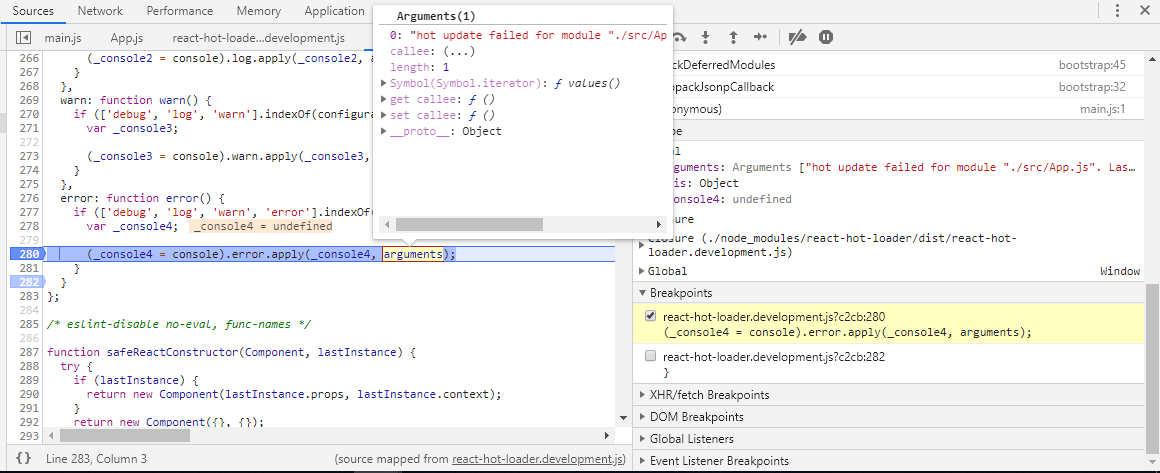
After adding it i got this error,

file processed was an empty string, i assume there is something wrong with my relative path in my webpack configuration? @hot-loader/react-dom" couldn’t detect my file path to process?
error information in console

below is my settings for react hot loader
//index.js
import ReactDOM from "react-dom";
import React from "react"; //sets the name Component to the default export of the 'react' package

//import { ThemeProvider } from "@material-ui/styles"; //JSS way of providing theme to top level. Passing it down to react components
//import "semantic-ui-css/semantic.min.css";
import "./styles.css";
import App from "./App";

const render = () => {
  ReactDOM.render(<App />, document.getElementById("reactApps"));
};

render();
//webpack.config.js

module.exports = {
  mode: "development",
  entry: ["./src/index"],
  output: {
    publicPath: "http://localhost:3000/", // relative to HTML page
    path: path.resolve(__dirname, "dist"),
    filename: "[name].bundle.js",
    chunkFilename: "[name].js"
    //pathinfo: true
  },
  resolve: {
    alias: {
      "react-dom": "@hot-loader/react-dom"
    }
  }, ......
  devServer: {
    open: true,
    contentBase: path.join(__dirname, "dist"),
    historyApiFallback: true,
    port: 3000
 }
}
//app.js
import { hot } from "react-hot-loader/root"; //enable ^16.6 react feature(preserve component internal state) for hmr.
import React, { Component } from "react";
import { Route, Switch, BrowserRouter as Router } from "react-router-dom";
import Login from "./login";
/*
const Main = React.lazy(() =>
  import( webpackChunkName: "MainPage"  "./Main");*/
import Main from "./Main";

class App extends Component {
...
}
export default hot(App);
What you are reporting: Red Error in console and overlay appearing in my webpage. Something wrong with my configuration ?
Expected behavior
no error overlay What you think should happen: working as expected. no errors screaming at me.
Environment
React Hot Loader version: “react-hot-loader”: “^4.12.6”, Run these commands in the project folder and fill in their results:
node -v: v 8.11.3npm -v: 6.9.2
Then, specify:
- Operating system:window
- Browser and version: chrome Version 75.0.3770.142 (Official Build) (64-bit)
Not sure how to solve it. would appreciate some help 😄
About this issue
- Original URL
- State: closed
- Created 5 years ago
- Comments: 16
@hi-zhaolei Hi. thank for the advice. I solved it weeks ago.
And yes, my hot function was not executed from
import {hot} react-hot-loader/root.i did set env to development mode
module.exports = { mode: "development",...i realize the problem was with my editor Atom that i am using. it is preventing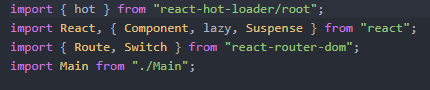
{hot}from executing,as you can see the
{hot}is white in color, no syntax highlight was applied so i guessed atom editor environment prevent me from importing{hot}for some reason (which i don’t know why) . so i changed to visual studio code and everything is working fine.@lancerace WOW. Glad to hear you resolve it. That`s weird for atom behave. I still use sublime be my IDE. so never see this before. But you did right to switch to vscode,it is most popular editer right now