food-lookup-demo: Cannot get route when deployed to heroku
Your config has been working great so far locally. When i deployed it to Heroku i started getting the following issue:
If i go to https://enjoy-copenhagen-dev.herokuapp.com everything is fine, i can navigate through the app, no issues there.
If i go to https://enjoy-copenhagen-dev.herokuapp.com/api or whichever one of my api post and get endpoints everything works.
If i try to open any other route i get Cannot GET /route-i-tried-to-open.

My server.js
const cors = require('cors');
const path = require('path');
const express = require('express');
const nodemailer = require('nodemailer');
const bodyParser = require('body-parser');
const app = express();

const mail = require('./emailSenders');

app.use(cors());

app.use((req, res, next) => {
  res.header('Access-Control-Allow-Origin', '*');
  res.header('Access-Control-Allow-Methods', 'DELETE, PUT, GET, POST');
  res.header(
    'Access-Control-Allow-Headers',
    'Origin, X-Requested-With, Content-Type, Accept'
  );
  next();
});

// support json encoded bodies
app.use(bodyParser.json());
// support encoded bodies
app.use(bodyParser.urlencoded({ extended: false }));

app.set('port', process.env.PORT || 3001);

// Express only serves static assets in production
if (process.env.NODE_ENV === 'production') {
  app.use(express.static('client/build'));
}

app.get('/api', (req, res) => {});
app.post('/api/createCustomer', (req, res) => {});
app.post('/api/retrieveCustomer', (req, res) => {});
app.post('/api/createCharge', (req, res) => {});
app.post('/api/sendEmail', (req, res) => {});

app.listen(app.get('port'), () => {
  console.log(`Find the server at: http://localhost:${app.get('port')}/`); // eslint-disable-line no-console
});
package.json
{
	"name": "lookup-server",
	"version": "0.0.1",
	"private": true,
	"dependencies": {
		"babel-core": "6.14.0",
		"body-parser": "^1.18.2",
		"cors": "^2.8.4",
		"ejs": "^2.5.7",
		"email-templates": "^3.5.2",
		"express": "4.13.3",
		"fs": "0.0.2",
		"node-schedule": "^1.3.0",
		"nodemailer": "^4.4.2",
		"sql.js": "0.3.2",
		"stripe": "^5.4.0"
	},
	"scripts": {
		"start": "concurrently \"npm run server\" \"npm run client\"",
		"server": "node server.js",
		"client": "node start-client.js",
		"dev": "echo \"This command has been deprecated. Use 'npm start'\" && exit 1",
		"lint": "eslint ."
	},
	"devDependencies": {
		"concurrently": "3.1.0",
		"eslint": "^3.19.0",
		"eslint-config-airbnb": "14.1.0",
		"eslint-plugin-import": "2.2.0",
		"eslint-plugin-jsx-a11y": "4.0.0",
		"eslint-plugin-react": "6.9.0"
	}
}
file structure
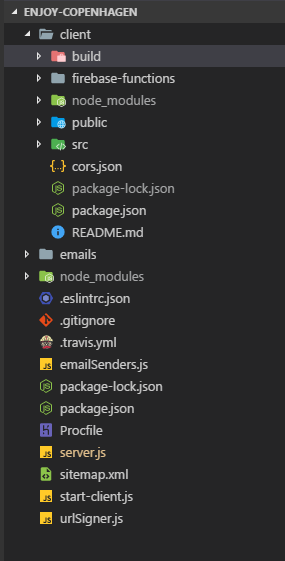
Please help me fix this!
About this issue
- Original URL
- State: closed
- Created 6 years ago
- Comments: 18
Links to this issue
Commits related to this issue
- Production environment addition made https://github.com/fullstackreact/food-lookup-demo/issues/49 — committed to kaushalvivek/stay-in-touch by kaushalvivek 4 years ago
The solution is to make sure you have this in your server:
And also add this:
You can’t serve a static single page application with dynamic routes without an express server set up this way.
What is ‘client’ and ‘build’ ??
i do have similar error… express server deployed on heroku is serving my static files fine… like my homepage and all the routing thing is working but i do have some apis to call them with axios… they are generating error 404. i dont know why this is my first time facing such issues.
@sudhaparayil Try this:
If you’re using axios, go into the index.js file of your src/api. Change the baseURL from pointing to your local server (localhost:5000) to the url that was given to you by heroku.