PMS: Unable to see readings w Arduino UNO
Hello,
Thanks for this library.
I am attempting to use the PMS5003 via breakout board with an Arduino UNO.
I am using SoftwareSerial.h to create a Serial1 with Uno Pins 2,3.
However, I cannot see any readings from the PMS5003 unit.
Please advise on my next step? Thank you
Jason
My setup:
Sensor TX -> Arduino PIN 2 Sensor RX -> Arduino PIN 3 5V to 5V, GND to GND Reset and EN pin not plugged in

My code:
#include <PMS.h>
#include <SoftwareSerial.h>

SoftwareSerial Serial1(2,3);

PMS pms(Serial);
PMS::DATA data;

void setup()
{
  Serial.begin(9600);   // GPIO1, GPIO3 (TX/RX pin on ESP-12E Development Board)
  Serial1.begin(9600);  // GPIO2 (D4 pin on ESP-12E Development Board)
}

void loop() {

  if (pms.read(data))  {

    Serial.print("reading data");
    Serial1.print("PM 1.0 (ug/m3): ");
    Serial1.println(data.PM_AE_UG_1_0);

    Serial1.print("PM 2.5 (ug/m3): ");
    Serial1.println(data.PM_AE_UG_2_5);

    Serial1.print("PM 10.0 (ug/m3): ");
    Serial1.println(data.PM_AE_UG_10_0);

    Serial1.println();
  }
  // Do other stuff...
}
About this issue
- Original URL
- State: closed
- Created 4 years ago
- Reactions: 1
- Comments: 29 (11 by maintainers)
hi @fu-hsi and @munzc . My new unit arrived and it turns out that it was a faulty unit. I plugged in a new unit and everything works fine. Thanks for all the assistance 😃
Hope you stay safe during this plague, and I wish you both good fortune in the wars to come 😉
Sorry about that post before, I didn’t realize that I was using the hardware serial port for both writing and reading (I’m still a beginner with this).
In hindsight, the best thing for this is to probably use an Arduino Due or Mega that has multiple serial ports, or using a HC-05/06 module so you can use the hardware port for the PMS.
https://arduino.stackexchange.com/questions/34126/whats-the-difference-between-all-the-software-serial-libraries-which-one-is-ar I read here that the next best thing to a hardware serial port is
AltSoftSerial. I have this code on my UNO with (Sensor TX -> Pin 8) and (Sensor RX -> Pin 9).Fu-Hsi: I fixed the link.
EDIT: This code is wrong. I have a newer comment below with a correction.
I did some research and I found a way to use the serial hardware port (digital pin 0 and 1 on the Uno) instead of using SoftwareSerial as recommended by @fu-hsi.
You must upload this code to the Uno before plugging any sensor wires into the Arduino RX or TX ports (D0 & D1 on the Uno), otherwise you’ll have an error uploading. I believe this is because the Arduino uses D0 and D1 to communicate with the PC, so plugging other wires in there will interfere with the serial connectivity when initially uploading code.
Then wire as follows: Sensor TX -> Arduino DX (pin D0) Sensor RX -> Arduino TX (pin D1) Sensor GND -> Arduino digital GND Sensor VCC -> Arduino 5V
Using
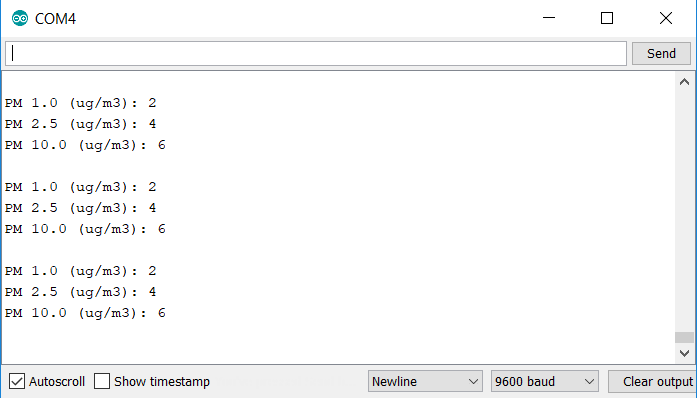
PMS pms(Serial)automatically references D0 and D1 as RX and TX ports, so you don’t have to manually write in the pins as you would with SoftwareSerial. Also, I found that addingpms.activeMode()intosetup()is helpful as it makes sure that the sensor is at default mode.Here is an example of the output. @jsy360 Please let me know if you try this out and it works for you! I’m interested to see if you get similar outputs as mine under normal indoor conditions.