Pluto.jl: Pkg activate fails to load the correct versions of the packages
I am experiencing a very annoying and difficult-to-debug behaviour when updating to 0.16.0 or 0.16.1:
In my course I do not use the Pluto pkg manager but ship a custom Manifest file.
Each notebook starts with using Pkg; Pkg.activate("MLCourse"). Until Pluto version 0.15.1 this works fine.
With the new Pluto versions it seems other versions of the packages are loaded.
The weird thing is: Pkg.status() from within the Pluto notebook shows the correct versions (in the REPL),
but @which somefunction() points me to other versions of the packages, e.g. in this notebook I expect version v1.1.0 of MLJOpenML to be loaded but @which MLJOpenML(554) points to v1.0.0 of MLJOpenML.
With the pop-up saying that there is a new version of Pluto the students are really tempted to update their Pluto version, just to find that after the update the notebooks don’t work anymore…
About this issue
- Original URL
- State: closed
- Created 3 years ago
- Comments: 16 (12 by maintainers)
I am working on this now with @Pangoraw, the discussion about the LOAD_PATH above should be corrected: we only set a custom LOAD_PATH when you use Pluto’s package manager, when you use
Pkg.activateor@quickactivate, the LOAD_PATH is unchanged (i.e. it is["@", "@v#.#", "@stdlib"]). So theLOAD_PATHis unrelated to our problem today.The reason why the notebook from https://github.com/fonsp/Pluto.jl/issues/1511#issuecomment-947210943 is not working is: you cannot use a macro in the same expression that you define it. (
beginendgroups the two into a single expression).In the Julia REPL:
This is the case for any Julia macro, including
@quickactivate. The reason that it worked before was because of a bug in our execution model, where we evaluated allusingstatements before evaluating a cell, which is (unfortunately) fixed in 0.16.2. We think it is the right decision to fix this bug, because our Julia execution should be the same as running the notebook as a script.The solution will be to split the quickactivate cell in two:
This will not work properly in 0.16.2 because the cell order heuristic needs to be updated to make this work. We are working on this now, and it should be released in Pluto 0.16.3 today.
@Pangoraw fixed it and we now have a test specifically for
@quickactivate:https://github.com/fonsp/Pluto.jl/commit/b7021ae38dfd194b66d2c3a1d44f7a4bc427254f
Released as 0.16.3
It still means that notebooks with this code:
will have to be rewritten, and maybe the documentation in DrWatson can be updated with the new Pluto example?
This argument does not make sense to me. The standard Julia load path still has
@v#.#, yet it still works fine using the standard package manager and identifies correct package versions. So my understanding is you didn’t fix the bug, you just alltogether dissalowed the (normally existing standard Julia behavior) of the global environment being accessible for its pool of packages.Having to do all these weird stuff of changing
LOAD_PATHseems way too convoluted. A typical Julia user would never have heard ofLOAD_PATH, and frankly, shouldn’t have to. If someone uses only exclusively Pluto.jl, things work. But as soon as one wants to use Pluto along with other editors, things become unnecessarily convoluted.Pluto sets yourLOAD_PATHvariable to["@", "@stdlib"]to prevent pulling in packages from the global environment. This issue reports a bug where Pluto would beusing Packageswhen the load path was not yet set to this value. To use DrWatson you have to set theLOAD_PATHto["@", "@v#.#", "@stdlib"]before using it.Also note that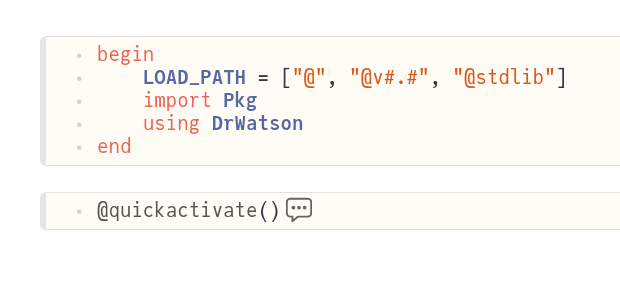
@quickactivatebeing a macro it needs to be in a different cell thanusing DrWatson:The
import Pkgwas added to workaround the execution order heuristics which do not play nicely with DrWatson and should probably be fixed on Pluto’s side.@Pangoraw found the source of the bug! Fix coming soon. Thanks again for narrowing down to the issue!