fluent-bit: Fluent Bit is unable to recover from too many accumulated buffers with filesystem storage type
Bug Report
Describe the bug Fluent Bit becomes unable to recover when too many buffers have been created with filesystem storage type due to loss of connectivity with an output server. This works correctly when it’s for a short duration (up to 1 or 2 minutes), but the issue starts to show up as more time passes and becomes apparent when it reaches 10+ minutes at 1500 records with a record payload of about 1.75KB each. The backlog kept increasing even when the output server became available until the partition where the buffers are stored became full and started losing records while never being able to recover.
Monitoring the buffers folder at the beginning, I see the files created are around 2MB each, sometimes less depending on the flush time set in the config and when the count reaches 128 files, every new files becomes a single record. I have observed hundreds of thousand of around 2KB files when Fluent Bit is unable to recover. The CPU usage of Fluent Bit is at around 8% during a normal load I have tested, then goes to around 6-11% when the output server connection is down until 128 buffers have been created, then the CPU usage jumps to 100% when writing each record as single files.
During the recovery, the CPU usage of Fluent Bit appears to vary depending on how many buffer files have been created and if the CPU usage reaches 100%, it can become unlikely to fully recover unless the traffic of new records is significantly lowered.
Limiting the partition size of the Fluent Bit buffers folder is a workaround I have found so Fluent Bit never falls into an unrecoverable situation, but this means losing most of the records during a syslog connectivity downtime.
To Reproduce
- Steps to reproduce the problem:
- Simulate a high load (1500 records of ~1.75KB each) on Fluent Bit’s input forward.
- Stop the output server. (ie.: stopping the rsyslog service on the output’s server)
- Check the Fluent Bit buffers folder to see files slowly accumulating until it reaches 128, then the number of files rapidly increase.
- Restart the output server when more than 1GB of buffers have been accumulated. (ie.: restart the rsyslog service on the output’s server)
- Check if Fluent Bit is able to recover from the accumulated backlog. The folder should slowly empty over time.
Which output server type used doesn’t appear to change the result. (Also tried with ElasticSearch)
Expected behavior When the output server goes down, Fluent Bit will keep creating new buffer files to keep all the incoming records from the forward input until the output server becomes available again. Once the output server is back, Fluent Bit should be able to process the incoming records from the input forward while slowly emptying the accumulated backlog. The buffer files should respect the configured flush time and/or up to 2MB in size. (Not single record per file)
Screenshots
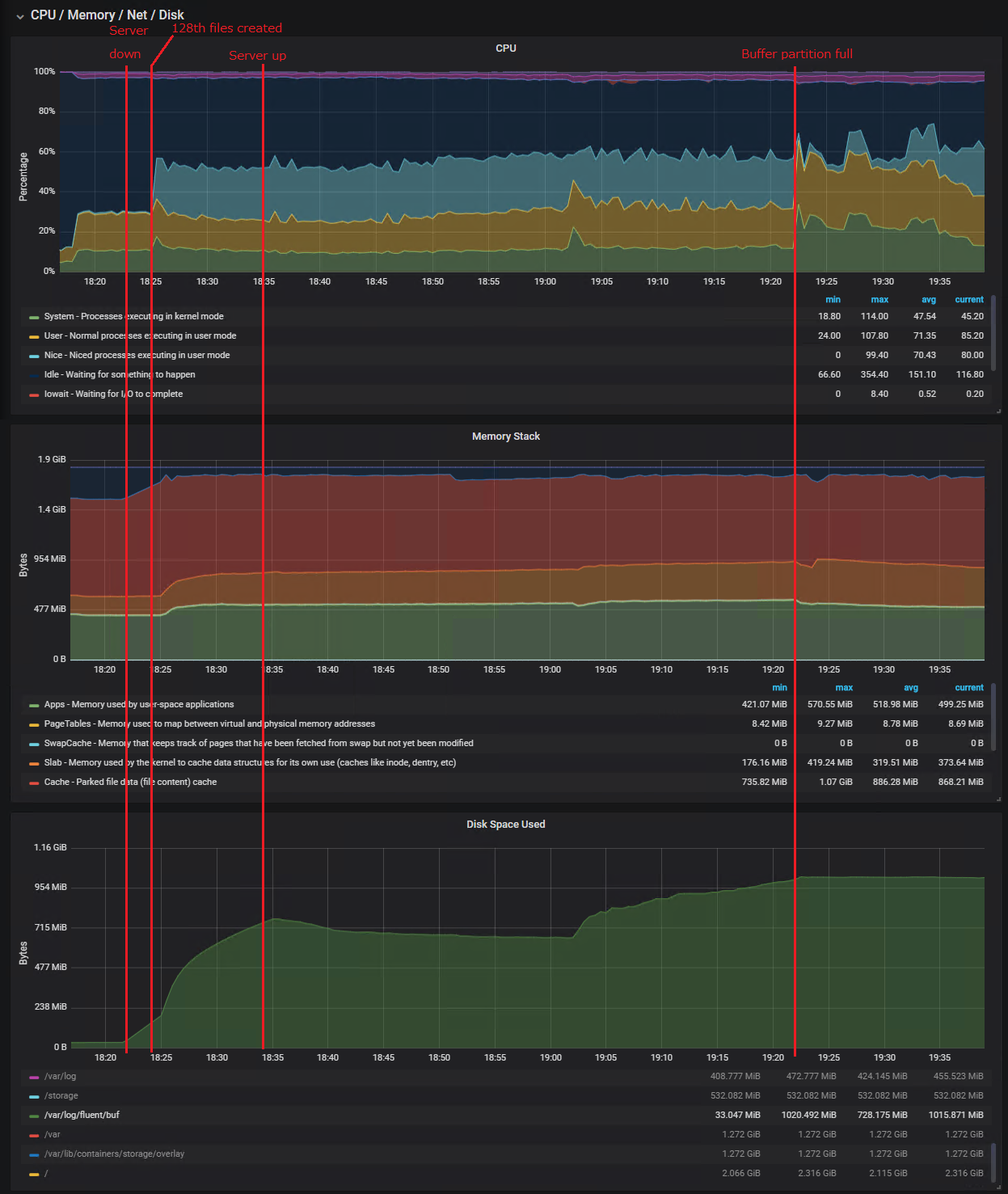 I added information of where the events happened in the timeline.
Your Environment
- Version used: 1.5.4
- Configuration:
[SERVICE]
    # Flush records to destinations every 5s
    Flush        5

    # Run in foreground mode
    Daemon       Off

    # Use 'info' verbosity for Fluent Bit logs
    Log_Level    info

    # Standard parsers & plugins
    Parsers_File parsers.conf
    Plugins_File plugins.conf

    # Enable built-in HTTP server for metrics
    # Prometheus metrics: <host>:24231/api/v1/metrics/prometheus
    HTTP_Server  On
    HTTP_Listen  0.0.0.0
    HTTP_Port    24231

    # Persistent storage path for buffering
    storage.path /var/log/fluent/buf/

[INPUT]
    Name   forward
    Port   24224
    storage.type  filesystem

# Remote syslog output
[OUTPUT]
    Name  syslog
    Match system.*
    Retry_Limit False

    # CONFIG: Syslog host
    Host 192.168.1.68
    # CONFIG: Syslog port
    Port 514
    Mode       tcp

    Syslog_Severity_Key log.syslog.severity.code
    Syslog_Facility_Key log.syslog.facility.code
    Syslog_Hostname_Key host.name
    Syslog_AppName_Key  process.name
    Syslog_ProcID_Key   process.pid
    Syslog_Message_Key  message
    Syslog_SD_Key       labels
- Environment name and version: KVM VM using 4 CPU cores and 2GB of ram
- Server type and version: QEMU/KVM LXC ESX / libvirt 4.5.0
- Operating System and version: CentOS 7
- Filters and plugins: None (Adding filters greatly reduces the chance of recovery)
Additional context We had various issues in the past when the connection to the syslog server was lost for a long period of time and wanted to confirm Fluent Bit would be able to work correctly after a very long downtime. (15+ minutes)
We intended to use a partition size of several GB in size for the buffers to be sure we don’t lose any record during a loss of connectivity, but this cause Fluent Bit to never recover when it happens.
This issue was first noticed when we had simple filters to add id/type/hostname/name/ip informations and encode json message which limited the CPU usage available to process the backlog but can be reproduced without any filter.
About this issue
- Original URL
- State: closed
- Created 4 years ago
- Reactions: 1
- Comments: 26 (6 by maintainers)
I see this issues still exists in 2.1.6 version. I have
threaded onfor input tail, and I see a ton ofSeeing similar issue when too many backlogs chunks are registered.
Commenting to prevent issue from becoming stale. This is issue is still applicable: if we need to process a large number of messages with filesystem storage type, a build from the pull request #2804 MUST be used.
Hi there! We’re facing the same issue when trying to implement reliable log shippment with storage-backed buffers on fluent-bit side. And this is kinda critical bug IMO when logs is not just a regular text in cases e.g. when fluent-bit is using for business-critical data forwarding (my case).
@edsiper is there any updates on this issue?
Hi @edsiper, noticed you did optimizations with the number of chunks used when the system is under load in #2025 (commit 9420ed9) and thought it was similar to the issue I am currently having.
As I previously mentioned, I tried different configuration parameters but it always come down to creating 1 file per message when the number of chunks up is reached. Increasing the limit of up chunks is not easily feasible since it requires enough ram to keep them even though we specified to use the file system storage. From what I understand, they are put in ram with async option to write on the disk, but the cpu usage spikes high fast when it starts creating a large number of files instead of packing them in the usual large chunks.
I am currently looking into modifying the code to allow putting down older up chunks to free that resource for newer chunks to be created as usual when the output has connection issues. So it can be able to continue ingesting messages and later be able to process them when the output is working again. Although the current behavior is able to resume, a lot of CPU utilization is lost in just trying to iterate the large amount of tiny chunks it created and is unable to sustain the current load anymore which we will lose messages eventually as the messages are now mostly backing up in this scenario.
I investigated more and found the 128 buffers “limit” before Fluent Bit writes every messages in their own files causing the CPU usage to go high very fast is the limit of “up” chunks allowed and this can be tweaked with the parameter “storage.max_chunk_up”. The downside to increase this value is how much RAM Fluent Bit will use since these chunks are mapped into memory and asynchronously synched to the disk when filesystem storage type is used.
As all received messages are eventually saved in their own files, writing about 1500 files per second, most of the CPU usage is lost at 2 places. Both places (flb_input_chunk_total_size and input_chunk_get) seems to loop through all the chunks (or files) created so far at every message, so it is clear the system cannot handle a very high number of small files.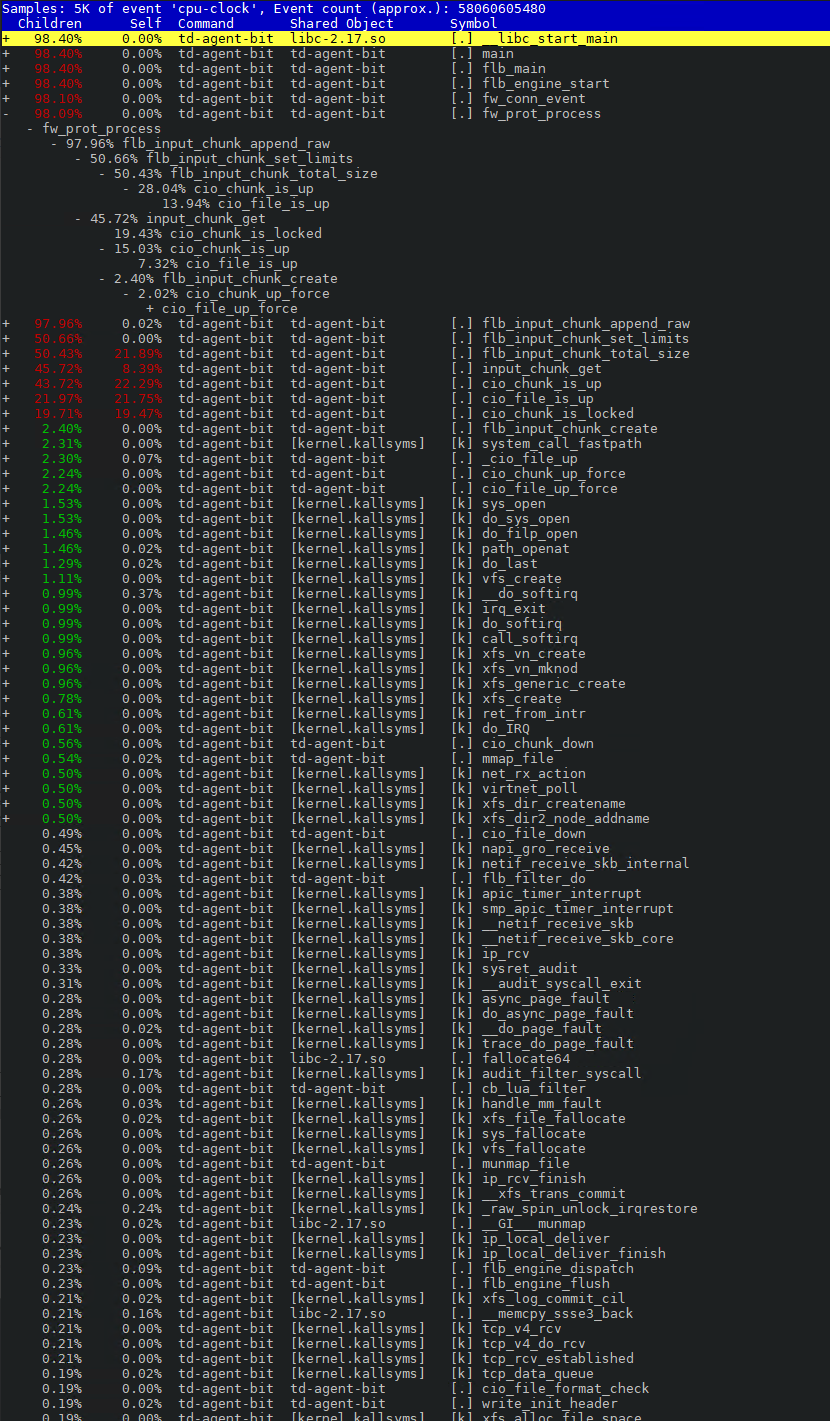
Another way to flush the up chunks to a down state I found is by setting a “mem_buf_limit”, but these chunks will immediately be written to the disk when the threshold is met. There’s also the possibility the chunk will stay in the up state if the threshold is not met and will have the same behavior of high CPU usage as I was seeing.
From what I can see, there’s already a mechanism in place to flush the up chunks onto the filesystem when the input source is set as such, but there’s no definitive way of using it at this time. I was thinking there could be another threshold or number of up chunks is reached before Fluent Bit starts to flush older chunks down to the disk so the system can accumulate a certain number of chunks in memory before actively starting to write to disk. This will free up the available up chunks so newly received messages can continue be bundled in chunks and not encounter the scenario where a high number of files are created.