extensions: Error when running fs-bq-import-collection. PartialFailureError
[REQUIRED] Step 2: Describe your configuration
- Extension name: ** fs-bq-import-collection **
- Extension version: ** N/A **
- Configuration values (redact info where appropriate):
- ** project: pats-production **
- ** collection: oilworx-customers **
- ** dataset: firestore_export **
- ** table_prefix: oilworx_customers **
[REQUIRED] Step 3: Describe the problem
When running npx @firebaseextensions/fs-bq-import-collection i get an error and no rows are imported. I tried with several collections and projects and none of them is working. This script worked for me a week ago.
Steps to reproduce:
What happened? How can we make the problem occur? This could be a description, log/console output, etc.
Importing data from Cloud Firestore Collection: oilworx-customers, to BigQuery Dataset: firestore_export, Table: oilworx_customers_raw_changelog
BigQuery dataset already exists: firestore_export
BigQuery table with name oilworx_customers_raw_changelog already exists in dataset firestore_export!
View with id oilworx_customers_raw_latest already exists in dataset firestore_export.
Inserting 100 row(s) of data into BigQuery
Error importing Collection to BigQuery: PartialFailureError
Expected result
Documents imported to bigquery
Actual result
No documents were imported to bigquery
About this issue
- Original URL
- State: closed
- Created 4 years ago
- Reactions: 15
- Comments: 31 (10 by maintainers)
@joaqcid this was a big help!!!
hi all,
i creted a branch “run-manual-import” on my fork for to run it manually, https://github.com/joaqcid/extensions
from there, you need to
hope this helps
run-manual-import
@joaqcid Do I want to use the fix-bq-import fork or the run-manual-import fork?
Hi, the package has been updated on NPM, sorry for the delay!
@sourcec0de , got compilation errors during install:
I ignored those installation errors and proceed to import. Which worked well. Thx.
@joaqcid no errors when doing npm install at scripts/import, but still get this error:
13 verbose stack Error: @firebaseextensions/fs-bq-import-collection@0.1.3 import:node ./lib/index.js13 verbose stack Exit status 1 13 verbose stack at EventEmitter.<anonymous> (/usr/local/lib/node_modules/npm/node_modules/npm-lifecycle/index.js:332:16) 13 verbose stack at EventEmitter.emit (events.js:223:5) 13 verbose stack at ChildProcess.<anonymous> (/usr/local/lib/node_modules/npm/node_modules/npm-lifecycle/lib/spawn.js:55:14) 13 verbose stack at ChildProcess.emit (events.js:223:5) 13 verbose stack at maybeClose (internal/child_process.js:1021:16) 13 verbose stack at Process.ChildProcess._handle.onexit (internal/child_process.js:283:5) 14 verbose pkgid @firebaseextensions/fs-bq-import-collection@0.1.3MacBook-Pro:import User$ npm run import
internal/modules/cjs/loader.js:796 throw err; ^
Error: Cannot find module ‘/Users/user/node_modules/extensions-run-manual-import/firestore-bigquery-export/scripts/import/lib/scripts/import/src/index.js’ at Function.Module._resolveFilename (internal/modules/cjs/loader.js:793:17) at Function.Module._load (internal/modules/cjs/loader.js:686:27) at Function.Module.runMain (internal/modules/cjs/loader.js:1043:10) at internal/main/run_main_module.js:17:11 { code: ‘MODULE_NOT_FOUND’, requireStack: [] } npm ERR! code ELIFECYCLE npm ERR! errno 1 npm ERR! @firebaseextensions/fs-bq-import-collection@0.1.3 import:
node ./lib/scripts/import/src/index.jsnpm ERR! Exit status 1 npm ERR! npm ERR! Failed at the @firebaseextensions/fs-bq-import-collection@0.1.3 import script. npm ERR! This is probably not a problem with npm. There is likely additional logging output above.npm ERR! A complete log of this run can be found in: npm ERR! /Users/user/.npm/_logs/2020-02-14T10_34_01_803Z-debug.log
@joaqcid i tried your solution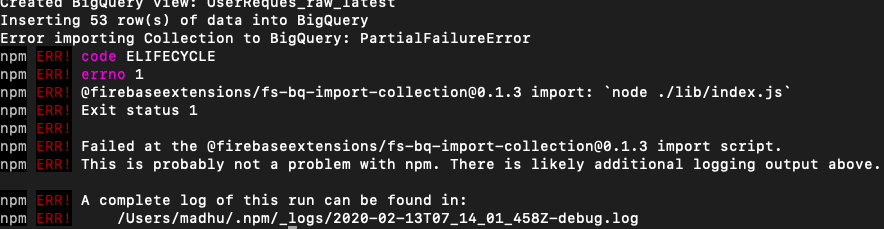
getting this error , it will be great if you can look into this
@tptshoe i cant understand the error in the logs, try clearing all node_modules folders from the firebase/extensions and re-run npm install only under /firestore-bigquery-export/firestore-bigquery-change-tracker /firestore-bigquery-export/scripts/import
then run npm import under
/firestore-bigquery-export/scripts/import
@joaqcid. Thanks a heap, worked a treat…
I made the changes suggested in the PR to the index.js file (not using Typescript) and I updated the dependency to 4.7 but I’m still getting the error.
I called
ngxwith the--no-installflag so that it would have to use the modified file.Hi @joaqcid
You seem to have solved this, but I wasn’t able to replicate what you did. I cloned the repo and updated the dependecy to 4.7, but that didn’t seem to help when I ran it again.
Could you do an idiots guide version of your above comment please?