fastlane: Google Api Error: Invalid request - Access Not Configured
New Issue Checklist
- Updated fastlane to the latest version
- I read the Contribution Guidelines
- I read docs.fastlane.tools
- I searched for existing GitHub issues
Issue Description
Hi,
I have an issue with the supply command, which doesn’t work as expected.
Following the documentation, I did the following:
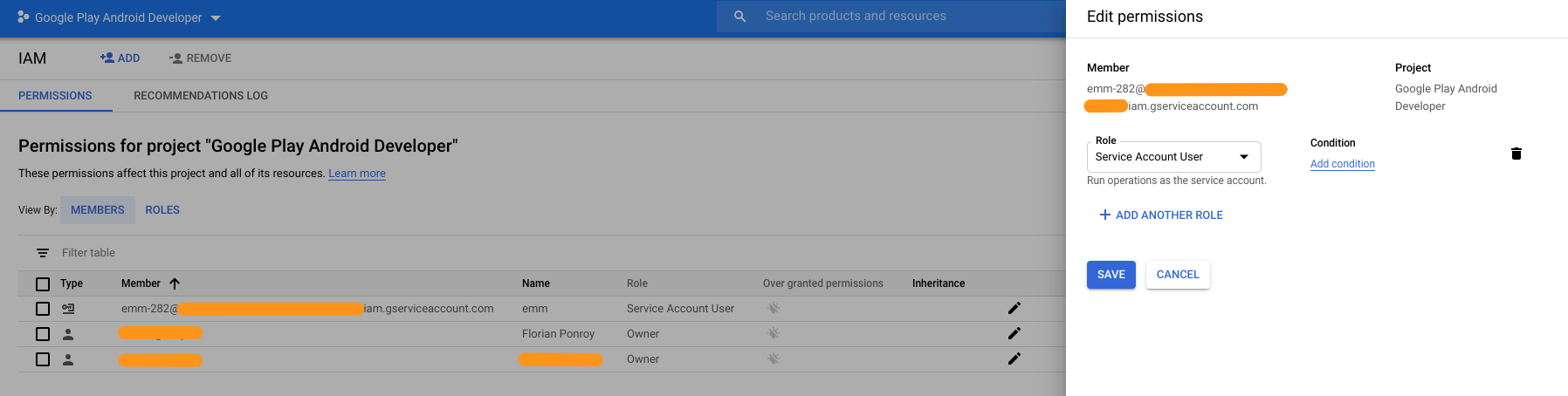
- I created a service account with the
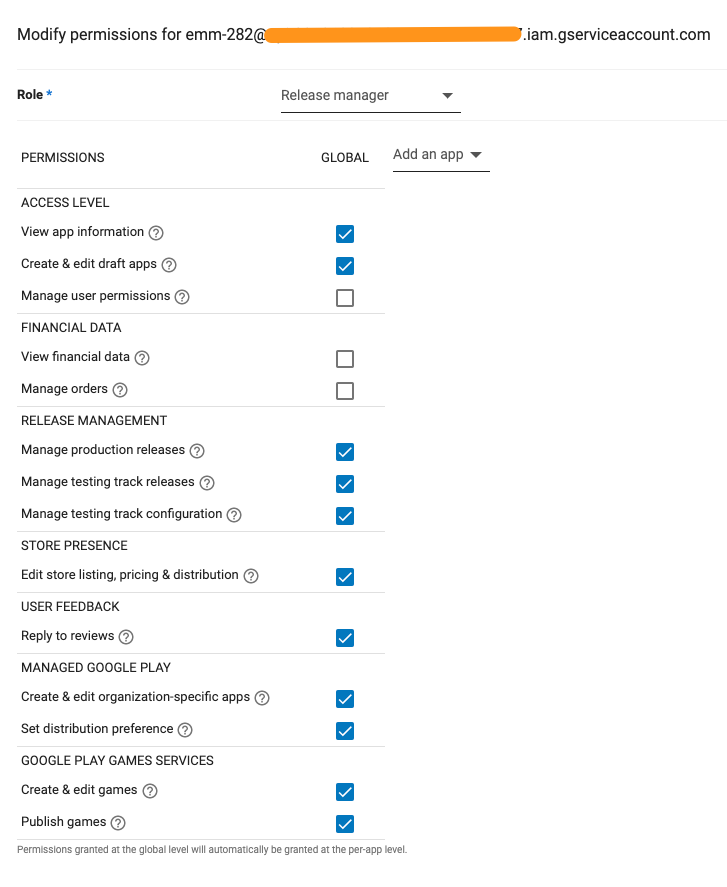
Service Account Userrole - I’ve assigned the
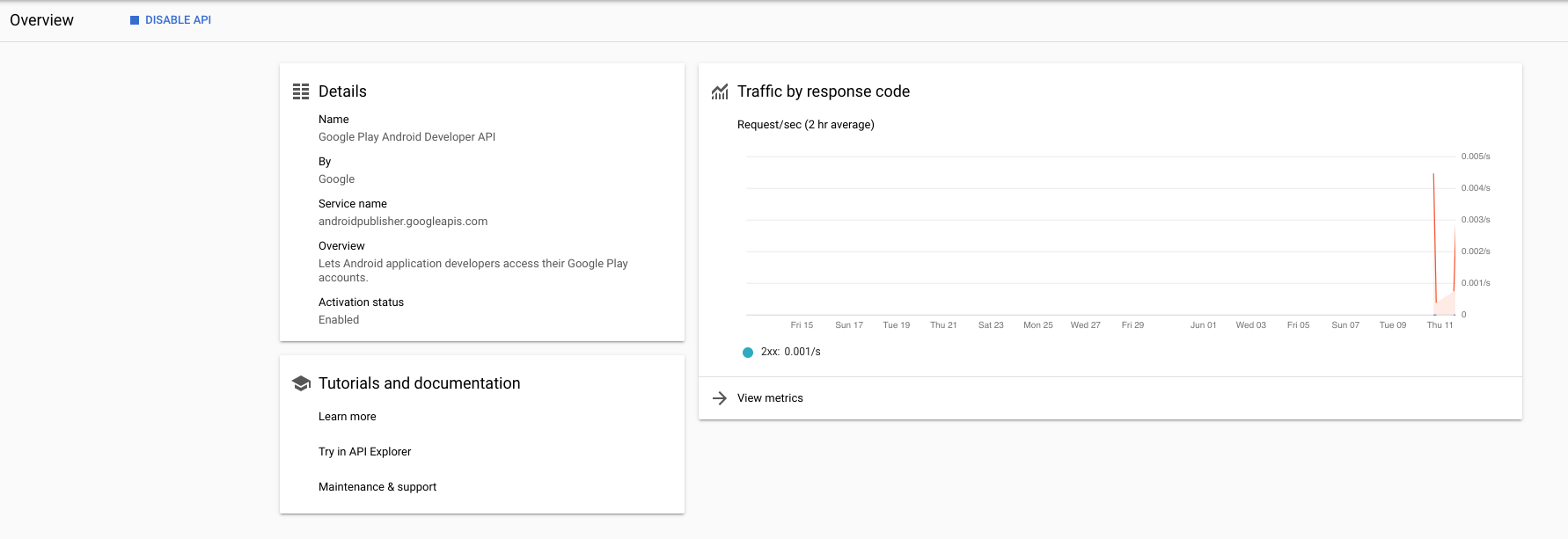
Release Managerrole to this user in the Play Console - I’ve enabled the Google Play Android Developer API in the Google Cloud Console
When I ran the fastlane supply init command, it properly downloaded the metadata. I can even see the calls in the GCP console.
Then I created a lane called playstore, with a dedicated track (which already exists).
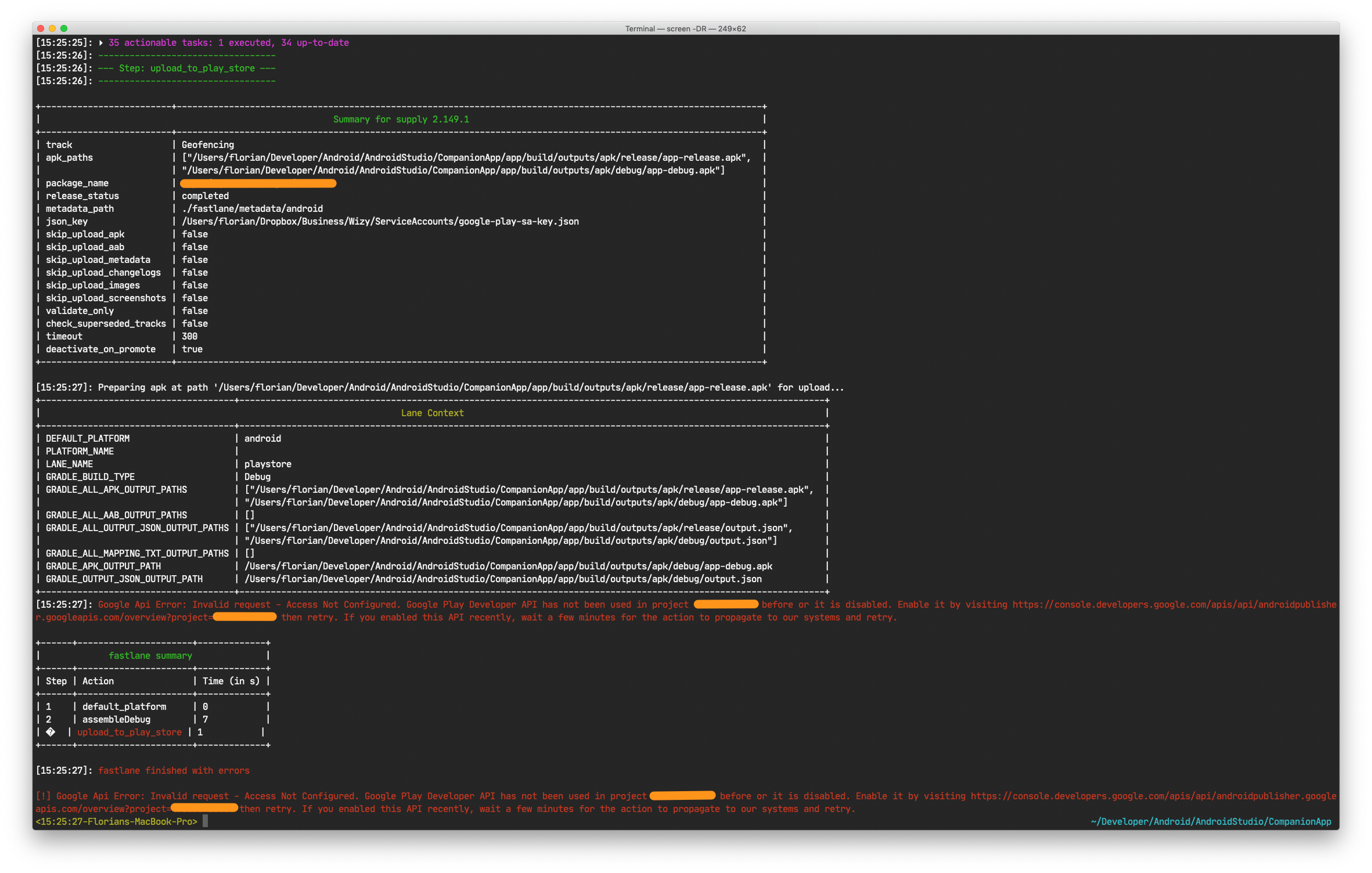
But when I want to push a new version of my app, whether in the production or in the track, I still have the following error:
Google Api Error: Invalid request - Access Not Configured. Google Play Developer API has not been used in project XXXXXX before or it is disabled. Enable it by visiting https://console.developers.google.com/apis/api/androidpublisher.googleapis.com/overview?project=XXXXXX then retry. If you enabled this API recently, wait a few minutes for the action to propagate to our systems and retry.
The project was created more than 24 hours ago.
Thanks in advance for your help!
Command executed
fastlane playstore
Complete output when running fastlane, including the stack trace and command used
Please see screenshots below
Environment
✅ fastlane environment ✅
Stack
| Key | Value |
|---|---|
| OS | 10.14.6 |
| Ruby | 2.5.8 |
| Bundler? | false |
| Git | git version 2.10.1 |
| Installation Source | /usr/local/Cellar/fastlane/2.149.1/libexec/bin/fastlane |
| Host | Mac OS X 10.14.6 (18G4032) |
| Ruby Lib Dir | /usr/local/Cellar/ruby@2.5/2.5.8/lib |
| OpenSSL Version | OpenSSL 1.1.1f 31 Mar 2020 |
| Is contained | false |
| Is homebrew | false |
| Is installed via Fabric.app | false |
| Xcode Path | /Library/Developer/CommandLineTools/ |
| Xcode Version |
System Locale
| Variable | Value | |
|---|---|---|
| LANG | en_US.UTF-8 | ✅ |
| LC_ALL | en_US.UTF-8 | ✅ |
| LANGUAGE |
fastlane files:
`./fastlane/Fastfile`
# This file contains the fastlane.tools configuration
# You can find the documentation at https://docs.fastlane.tools
#
# For a list of all available actions, check out
#
#     https://docs.fastlane.tools/actions
#
# For a list of all available plugins, check out
#
#     https://docs.fastlane.tools/plugins/available-plugins
#

# Uncomment the line if you want fastlane to automatically update itself
# update_fastlane

default_platform(:android)

platform :android do
  desc "Runs all the tests"
  lane :test do
    gradle(task: "test")
  end

  desc "Submit a new Beta Build to Crashlytics Beta"
  lane :beta do
    gradle(task: "clean assembleRelease")
    crashlytics

    # sh "your_script.sh"
    # You can also use other beta testing services here
  end

  desc "Deploy a new version to the Google Play"
  lane :deploy do
    gradle(task: "clean assembleRelease")
    upload_to_play_store
  end
end

lane :playstore do
  gradle(
    task: 'assemble',
    build_type: 'Debug'
  )
  upload_to_play_store(
    track: 'Geofencing'
  )
end
`./fastlane/Appfile`
json_key_file("/Users/florian/Dropbox/Business/Wizy/ServiceAccounts/google-play-sa-key.json") # Path to the json secret file - Follow https://docs.fastlane.tools/actions/supply/#setup to get one
package_name("app.wizyemm.eu.companion.test") # e.g. com.krausefx.app
fastlane gems
| Gem | Version | Update-Status |
|---|---|---|
| fastlane | 2.149.1 | ✅ Up-To-Date |
Loaded fastlane plugins:
No plugins Loaded
Loaded gems
| Gem | Version |
|---|---|
| slack-notifier | 2.3.2 |
| atomos | 0.1.3 |
| CFPropertyList | 3.0.2 |
| claide | 1.0.3 |
| colored2 | 3.1.2 |
| nanaimo | 0.2.6 |
| xcodeproj | 1.16.0 |
| rouge | 2.0.7 |
| xcpretty | 0.3.0 |
| terminal-notifier | 2.0.0 |
| unicode-display_width | 1.7.0 |
| terminal-table | 1.8.0 |
| plist | 3.5.0 |
| public_suffix | 2.0.5 |
| addressable | 2.7.0 |
| multipart-post | 2.0.0 |
| word_wrap | 1.0.0 |
| tty-screen | 0.8.0 |
| tty-cursor | 0.7.1 |
| tty-spinner | 0.9.3 |
| babosa | 1.0.3 |
| colored | 1.2 |
| highline | 1.7.10 |
| commander-fastlane | 4.4.6 |
| excon | 0.73.0 |
| faraday | 1.0.1 |
| unf_ext | 0.0.7.7 |
| unf | 0.1.4 |
| domain_name | 0.5.20190701 |
| http-cookie | 1.0.3 |
| faraday-cookie_jar | 0.0.6 |
| faraday_middleware | 1.0.0 |
| fastimage | 2.1.7 |
| gh_inspector | 1.1.3 |
| json | 2.3.0 |
| mini_magick | 4.10.1 |
| multi_xml | 0.6.0 |
| rubyzip | 1.3.0 |
| security | 0.1.3 |
| xcpretty-travis-formatter | 1.0.0 |
| dotenv | 2.7.5 |
| bundler | 2.1.4 |
| naturally | 2.2.0 |
| simctl | 1.6.8 |
| jwt | 2.1.0 |
| uber | 0.1.0 |
| declarative | 0.0.10 |
| declarative-option | 0.1.0 |
| representable | 3.0.4 |
| retriable | 3.1.2 |
| mini_mime | 1.0.2 |
| multi_json | 1.14.1 |
| signet | 0.14.0 |
| memoist | 0.16.2 |
| os | 1.1.0 |
| googleauth | 0.12.0 |
| httpclient | 2.8.3 |
| google-api-client | 0.38.0 |
| google-cloud-env | 1.3.2 |
| google-cloud-errors | 1.0.1 |
| google-cloud-core | 1.5.0 |
| digest-crc | 0.5.1 |
| google-cloud-storage | 1.26.2 |
| emoji_regex | 1.0.1 |
| jmespath | 1.4.0 |
| aws-partitions | 1.324.0 |
| aws-eventstream | 1.1.0 |
| aws-sigv4 | 1.1.4 |
| aws-sdk-core | 3.97.1 |
| aws-sdk-kms | 1.33.0 |
| aws-sdk-s3 | 1.67.1 |
generated on: 2020-06-11
About this issue
- Original URL
- State: closed
- Created 4 years ago
- Reactions: 24
- Comments: 41 (10 by maintainers)
Same issue here. Our situation is as followed: New app on the google Play store. We’ve uploaded an APK manually to the test track so that the Google Play Store assigns it the desired bundle ID. Then when we want fastlane to send the APK to the production track we get the exact same error.
We have tried waiting for more than 24 hours. We have tried making a new key for the Service Account. We have tried to make a new Service account. We have made a new project in the Google Cloud Console.
And we still end up with the error.
@wcenGitHub Thanks for all this information! That should be helpful ❤
I’ve assigned the issue to @snatchev and we are seeing if we can escalate this someone inside of Google. Will keep you all posted when we find out more!
I am also experiencing the issue and am in the completely same situation: did all the things the author of this issue has listed:(
I’m in the same boat… tests work perfectly, build fails.
Experiencing the same issue on 2.149.1 even though the
validate_play_store_json_keytest is successful:Same issue here, following is the stack trace from reports:
Can confirm that it is working on my end with no issues. And I’ve deployed a good 20-30 apps so far 😄
Same problem here.
However I believe the source of the problem is NOT fastlane.
Unfortunately it seems this problem is coming from Google Play or the Google Cloud Console, or the linking between them, and it only affects some Google Play accounts. We use the same deployment code and same machine for several different Google Play account and we’ve started bumping into this issue recently with some accounts, while the rest work just fine.
We’re used to setting this up with customers and we’ve been doing it for a while, we know the setup and the steps by heart. We double/triple/n checked everything and it should be working but it’s not, even after several days with the setup being done.
One interesting thing to note: In the Google Play Console if we remove the service account access from “Users & permissions”, the API works properly and gives out the forbidden error response:
instead of
This makes me think that something in Google Play is broken somehow. We’ve emailed Google Play support over a week ago, but so far no response.
Does anyone know of a way to escalate this to the Google Play Publisher API team maybe?
Wow is anyone looking into this yet? Seems like a lot of us are stuck. For the first time ever my iOS releases are going out faster than my Android ones lol
this starts working for me from Azure DevOps and App Center now, it could have been a problem in Google side.
Hello everyone, Without doing anything, I succeeded to run the
google_play_track_version_codesaction, and upload an new binary to the Play Store. Seems to be related to Google directly.While it wasn’t working, I deleted and regenerated the service account two times. So it is working now with a service account created during the error time.
I’m using Fastlane, and it’s not working right now. I will check regularly if it seems to work for some of us here. Maybe it is needed to generate again the Service Account (and the related key)?
It seems to be working now. I am using fastlane
I can confirm that everything is back to normal and working 😃
This is very strange! It appears to be something on Google’s API (but maybe we need an SDK bump???). I will see if I can find somebody who knows more? 😊
Unfortunately nothing what we can do from fastlane side (right @joshdholtz?). Using the official support channel is usually a good idea.
same here. issue seem to be failing for this method androidpublisher.edits.insert in google api.