fastlane: Fastlane : [altool] Error: Unable to upload archive. Failed to get authorization for username and password
New Issue Checklist
- Updated fastlane to the latest version
- I read the Contribution Guidelines
- I read docs.fastlane.tools
- I searched for existing GitHub issues
Issue Description
Building ios app works fine, but when try to do deployment gives me an error. Last time we deployed the app was 2 weeks ago.
Command executed
Fastfile:
# This file contains the fastlane.tools configuration
# You can find the documentation at https://docs.fastlane.tools
#
# For a list of all available actions, check out
#
#     https://docs.fastlane.tools/actions
#
# For a list of all available plugins, check out
#
#     https://docs.fastlane.tools/plugins/available-plugins
#

# Automatically update fastlane
update_fastlane

default_platform(:ios)

# Default temporary keychain password and name, if not included from environment
TEMP_KEYCHAIN_NAME_DEFAULT = "fastlane_flutter"
TEMP_KEYCHAN_PASSWORD_DEFAULT = "temppassword"

# Remove the temporary keychain, if it exists
def delete_temp_keychain(name)
  delete_keychain(
    name: name
  ) if File.exist? File.expand_path("~/Library/Keychains/#{name}-db")
end

# Create the temporary keychain with name and password
def create_temp_keychain(name, password)
  create_keychain(
    name: name,
    password: password,
    unlock: false,
    timeout: 0
  )
end

# Ensure we have a fresh, empty temporary keychain
def ensure_temp_keychain(name, password)
  delete_temp_keychain(name)
  create_temp_keychain(name, password)
end

platform :ios do
  desc "Build & sign appname iOS app"
  lane :build_ios_appname do |options|
    increment_build_number(build_number: ENV['CI_JOB_ID'])
    update_code_signing_settings(
      use_automatic_signing: false,
      path: "./Runner.xcodeproj",
      team_id: CredentialsManager::AppfileConfig.try_fetch_value(:team_id),
      profile_name: "match AppStore #{CredentialsManager::AppfileConfig.try_fetch_value(:app_identifier)}",
      code_sign_identity: "iPhone Distribution",
    )
    keychain_name = ENV['TEMP_KEYCHAIN_NAME'] || TEMP_KEYCHAIN_NAME_DEFAULT
    keychain_password = ENV['TEMP_KEYCHAIN_PASSWORD'] || TEMP_KEYCHAN_PASSWORD_DEFAULT
    ensure_temp_keychain(keychain_name, keychain_password)
    match(
      app_identifier: CredentialsManager::AppfileConfig.try_fetch_value(:app_identifier),
      type: "appstore",
      readonly: is_ci,
      keychain_name: keychain_name,
      keychain_password: keychain_password,
      git_branch: "master"
    )
    sh "./flutter_build_appname.sh --clean"
    build_ios_app(
      scheme: "appname",
      export_options: {
          method: "app-store"
      },
      output_directory: "./appname"
    )
    delete_temp_keychain(keychain_name)
  end

  desc "Upload iOS app to app store"
  lane :deploy_ios do |options|
    # Upload to test flight or AppStore depending on caller parameters
    if options[:testflight]
      upload_to_testflight(
        skip_submission: true,
        ipa: "./#{options[:flavor]}/Runner.ipa"
      )
    else
      deliver(
        skip_metadata: false,
        skip_screenshots: true,
        submit_for_review: true,
        force: true,
        ipa: "./#{options[:flavor]}/Runner.ipa"
      )
    end
  end
end
Complete output when running fastlane, including the stack trace and command used
[16:29:50]: Login to App Store Connect (appleid).
[16:29:53]: Login successful
[16:29:54]: Ready to upload new build to TestFlight (App: 1502436715)...
[16:29:55]: Fetching password for transporter from environment variable named `FASTLANE_APPLE_APPLICATION_SPECIFIC_PASSWORD`
[16:29:57]: [altool] }
[16:29:57]: [altool] 2023-02-17 16:29:57.738 Non-localized server string received: 'Error Description not available (-24169)'.
[16:29:57]: [altool] 2023-02-17 16:29:57.739 Non-localized server string received: 'Error Description not available (-24169)'.
[16:29:57]: [altool] 2023-02-17 16:29:57.739 {
[16:29:57]: [altool]     EnableJWTForAllCalls = 0;
[16:29:57]: [altool]     ErrorCode = "-24169";
[16:29:57]: [altool]     ErrorMessage = "Error Description not available (-24169)";
[16:29:57]: [altool]     Errors =     (
[16:29:57]: [altool]         "Error Description not available (-24169)"
[16:29:57]: [altool]     );
[16:29:57]: [altool]     RestartClient = 0;
[16:29:57]: [altool]     ShouldUseRESTAPIs = 0;
[16:29:57]: [altool]     Success = 0;
[16:29:57]: [altool] }
[16:29:57]: [altool] 2023-02-17 16:29:57.739 Non-localized server string received: 'Error Description not available'.
[16:29:57]: [altool] 2023-02-17 16:29:57.739 Non-localized server string received: 'Error Description not available (-24169)'.
[16:29:57]: [altool] 2023-02-17 16:29:57.739 Non-localized server string received: 'Error Description not available'.
[16:29:57]: [altool] 2023-02-17 16:29:57.806 Bad status code: <MZWebServiceDAWTokenForUsernameAndPassword: 0x111e05fe0>
[16:29:57]: [altool] {"tool-version":"6.043.1[40](https://git.repo.appname/-/jobs/254260#L40)[43](https://git.repo.appname/name/appname-app/-/jobs/254260#L43)","tool-path":"\/Applications\/Xcode.app\/Contents\/SharedFrameworks\/ContentDeliveryServices.framework\/Versions\/A\/Frameworks\/AppStoreService.framework","os-version":"13.2.1","product-errors":[{"message":"Failed to list providers.","userInfo":{"NSLocalizedDescription":"Failed to list providers.","NSLocalizedFailureReason":"Failed to get authorization for username 'appleid' and password. (\n    \"Error Domain=NSCocoaErrorDomain Code=0 \\\"Status code: 0\\\" UserInfo={NSLocalizedDescription=Status code: 0, NSLocalizedFailureReason=The auth server returned a bad status code.}\"\n)"},"code":-1011}]}
[16:29:57]: [altool]
[16:29:57]: Application Loader output above ^
[16:29:57]: The call to the altool completed with a non-zero exit status: 1. This indicates a failure.
[16:29:57]: Fetching password for transporter from environment variable named `FASTLANE_APPLE_APPLICATION_SPECIFIC_PASSWORD`
[16:29:57]: Going to upload updated app to App Store Connect
[16:29:57]: This might take a few minutes. Please don't interrupt the script.
[16:29:59]: [altool] 2023-02-17 16:29:59.151 *** Error: Unable to upload archive. Failed to get authorization for username 'appleid' and password. (
[16:29:59]: [altool]     "Error Domain=NSCocoaErrorDomain Code=0 \"Status code: 0\" UserInfo={NSLocalizedDescription=Status code: 0, NSLocalizedFailureReason=The auth server returned a bad status code.}"
[16:29:59]: [altool] ) (-1011)
[16:29:59]: [altool]  {
[16:29:59]: [altool]     NSLocalizedDescription = "Unable to upload archive.";
[16:29:59]: [altool]     NSLocalizedFailureReason = "Failed to get authorization for username 'appleid' and password. (\n    \"Error Domain=NSCocoaErrorDomain Code=0 \\\"Status code: 0\\\" UserInfo={NSLocalizedDescription=Status code: 0, NSLocalizedFailureReason=The auth server returned a bad status code.}\"\n)";
[16:29:59]: [altool] }
[16:29:[59](https://git.repo.appname/name/appname-app/-/jobs/254260#L59)]: Application Loader output above ^
[16:29:59]: The call to the altool completed with a non-zero exit status: 1. This indicates a failure.
[16:29:59]: Could not download/upload from App Store Connect!
+------------------+----------------+
|           Lane Context            |
+------------------+----------------+
| DEFAULT_PLATFORM | ios            |
| PLATFORM_NAME    | ios            |
| LANE_NAME        | ios deploy_ios |
+------------------+----------------+
[16:29:59]: Error uploading ipa file:
 [Application Loader Error Output]: Error uploading '/var/folders/n_/_j0jjx_n35dbr_89n126_xjh0000gn/T/6e87780a-16e8-4bf7-82e5-08eae6c6da74.ipa'.
[Application Loader Error Output]: Unable to upload archive. Failed to get authorization for username 'appleid' and password. (
[Application Loader Error Output]: The call to the altool completed with a non-zero exit status: 1. This indicates a failure.
+------+----------------------+-------------+
|             fastlane summary              |
+------+----------------------+-------------+
| Step | Action               | Time (in s) |
+------+----------------------+-------------+
| 1    | update_fastlane      | 1           |
| 2    | default_platform     | 0           |
| 💥   | upload_to_testflight | 8           |
+------+----------------------+-------------+
[16:29:59]: fastlane finished with errors
[!] Error uploading ipa file:
 [Application Loader Error Output]: Error uploading '/var/folders/n_/_j0jjx_n35dbr_89n126_xjh0000gn/T/6e87780a-16e8-4bf7-82e5-08eae6c6da[74](https://git.repo.appname/name/appname-app/-/jobs/254260#L74).ipa'.
[Application Loader Error Output]: Unable to upload archive. Failed to get authorization for username 'appleid' and password. (
[Application Loader Error Output]: The call to the altool completed with a non-zero exit status: 1. This indicates a failure.
Cleaning up project directory and file based variables
00:00
ERROR: Job failed: exit status 1
[REPLACE THIS WITH YOUR INFORMATION]
Environment
🚫 fastlane environment 🚫
Stack
| Key | Value |
|---|---|
| OS | 13.2.1 |
| Ruby | 3.1.0 |
| Bundler? | false |
| Git | git version 2.37.1 (Apple Git-137.1) |
| Installation Source | ~/.rvm/gems/ruby-3.1.0/bin/fastlane |
| Host | macOS 13.2.1 (22D68) |
| Ruby Lib Dir | ~/.rvm/rubies/ruby-3.1.0/lib |
| OpenSSL Version | OpenSSL 1.1.1o 3 May 2022 |
| Is contained | false |
| Is homebrew | false |
| Is installed via Fabric.app | false |
| Xcode Path | /Applications/Xcode.app/Contents/Developer/ |
| Xcode Version | 14.2 |
| Swift Version | 5.7.2 |
System Locale
| Error |
|---|
| No Locale with UTF8 found 🚫 |
fastlane files:
No Fastfile found
No Appfile found
fastlane gems
| Gem | Version | Update-Status |
|---|---|---|
| fastlane | 2.211.0 | ✅ Up-To-Date |
Loaded fastlane plugins:
No plugins Loaded
Loaded gems
| Gem | Version |
|---|---|
| error_highlight | 0.3.0 |
| did_you_mean | 1.6.1 |
| rouge | 2.0.7 |
| xcpretty | 0.3.0 |
| terminal-notifier | 2.0.0 |
| terminal-table | 1.8.0 |
| plist | 3.6.0 |
| multipart-post | 2.0.0 |
| word_wrap | 1.0.0 |
| optparse | 0.1.1 |
| tty-screen | 0.8.1 |
| tty-cursor | 0.7.1 |
| tty-spinner | 0.9.3 |
| artifactory | 3.0.15 |
| babosa | 1.0.4 |
| colored | 1.2 |
| highline | 2.0.3 |
| commander | 4.6.0 |
| faraday-cookie_jar | 0.0.7 |
| gh_inspector | 1.1.3 |
| naturally | 2.2.1 |
| rubyzip | 2.3.2 |
| security | 0.1.3 |
| xcpretty-travis-formatter | 1.0.1 |
| set | 1.0.2 |
| rexml | 3.2.5 |
| nanaimo | 0.3.0 |
| colored2 | 3.1.2 |
| claide | 1.1.0 |
| CFPropertyList | 3.0.6 |
| atomos | 0.1.3 |
| xcodeproj | 1.22.0 |
| unicode-display_width | 1.8.0 |
| public_suffix | 5.0.1 |
| addressable | 2.8.1 |
| excon | 0.99.0 |
| ruby2_keywords | 0.0.5 |
| faraday-retry | 1.0.3 |
| faraday-rack | 1.0.0 |
| faraday-patron | 1.0.0 |
| faraday-net_http_persistent | 1.2.0 |
| faraday-net_http | 1.0.1 |
| faraday-multipart | 1.0.4 |
| faraday-httpclient | 1.0.1 |
| faraday-excon | 1.1.0 |
| faraday-em_synchrony | 1.0.0 |
| faraday-em_http | 1.0.0 |
| faraday | 1.10.3 |
| unf_ext | 0.0.8.2 |
| unf | 0.1.4 |
| domain_name | 0.5.20190701 |
| http-cookie | 1.0.5 |
| faraday_middleware | 1.2.0 |
| fastimage | 2.2.6 |
| json | 2.6.3 |
| mini_magick | 4.12.0 |
| dotenv | 2.8.1 |
| bundler | 2.3.22 |
| simctl | 1.6.10 |
| jwt | 2.7.0 |
| webrick | 1.8.1 |
| httpclient | 2.8.3 |
| multi_json | 1.15.0 |
| signet | 0.17.0 |
| os | 1.1.4 |
| memoist | 0.16.2 |
| googleauth | 1.3.0 |
| mini_mime | 1.1.2 |
| retriable | 3.1.2 |
| trailblazer-option | 0.1.2 |
| declarative | 0.0.20 |
| uber | 0.1.0 |
| representable | 3.2.0 |
| google-apis-core | 0.11.0 |
| google-apis-playcustomapp_v1 | 0.12.0 |
| google-apis-androidpublisher_v3 | 0.34.0 |
| rake | 13.0.6 |
| digest-crc | 0.6.4 |
| google-apis-storage_v1 | 0.19.0 |
| google-apis-iamcredentials_v1 | 0.16.0 |
| google-cloud-errors | 1.3.0 |
| google-cloud-env | 1.6.0 |
| google-cloud-core | 1.6.0 |
| google-cloud-storage | 1.44.0 |
| emoji_regex | 3.2.3 |
| aws-eventstream | 1.2.0 |
| aws-sigv4 | 1.5.2 |
| aws-partitions | 1.713.0 |
| jmespath | 1.6.2 |
| aws-sdk-core | 3.170.0 |
| aws-sdk-kms | 1.62.0 |
| aws-sdk-s3 | 1.119.1 |
| forwardable | 1.3.2 |
| logger | 1.5.0 |
| pathname | 0.2.0 |
| shellwords | 0.1.0 |
| cgi | 0.3.1 |
| date | 3.2.2 |
| timeout | 0.2.0 |
| stringio | 3.0.1 |
| securerandom | 0.1.1 |
| uri | 0.11.0 |
| openssl | 3.0.0 |
| digest | 3.1.0 |
| io-nonblock | 0.1.0 |
| ipaddr | 1.2.3 |
| io-wait | 0.2.1 |
| zlib | 2.1.1 |
| resolv | 0.2.1 |
| time | 0.2.0 |
| open-uri | 0.2.0 |
| mutex_m | 0.1.1 |
| net-protocol | 0.1.2 |
| net-http | 0.2.0 |
| ostruct | 0.5.2 |
| english | 0.7.1 |
| erb | 2.2.3 |
| strscan | 3.0.1 |
| abbrev | 0.1.0 |
| io-console | 0.5.10 |
| tempfile | 0.1.2 |
| delegate | 0.2.0 |
| fileutils | 1.6.0 |
| tmpdir | 0.1.2 |
| base64 | 0.1.1 |
| singleton | 0.1.1 |
| open3 | 0.1.1 |
| nkf | 0.1.1 |
| prettyprint | 0.1.1 |
| pp | 0.3.0 |
| find | 0.1.1 |
| yaml | 0.2.0 |
| psych | 4.0.3 |
generated on: 2023-02-17
Macos: Ventura 13.2.1 Xcode: Version 14.2 (14C18)
About this issue
- Original URL
- State: closed
- Created a year ago
- Reactions: 19
- Comments: 25 (2 by maintainers)
I think this is because of Developer ID Notary Service - Issue https://developer.apple.com/system-status/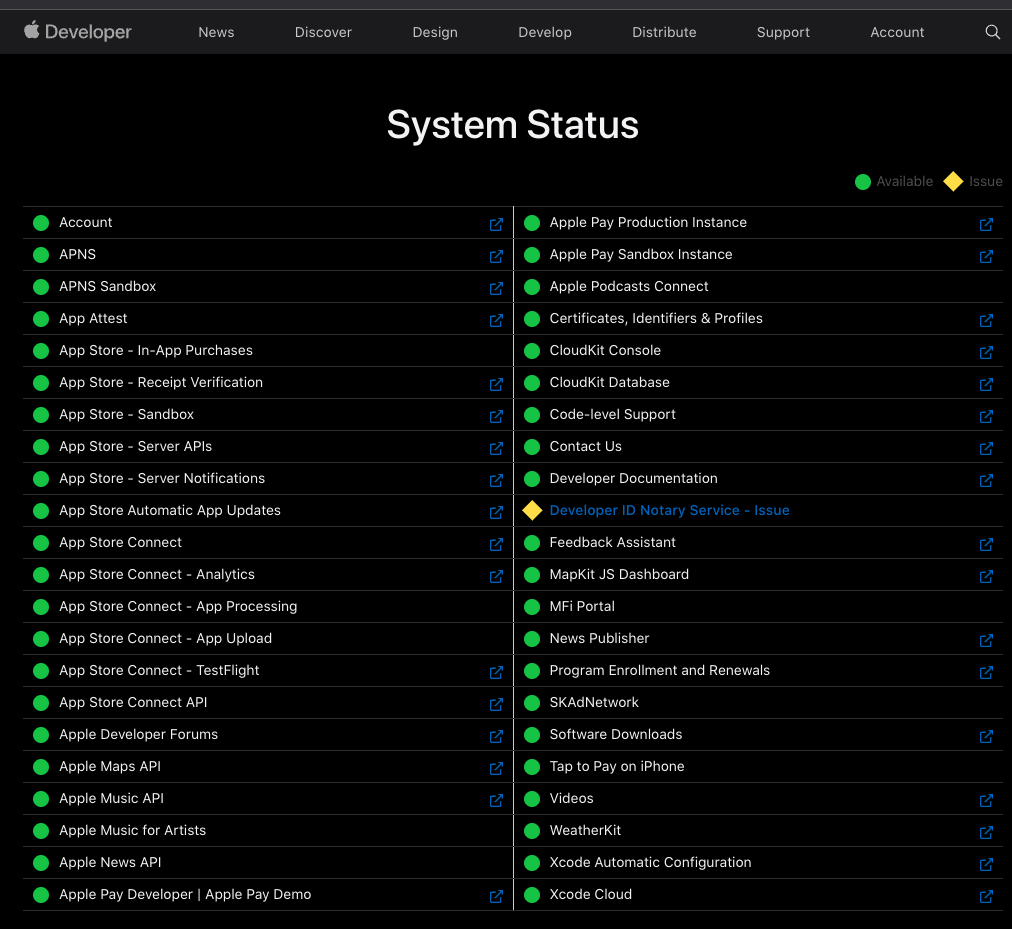
Solved with this
It turns out that it’s not related to related to transporter but you have to create an apple application password and store it in the .env with FASTLANE_APPLE_APPLICATION_SPECIFIC_PASSWORD
We’re seeing this same exact issue. Last release on a week ago, all was working fine. Today all day, we’ve being seeing this issue.
And it’s not working again. I think we should re-open this issue :face_palm:
I have the same issue when running altool directly.
Fastlane needs an Apple user id and app-specific password for iOS configuration which is present in the .env file with the environment variable ‘FASTLANE_USER’ and ‘FASTLANE_APPLE_APPLICATION_SPECIFIC_PASSWORD’.
To generate an app-specific password:
This way you can use an app-specific password to sign in to an app or a service not provided by Apple such as Fastlane.
I switched from the old
FASTLANE_USERenv var and password in the Keychain to theapp_store_connect_api_keyaction, and it worked.We’re seeing this, too. Apple system status is green at the moment, but y’all know how that goes 🤷♀️
it works for me
I had tried to upload an archive through Xcode and it worked properly, but, when I try to upload the same archive through fastlane it crash!
I’m seeing this issue today No reported outages on Apple Status
Same issue here, let’s hope Apple fixes it on their side
Hi @louis-sicko, you can create a
.envfile on your own inios/fastlane/.envand add the two properties I mentioned above.thanks @komritza. I can confirm the same. In our CI/CD it was not working today in the morning. And it’s working now again. 🚀
Confirmed, it’s working flawlessly, thanks!
same issue since 4 month. First fastlane make a session cookies login and store in the keychain deliver.xxx.com with the apple password. But when it try tu upload the bundle it should use apple application password but expose the Apple ID password.
So they ask 2 different password for the same keychain element. It makes me crazy Must change in keychain from user password to apple application password. !!!
We’re also seeing this. It was happening intermittently this morning (9-12 GMT) but retrying it fixed it once or twice, however now it’s 100% of the time. The fact that it was on and off this morning said to me that something was failing rather than something expiring (or whatever) outright on my end… Hopefully it’s all resolved itself before I get back into the office on Monday 😃