fastlane: Couldn't automatically detect the provisioning profile mapping
New Issue Checklist
- Updated fastlane to the latest version
- I read the Contribution Guidelines
- I read docs.fastlane.tools
- I searched for existing GitHub issues
Issue Description
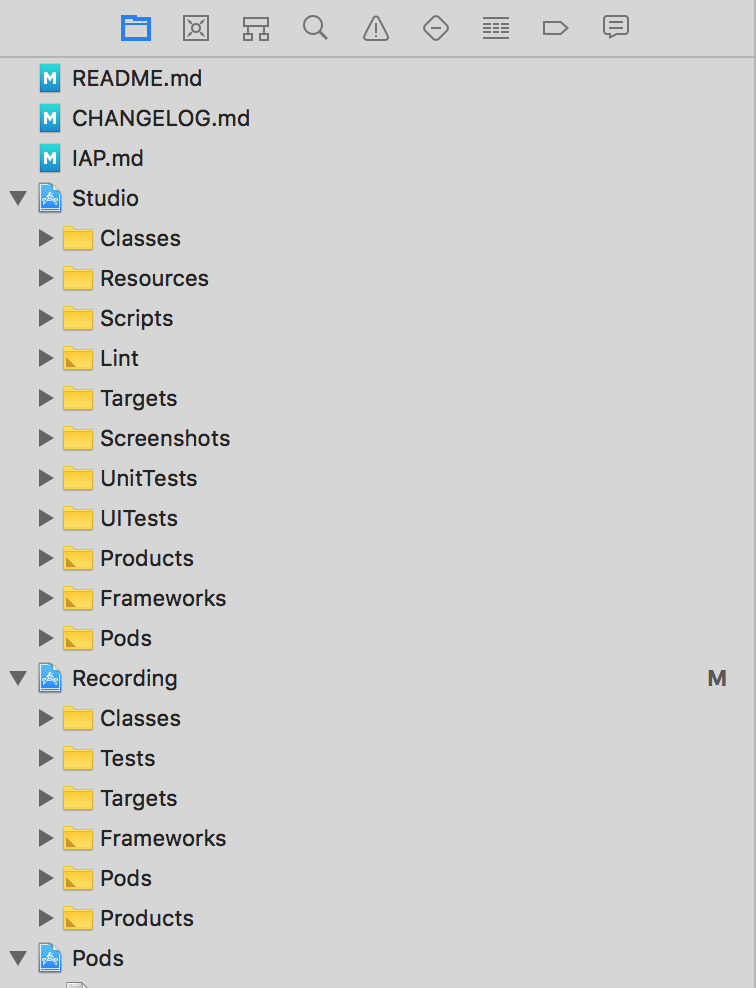
If the workspace contains files (at root level) that are not .xcproject, these errors are logged.
[10:01:49]: $ xcodebuild -showBuildSettings -workspace ./Studio.xcworkspace -scheme Studio\ Beta -configuration BetaRelease
[10:01:52]: Command timed out after 3 seconds on try 1 of 4, trying again with a 6 second timeout...
[10:01:56]: Couldn't automatically detect the provisioning profile mapping
[10:01:56]: Since Xcode 9 you need to provide an explicit mapping of what
[10:01:56]: provisioning profile to use for each target of your app
[10:01:56]: The plist file at path `/workspace/ios-studio/README.md/project.pbxproj` doesn't exist.
[10:01:56]: Couldn't automatically detect the provisioning profile mapping
[10:01:56]: Since Xcode 9 you need to provide an explicit mapping of what
[10:01:56]: provisioning profile to use for each target of your app
[10:01:56]: The plist file at path `/workspace/ios-studio/CHANGELOG.md/project.pbxproj` doesn't exist.
[10:01:56]: Couldn't automatically detect the provisioning profile mapping
[10:01:56]: Since Xcode 9 you need to provide an explicit mapping of what
[10:01:56]: provisioning profile to use for each target of your app
[10:01:56]: The plist file at path `/workspace/ios-studio/IAP.md/project.pbxproj` doesn't exist.
Those files should be simply ignored.
My workspace looks like this
Complete output when running fastlane, including the stack trace and command used
[INSERT OUTPUT HERE]
Environment
[INSERT OUTPUT HERE]
About this issue
- Original URL
- State: closed
- Created 6 years ago
- Comments: 20 (12 by maintainers)
Thanks @joshdholtz 💪
Here it is an example project https://www.dropbox.com/s/hg8elqj17eqgttt/fastlane-issue-12354-ExampleProject.zip?dl=0
Just run
fastlane buildin the main folder and you’ll get the error 👍