react-native: [Android] TextInput's padding is ignored when sibling suspends
Sorry if I had to re-use the same title of this other issue but basically I find that issue well written (except for a useful repro that could be there) and so there was no reason to modify it.
Be warned when using the examples because the changes you apply to the code may autorefresh and the padding gets applied in this way too, so you would not notice the bug. In fact I’ve put up a setTimeout of 6 seconds that directly trigger a rerender showing you that with the new string the padding gets applied
Description
This issue is in Android only. If a TextInput has paddingLeft applied and has sibling component(s) which uses suspense, on the first render the padding won’t be applied. If the parent component rerenders, then the padding is applied.
Though the parent rerendering is common when using controlled components, it is not when using uncontrolled components (I discovered this and it’s very noticeable with react-hook-form which uses uncontrolled components).
React Native version:
info Fetching system and libraries information...
System:
    OS: macOS 10.15.5
    CPU: (4) x64 Intel(R) Core(TM) i5-6500 CPU @ 3.20GHz
    Memory: 3.99 GB / 16.00 GB
    Shell: 5.7.1 - /bin/zsh
  Binaries:
    Node: 14.4.0 - ~/.nvm/versions/node/v14.4.0/bin/node
    Yarn: 1.22.4 - /usr/local/bin/yarn
    npm: 6.14.5 - ~/.nvm/versions/node/v14.4.0/bin/npm
    Watchman: Not Found
  Managers:
    CocoaPods: 1.9.3 - /usr/local/bin/pod
  SDKs:
    iOS SDK:
      Platforms: iOS 13.5, DriverKit 19.0, macOS 10.15, tvOS 13.4, watchOS 6.2
    Android SDK:
      API Levels: 28, 29, 30
      Build Tools: 28.0.3, 30.0.0
      System Images: android-30 | Google Play Intel x86 Atom
      Android NDK: Not Found
  IDEs:
    Android Studio: 4.0 AI-193.6911.18.40.6514223
    Xcode: 11.5/11E608c - /usr/bin/xcodebuild
  Languages:
    Java: 1.8.0_252 - /usr/bin/javac
    Python: 2.7.16 - /usr/bin/python
  npmPackages:
    @react-native-community/cli: Not Found
    react: 16.13.1 => 16.13.1
    react-native: 0.63.0 => 0.63.0
  npmGlobalPackages:
    *react-native*: Not Found
Steps To Reproduce
Provide a detailed list of steps that reproduce the issue.
- Create a suspending component
- Place a TextInput with a paddingLeft as a sibling of the suspending component
- Watch the padding not getting applied on first render
Expected Results
I expect the padding to be applied immediately on first render.
Snack, code example, screenshot, or link to a repository:
Here you have the snack link: https://snack.expo.io/zYq9TXJ0w Here a repo to repro this on your local env based on rn init with react-native -v 0.63.0: https://github.com/giacomocerquone/rn_textinput_padding_suspense_bug_android
Before rerender triggered by setTimeout:
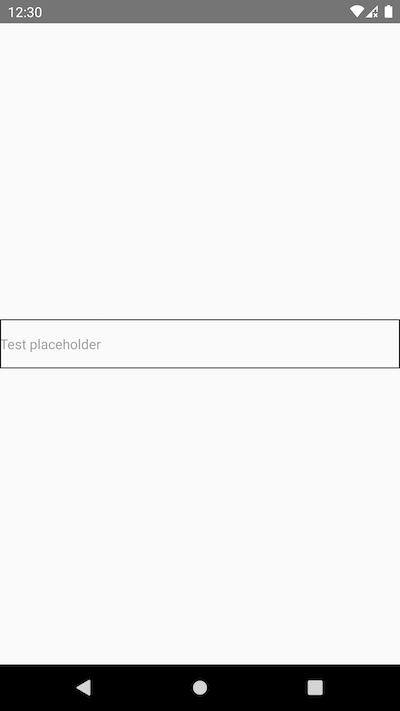
After rerender triggered by setTimeout:

About this issue
- Original URL
- State: closed
- Created 6 years ago
- Reactions: 13
- Comments: 15 (2 by maintainers)
Here is a makeshift solution, not ideal but I hope it helps:
Thanks for this, saved my night from going crazy 👍
this issue still exists, hoping to find a fix soon
I am suffering from exactly same issue as @giacomocerquone. Just knowing it is caused by suspense in this thread. Please solve it.