fresco: Fatal Exception: java.lang.UnsatisfiedLinkError couldn't find DSO to load: libimagepipeline.so / com.facebook.imagepipeline.memory.NativeMemoryChunk
Description
Update to version 1.8.0, Crashlytic report these issues.
Fatal Exception: java.lang.UnsatisfiedLinkError: couldn't find DSO to load: libimagepipeline.so at com.facebook.soloader.SoLoader.doLoadLibraryBySoName(SoLoader.java:522) at com.facebook.soloader.SoLoader.loadLibraryBySoName(SoLoader.java:420) at com.facebook.soloader.SoLoader.loadLibrary(SoLoader.java:370) at com.facebook.soloader.SoLoader.loadLibrary(SoLoader.java:335) at com.facebook.imagepipeline.nativecode.ImagePipelineNativeLoader.load(ImagePipelineNativeLoader.java:42) at com.facebook.imagepipeline.memory.NativeMemoryChunk.<clinit>(NativeMemoryChunk.java:33) at com.facebook.imagepipeline.memory.NativeMemoryChunkPool.alloc(NativeMemoryChunkPool.java:58) at com.facebook.imagepipeline.memory.NativeMemoryChunkPool.alloc(NativeMemoryChunkPool.java:20) at com.facebook.imagepipeline.memory.BasePool.get(BasePool.java:257) at com.facebook.imagepipeline.memory.NativePooledByteBufferOutputStream.<init>(NativePooledByteBufferOutputStream.java:51) at com.facebook.imagepipeline.memory.NativePooledByteBufferFactory.newByteBuffer(NativePooledByteBufferFactory.java:98) at com.facebook.imagepipeline.memory.NativePooledByteBufferFactory.newByteBuffer(NativePooledByteBufferFactory.java:26) at com.facebook.imagepipeline.producers.LocalFetchProducer.getByteBufferBackedEncodedImage(LocalFetchProducer.java:89) at com.facebook.imagepipeline.producers.LocalFetchProducer.getEncodedImage(LocalFetchProducer.java:101) at com.facebook.imagepipeline.producers.LocalResourceFetchProducer.getEncodedImage(LocalResourceFetchProducer.java:39) at com.facebook.imagepipeline.producers.LocalFetchProducer$1.getResult(LocalFetchProducer.java:54) at com.facebook.imagepipeline.producers.LocalFetchProducer$1.getResult(LocalFetchProducer.java:50) at com.facebook.common.executors.StatefulRunnable.run(StatefulRunnable.java:45) at java.util.concurrent.ThreadPoolExecutor.runWorker(ThreadPoolExecutor.java:1115) at java.util.concurrent.ThreadPoolExecutor$Worker.run(ThreadPoolExecutor.java:590) at com.facebook.imagepipeline.core.PriorityThreadFactory$1.run(PriorityThreadFactory.java:53) at java.lang.Thread.run(Thread.java:818)
Fatal Exception: java.lang.UnsatisfiedLinkError: com.facebook.imagepipeline.memory.NativeMemoryChunk at com.facebook.imagepipeline.memory.NativeMemoryChunkPool.alloc(NativeMemoryChunkPool.java:58) at com.facebook.imagepipeline.memory.NativeMemoryChunkPool.alloc(NativeMemoryChunkPool.java:20) at com.facebook.imagepipeline.memory.BasePool.get(BasePool.java:257) at com.facebook.imagepipeline.memory.NativePooledByteBufferOutputStream.<init>(NativePooledByteBufferOutputStream.java:51) at com.facebook.imagepipeline.memory.NativePooledByteBufferFactory.newByteBuffer(NativePooledByteBufferFactory.java:98) at com.facebook.imagepipeline.memory.NativePooledByteBufferFactory.newByteBuffer(NativePooledByteBufferFactory.java:26) at com.facebook.imagepipeline.producers.LocalFetchProducer.getByteBufferBackedEncodedImage(LocalFetchProducer.java:89) at com.facebook.imagepipeline.producers.LocalFetchProducer.getEncodedImage(LocalFetchProducer.java:101) at com.facebook.imagepipeline.producers.LocalResourceFetchProducer.getEncodedImage(LocalResourceFetchProducer.java:39) at com.facebook.imagepipeline.producers.LocalFetchProducer$1.getResult(LocalFetchProducer.java:54) at com.facebook.imagepipeline.producers.LocalFetchProducer$1.getResult(LocalFetchProducer.java:50) at com.facebook.common.executors.StatefulRunnable.run(StatefulRunnable.java:45) at java.util.concurrent.ThreadPoolExecutor.runWorker(ThreadPoolExecutor.java:1112) at java.util.concurrent.ThreadPoolExecutor$Worker.run(ThreadPoolExecutor.java:587) at com.facebook.imagepipeline.core.PriorityThreadFactory$1.run(PriorityThreadFactory.java:53) at java.lang.Thread.run(Thread.java:818)
Reproduction
Solution
I want to know if update to 1.8.1 can fix these issues or I need add compile 'com.facebook.soloader:soloader:0.1.0+' to build.gradle
Additional Information
- Fresco version:
compile 'com.facebook.fresco:fresco:1.8.0'compile 'com.facebook.fresco:animated-gif:1.8.10' - Platform version: OPPO - OS: Android 5.1.1 DEVICE: R7sfg / R7g / A51fa
About this issue
- Original URL
- State: open
- Created 6 years ago
- Reactions: 5
- Comments: 88 (18 by maintainers)
Commits related to this issue
- fix(android): fix crash on R emulator (fresco issue) https://github.com/facebook/fresco/issues/2049 — committed to nativescript-community/ui-image by farfromrefug 4 years ago
@wangshuwen1107 @csbz17027 @ignaciogs Due to Facebook still checking the problem, I found the workaround solution that may temporary fix this issue.
dlopen("/data/data/xxx/lib-main/libimagepipeline.so", RTLD_LAZY) failed: dlopen failed: "/data/data/xxx/lib-main/libimagepipeline.so" is 64-bit instead of 32-bitThe log I found that is these specific devices run app in 32-bit (I don’t know why, maybe the framework bug) but the libimagepipeline.so is 64-bit.
Add the api filter as following code snap, skip the “arm64-v8a”
defaultConfig { ... ndk { abiFilters "armeabi", "armeabi-v7a", "x86", "x86_64", "mips", "mips64" } }It’s not the correct solution but maybe it will fix issue at the first and then we waiting the updateI use version 1.8.1 also have same problem.The device is VIVO X7(Android 5.1.1,arm64-v8a).
FrescoIoBoundExecutor-2(121704)
java.lang.UnsatisfiedLinkError
com.facebook.imagepipeline.memory.NativeMemoryChunk 1 com.facebook.imagepipeline.memory.NativeMemoryChunkPool.alloc(NativeMemoryChunkPool.java:58)
2 com.facebook.imagepipeline.memory.NativeMemoryChunkPool.alloc(NativeMemoryChunkPool.java:20) 3 com.facebook.imagepipeline.memory.BasePool.get(BasePool.java:257) 4 com.facebook.imagepipeline.memory.NativePooledByteBufferOutputStream.<init>(NativePooledByteBufferOutputStream.java:51) 5 com.facebook.imagepipeline.memory.NativePooledByteBufferFactory.newByteBuffer(NativePooledByteBufferFactory.java:98) 6 com.facebook.imagepipeline.memory.NativePooledByteBufferFactory.newByteBuffer(NativePooledByteBufferFactory.java:26) 7 com.facebook.imagepipeline.producers.LocalFetchProducer.getByteBufferBackedEncodedImage(LocalFetchProducer.java:89) 8 com.facebook.imagepipeline.producers.LocalFetchProducer.getEncodedImage(LocalFetchProducer.java:101) 9 com.facebook.imagepipeline.producers.LocalFileFetchProducer.getEncodedImage(LocalFileFetchProducer.java:34) 10 com.facebook.imagepipeline.producers.LocalFetchProducer$1.getResult(LocalFetchProducer.java:54) 11 com.facebook.imagepipeline.producers.LocalFetchProducer$1.getResult(LocalFetchProducer.java:50) 12 com.facebook.common.executors.StatefulRunnable.run(StatefulRunnable.java:45) 13 java.util.concurrent.ThreadPoolExecutor.runWorker(ThreadPoolExecutor.java:1112) 14 java.util.concurrent.ThreadPoolExecutor$Worker.run(ThreadPoolExecutor.java:587) 15 com.facebook.imagepipeline.core.PriorityThreadFactory$1.run(PriorityThreadFactory.java:53) 16 java.lang.Thread.run(Thread.java:818)
FrescoIoBoundExecutor-1(121150)
java.lang.UnsatisfiedLinkError
couldn’t find DSO to load: libimagepipeline.so 1 com.facebook.soloader.SoLoader.doLoadLibraryBySoName(SoLoader.java:522)
2 com.facebook.soloader.SoLoader.loadLibraryBySoName(SoLoader.java:420) 3 com.facebook.soloader.SoLoader.loadLibrary(SoLoader.java:370) 4 com.facebook.soloader.SoLoader.loadLibrary(SoLoader.java:335) 5 com.facebook.imagepipeline.nativecode.ImagePipelineNativeLoader.load(ImagePipelineNativeLoader.java:42) 6 com.facebook.imagepipeline.memory.NativeMemoryChunk.<clinit>(NativeMemoryChunk.java:33) 7 com.facebook.imagepipeline.memory.NativeMemoryChunkPool.alloc(NativeMemoryChunkPool.java:58) 8 com.facebook.imagepipeline.memory.NativeMemoryChunkPool.alloc(NativeMemoryChunkPool.java:20) 9 com.facebook.imagepipeline.memory.BasePool.get(BasePool.java:257) 10 com.facebook.imagepipeline.memory.NativePooledByteBufferOutputStream.<init>(NativePooledByteBufferOutputStream.java:51) 11 com.facebook.imagepipeline.memory.NativePooledByteBufferFactory.newByteBuffer(NativePooledByteBufferFactory.java:98) 12 com.facebook.imagepipeline.memory.NativePooledByteBufferFactory.newByteBuffer(NativePooledByteBufferFactory.java:26) 13 com.facebook.imagepipeline.cache.BufferedDiskCache.readFromDiskCache(BufferedDiskCache.java:336) 14 com.facebook.imagepipeline.cache.BufferedDiskCache.access$400(BufferedDiskCache.java:36) 15 com.facebook.imagepipeline.cache.BufferedDiskCache$2.call(BufferedDiskCache.java:182) 16 com.facebook.imagepipeline.cache.BufferedDiskCache$2.call(BufferedDiskCache.java:166) 17 bolts.Task$4.run(Task.java:357) 18 java.util.concurrent.ThreadPoolExecutor.runWorker(ThreadPoolExecutor.java:1112) 19 java.util.concurrent.ThreadPoolExecutor$Worker.run(ThreadPoolExecutor.java:587) 20 com.facebook.imagepipeline.core.PriorityThreadFactory$1.run(PriorityThreadFactory.java:53) 21 java.lang.Thread.run(Thread.java:818)
Why is Facebook not resolving this issue? We have posted a lot of queries still they are asking for the report. Such bad support by Facebook Team.
(note that I no longer work on Fresco and am speaking as a user)
We’re going to try the following workaround for this issue, which requires Fresco 1.11 or later.
Configure the image pipeline to use buffer memory instead of native memory (okhttp example):
I do not recommend this solution for devices running Android 4.x or lower AND less than 1GB of RAM.
In addition, if you’re not using native filters or transcoder, you should exclude them in your gradle file:
It will take us a week or two to confirm that this eliminates the bug in our app. @oprisnik, can this be added to the docs? Also, with this change it ought to be possible to exclude libimagepipeline.so from apps not using it, but that doesn’t appear to be the case.
Hey everyone, I do understand the frustration with this issue.
I want to let you know that we are well aware of the (various) issues with native code and the problems it causes. We are actively working on allowing using Fresco without any native code (see e.g. ImagePipelineExperiments#disableNativeCode). It might be ready with release v1.11 or v1.12. Kudos to @MikaelMorales
On issues like this, it’s really hard for us to make progress without any complete repro that we can work with. Here it seems that having snippets from the build.gradle file isn’t enough. It’d need to be a minimal, but complete, project.
If you do have a local repro, you can help us and everyone on this thread a lot by:
This is an issue where we need your help a lot! I’ve added the “bug” tag so that stale-bot keeps quiet.
@ch4ndu, you’ve correctly observed that
armeabiis missing the latest Fresco versions. It was removed in NDK r17 (https://developer.android.com/ndk/guides/abis)Hey @tyronen! Long time no ‘see’ 😃
Good timing, we actually have somebody working on this right now (a Java version of NativePooledByteBuffer and similar classes) - so this should be fixed soon.
However, we have quite a few other open issues and ideas for future improvements if you’d like to contribute again. We also have some bigger changes in mind for both Drawee and the pipeline, so things are likely to change soon.
I fixed it by doing the following changes:
After this change Fresco will use the native loader rather than soLoader to load any native libraries.
I met this too in same version, 1.13.0 So, I would like to know how to solve this without removing arm64 support. @oprisnik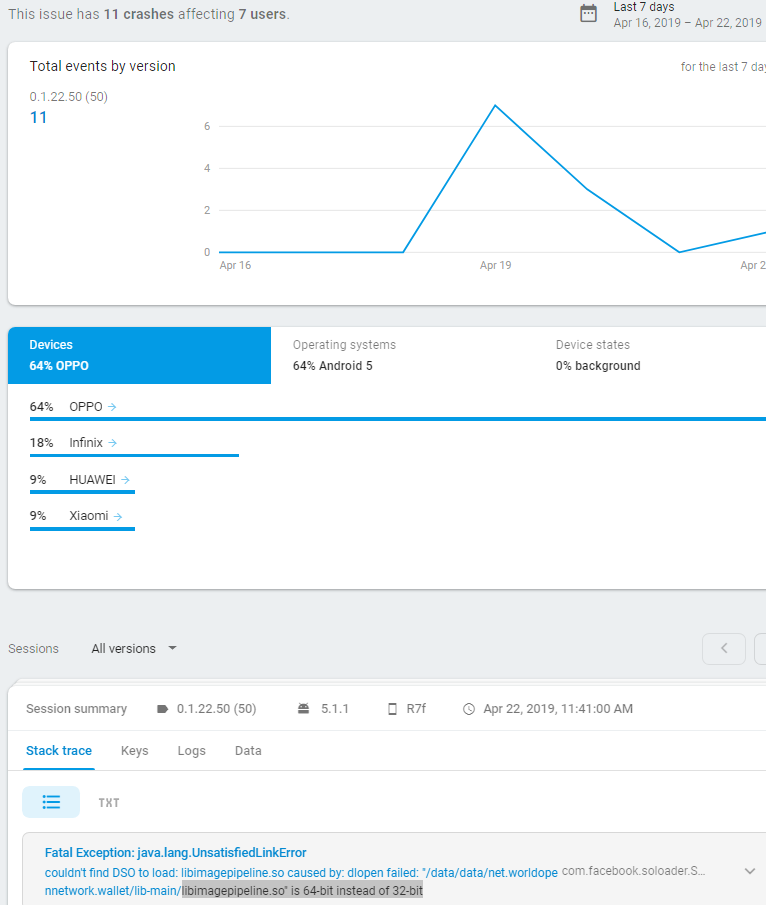
I have used your solution in production:
implementation(‘com.facebook.fresco:fresco:1.12.1’) { exclude module: ‘nativeimagefilters’ exclude module: ‘nativeimagetranscoder’ }
Still crashing: Caused by java.lang.UnsatisfiedLinkError couldn’t find DSO to load: libstatic-webp.so com.facebook.soloader.SoLoader.initSoSources (Unknown Source) com.facebook.soloader.SoLoader.init (Unknown Source) com.facebook.soloader.SoLoader.init (Unknown Source) com.facebook.soloader.SoLoader.init (Unknown Source) com.facebook.imagepipeline.nativecode.StaticWebpNativeLoader.ensure (Unknown Source) com.facebook.animated.webp.WebPImage.create (Unknown Source)
Confirmed that our app (Memrise) has eliminated this crash entirely using the code I posted above. We are not using static-webp so that is not an issue for us.
So is there any bugfix or workaround? Otherwise I will use another library, because such a bug for such a long time is a big NO.
I have found kinda workaround… Just add this to the android Tag in build.gradle
packagingOptions { exclude "lib/arm64-v8a/libimagepipeline.so" exclude "lib/arm64-v8a/libnative-imagetranscoder.so" }api ‘com.facebook.fresco:fresco:1.10.0’ 😂😂😂
Hi guys, good to ‘see’ you again.
@lambdapioneer, @oprisnik this issue has been reported in various incarnations since Fresco 0.1. The trouble is in the plethora of devices loading libraries, some of them are bound to have problems.
The recommended solution (splitting the APK) causes other issues. Among other things, splitting the APK requires separate version codes for each ABI. When you already have multiple product flavors and build types, all of which are managed by external plugins like hockeyapp, splitting makes the team’s eyes droop. At this point it would actually be easier to switch to Glide than to do that.
NativePooledByteBuffer isn’t really that important for API>=21, which is what a lot of apps are now targeting (Dalvik is now down to 10%). It might be worth making it optional, and just using standard Java memory for the later platforms.
I might be able to work on this later, but I suspect you’d prefer someone still at FB to do that 😃
I don’t know why it only happen on OPPO - OS: Android 5.1.1 and before update to version 1.8.0, these issue not happen with same build config
You should also add
exclude group: 'com.facebook.fresco', module: 'soloader', see the 2.1.0 release for more details:https://github.com/facebook/fresco/releases/tag/v2.1.0
@waseefakhtar I was able to reproduce the issue by compiling the app for “armeabi-v7a” in the device specs json file option of the bundletool (using AppBundle). Installed the app in a supported device and the crash appeared right away.
I was able to fix it by appling 2381#issuecomment-516825599 with no abiFilters or excludes added.
@glovebx You may want to check if limiting to 32Bit won’t cause you problems with google’s requirements for 64 Bit: https://android-developers.googleblog.com/2019/01/get-your-apps-ready-for-64-bit.html
From what i understood new apps or updates of existing apps will be required to support 64Bit starting 1.08.2019
Not that big a deal. There are bunch of bugs not resolved yet in Google’s API since 2017. Which caused 2000 crashes a day in my app. They just not take bugs as important as new features. The only one which fixes it in a week is Twitter.
Any fix? This is my log Fatal Exception: java.lang.UnsatisfiedLinkError: couldn’t find DSO to load: libimagepipeline.so at com.facebook.soloader.SoLoader.doLoadLibraryBySoName(SoLoader.java:522) at com.facebook.soloader.SoLoader.loadLibraryBySoName(SoLoader.java:420) at com.facebook.soloader.SoLoader.loadLibrary(SoLoader.java:370) at com.facebook.soloader.SoLoader.loadLibrary(SoLoader.java:335) at com.facebook.imagepipeline.nativecode.ImagePipelineNativeLoader.load(ImagePipelineNativeLoader.java:42) at com.facebook.imagepipeline.memory.NativeMemoryChunk.<clinit>(NativeMemoryChunk.java:33) at com.facebook.imagepipeline.memory.NativeMemoryChunkPool.alloc(NativeMemoryChunkPool.java:58) at com.facebook.imagepipeline.memory.NativeMemoryChunkPool.alloc(NativeMemoryChunkPool.java:20) at com.facebook.imagepipeline.memory.BasePool.get(BasePool.java:257) at com.facebook.imagepipeline.memory.NativePooledByteBufferOutputStream.<init>(NativePooledByteBufferOutputStream.java:51) at com.facebook.imagepipeline.memory.NativePooledByteBufferFactory.newOutputStream(NativePooledByteBufferFactory.java:141) at com.facebook.imagepipeline.memory.NativePooledByteBufferFactory.newOutputStream(NativePooledByteBufferFactory.java:26) at com.facebook.imagepipeline.producers.NetworkFetchProducer.onResponse(NetworkFetchProducer.java:90) at com.facebook.imagepipeline.producers.NetworkFetchProducer$1.onResponse(NetworkFetchProducer.java:70) at com.facebook.imagepipeline.backends.okhttp3.OkHttpNetworkFetcher$2.onResponse(OkHttpNetworkFetcher.java:180) at okhttp3.RealCall$AsyncCall.execute(RealCall.java:153) at okhttp3.internal.NamedRunnable.run(NamedRunnable.java:32) at java.util.concurrent.ThreadPoolExecutor.runWorker(ThreadPoolExecutor.java:1112) at java.util.concurrent.ThreadPoolExecutor$Worker.run(ThreadPoolExecutor.java:587) at java.lang.Thread.run(Thread.java:818)