flipper: unable to expand console.log object in Hermes debuggger for RN 0.70.1
🐛 Bug Report
unable to expand console.log object in Hermes debuggger. i am using React Native 0.70.1
Note: I can copy object but cannot expand in Hermes debugger
To Reproduce
init app with React Native 0.70.1 and try to console.log(anyobject)
Environment
i am using ios
Video
About this issue
- Original URL
- State: open
- Created 2 years ago
- Reactions: 61
- Comments: 53
Still having this issue
i recommend to try React Native Tools for VSCode. It works so much better for debugging.
I’m running on latest version of react-native(0.70.6), Flipper (0.176.1) on Desktop and 0.175.0 configured on podfile. My OSX is 13.0.1. This issue still exist and the objects still returning empty.
It only happens using IOS simulator… on android simulator is ok!
I’m running on latest version of react-native(0.70.6) and Flipper (0.176.1). This issue still exist.
I can confirm this is fixed after I updated my mac to OSX 13.
Confirmed! using another simulator (iphone 12 - IOS 16.3.1) and this issue’s fixed
Same problem after upgrading RN from 0.69.1 to 0.70.2
The same problem occurred after upgrading the RN from 0.69 to 0.70 RN0.69 version works without problems in Flipper 0.166.0
having the same issue upgrading RN from
0.68.0to0.71.1still happening on Flipper (0.182.0)
The problem seems solved on newer version. React Native: 0.71.3 Flipper: 0.180.0
i have just gave up trying to debug hermes maybe a year ago. And since then nothing changed.
using a temporary workaround as below
object - which we want to display in console
all you need to do is update Flipper version, it’s work for me with version 0.175.0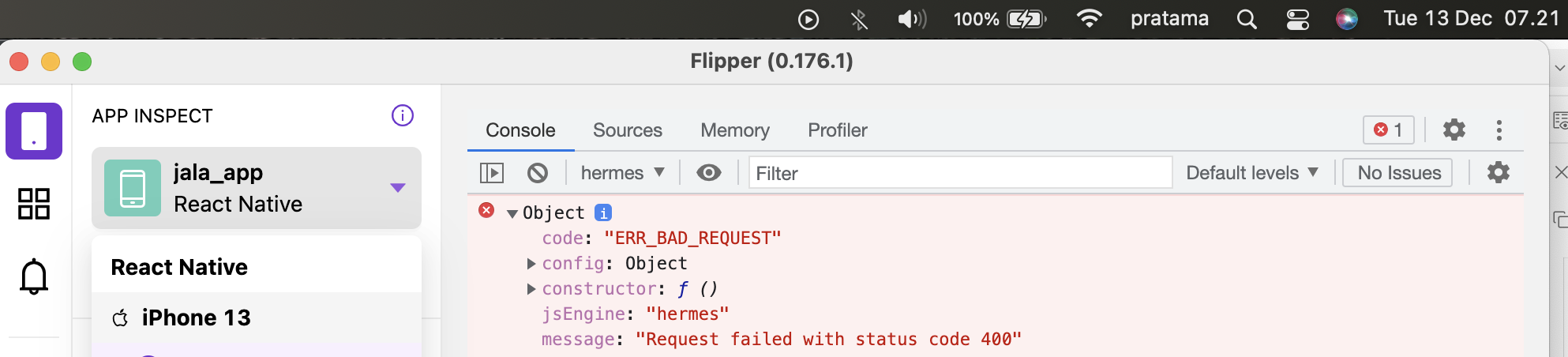
Upgrade to xCode lastest version solved this.
Same. 😦
@lblasa @LukeDefeo is there any chance?
any update did anyone find the solution
Then only option for you is to use android emulator predominately.
I’m still facing this issue on iOS
Flipper 0.175.0 react-native: 0.70.5 macOS Monterey 12.6.1
*update to OSX 13 is not currently an option for me
Same for iOS only. Android seams to be working fine