expo: Unable to link react-native-music-control in ExpoKit 35. App crashes.
🐛 Bug Report
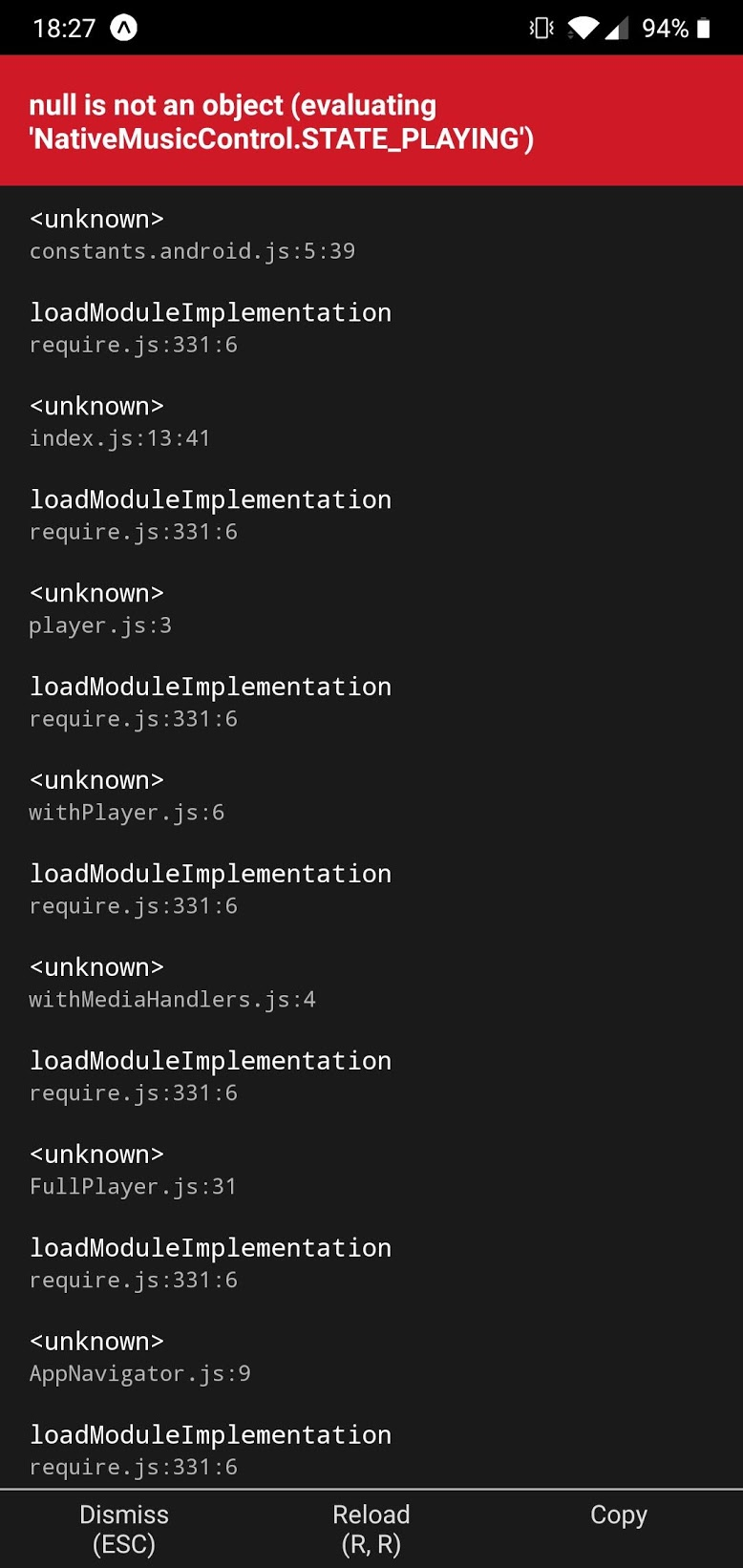
I’m using Expo SDK 35.0.0 (ejected using ExpoKit). When I try to use react-native-music-control , it seems I can’t link the library correctly and thus I get this error above just by doing import MusicControl from 'react-native-music-control'; (to use the lib).
Error:
Environment
App uses Expo SDK 35.0.0, ejected, using ExpoKit.
The error happens only on Android.
expo diagnostics:
Expo CLI 3.4.1 environment info: System: OS: macOS 10.15.1 Shell: 5.7.1 - /bin/zsh Binaries: Node: 12.12.0 - /usr/local/bin/node Yarn: 1.19.1 - /usr/local/bin/yarn npm: 6.11.3 - /usr/local/bin/npm Watchman: 4.9.0 - /usr/local/bin/watchman IDEs: Android Studio: 3.5 AI-191.8026.42.35.5900203 Xcode: 11.2/11B52 - /usr/bin/xcodebuild npmPackages: expo: ^35.0.0 => 35.0.1 react: 16.8.3 => 16.8.3 react-native: https://github.com/expo/react-native/archive/sdk-35.0.0.tar.gz => 0.59.8 npmGlobalPackages: expo-cli: 3.4.1
Steps to Reproduce
The error is reproducible by creating a new project with expo init and then doing expo eject (with ExpoKit):
Init expo app:
expo init <app>
Eject to ExpoKit:
expo eject- use ExpoKit
Add react-native-music-control:
expo install react-native-music-control OR yarn add react-native-music-control
Link library:
react-native link react-native-music-control
Add permissions:
Add <uses-permission android:name="android.permission.FOREGROUND_SERVICE" /> to AndroidManifest.xml
Add import to App.js:
import MusicControl from 'react-native-music-control';
Run:
yarn start - Error 😦
Expected Behavior
Shouldn’t throw this error, because it should link the library properly.
Actual Behavior
Due to the linking not working the lib throws this error.
Reproducible Demo
I’ve created a repo simulating the issue: https://github.com/pedro-lb/expo-35-react-native-music-control/
Related issues:
- Related issues
- https://github.com/expo/expo/issues/6188
- https://github.com/tanguyantoine/react-native-music-control/issues/112
- https://github.com/tanguyantoine/react-native-music-control/issues/167
- https://github.com/tanguyantoine/react-native-music-control/issues/156
- https://github.com/tanguyantoine/react-native-music-control/issues/13
About this issue
- Original URL
- State: closed
- Created 5 years ago
- Comments: 18 (3 by maintainers)
FWIW, it’s a pretty weird experience that ejecting from a managed project on SDK 36 results in something with autolinking not enabled - more generally, ejecting results in a template that doesn’t already match the template from
react-native initfrom the SDK version’s react-native version. Not sure if I should open a new issue for this, though; it sounds like a known issue and possibly a wontfix?@brentvatne could you perhaps clarify whether it’s in the scope of
expo ejectto produce a react native project that is basically what you’d get fromreact-native initwith the matching RN version (plus ExpoKit, if desired)?we don’t have documentation for it, this is a react-native upstream thing. you can init a new react-native-cli project and copy over the relevant pieces
The gist was that, for both iOS and Android, there were a few crucial steps required to enable autolinking:
There were a variety of other changes, but those were the main ones related to autolinking. However, those were explicitly described in the blog post I linked, in the “Migrate iOS to Autolinking” and “Migrate Android to Autolinking” sections. Are you sure you applied all the changes listed there?
We’re veering a bit out of scope of the issue tracker here, but if you open something on Stack Overflow and link it here, I’d be happy to continue helping to figure out the details.
@pedro-lb not sure if you’ve already sorted this out, but this tutorial should contain the aforementioned relevant pieces: https://reactnative.thenativebits.com/courses/upgrading-react-native/upgrade-to-react-native-0.60/
However, you may then encounter this issue on Android app launch:
which I had to solve rather crazily: https://github.com/facebook/react-native/issues/26672#issuecomment-569854865
Perhaps that should be a new issue here as well, but if autolinking isn’t a first-class workflow in ExpoKit projects yet, I’m not sure what that issue should look like either.
Needed to use this at top of podfile:
require_relative ‘…/node_modules/@react-native-community/cli-platform-ios/native_modules’
this in the target:
use_native_modules!
and this at bottom of target:
require_relative ‘…/node_modules/react-native-unimodules/cocoapods.rb’ use_unimodules!( modules_paths: [‘…/node_modules’], exclude: [ ‘expo-bluetooth’, ‘expo-in-app-purchases’, ‘expo-payments-stripe’, ], )
good riddance >:S
Hmmmmmm https://twitter.com/notbrent/status/1228444753982676992
Haven’t tested this or found the version where it landed, but it’s interesting at least.
I totally agree with @brettdh. Ejecting (to bare and ExpoKit) should generate a podfile template which is analog to
react-native init. I wasted some hours until my ejected bare project eventually started working.Considering these steps, the eject was very painful for me and since expo said “Expo never locks you in”, I had the feeling it did. Now I have to work my way trough firebase. These means tons of refactoring on the server side (laravel) + app (integrating firebase, grabbing tokens, storing them etc).
For me, this was not a good experience.
And there are still a bunch of APIs missing (Splashscreen, AppLoading and a few more).
I know my post got a bit out of scope, but I thought this is the right place instead of opening a new issue
Hmm. I do currently have a working ejected app using ExpoKit SDK 36, autolinking, and react-native-music-control (among other native libs), so maybe there’s something else going on.