expo: iOS 16 Multiple Print Bug
Summary
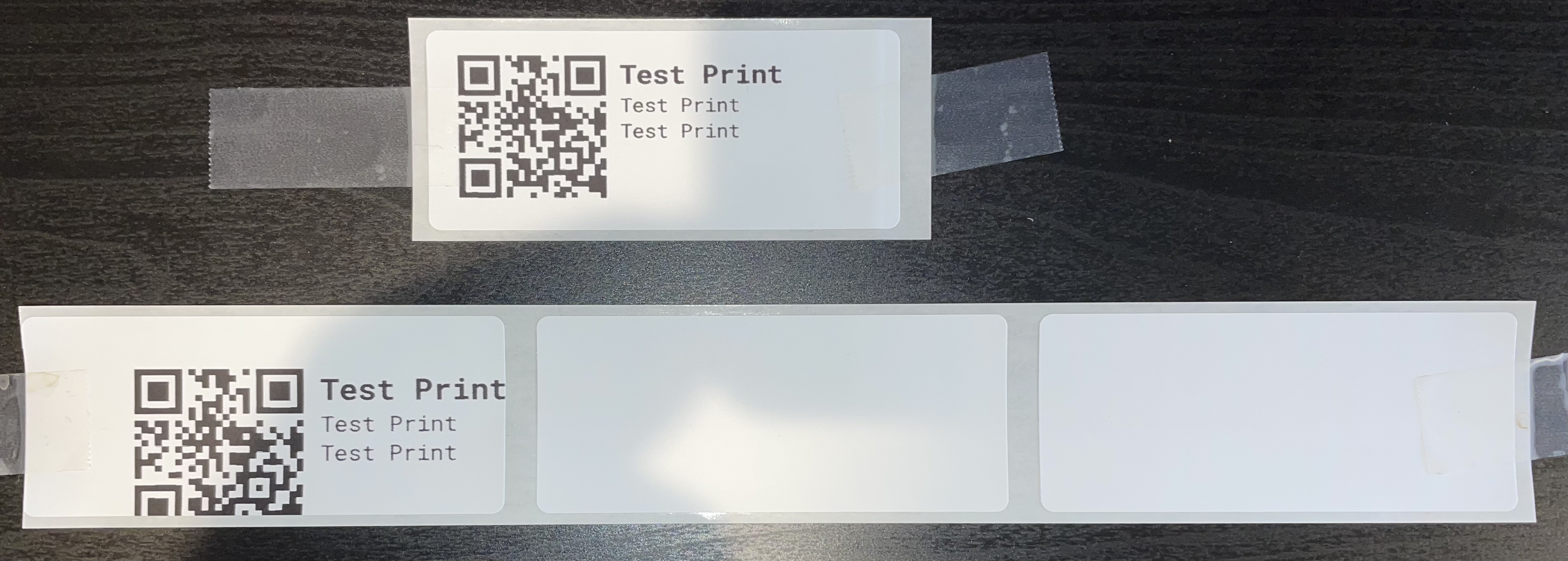
I have two React Native applications that use expo-print for label printing (i.e. with Brother Label Printer QL-810W). I noticed recently that when I print multiple times in either application, the label printing is inconsistent. It will print perfectly correct once, and the next time it prints off-center and multiple blank labels (I only ever want one label printed at a time). The way I print is to render what I want to print in React Native, then take a screenshot of that component, and convert it to a base64 image, which is then sent to AirPrint.
I am almost certain this is an iOS 16 issue, because I haven’t made any changes to one of these apps in a while, and printing was stable until recently. The issue only happens on iOS 16 devices. I tested on Android and iOS 15 and both are still stable. I also tested with multiple physical iOS 16 devices and an iOS 16 simulator. My team has tested this issue against several different printers, and we are seeing it everywhere. I am not sure whether this is an expo bug or an Apple bug, but I appreciate any help.
Here is a picture of what I am experiencing. Again – these are the exact same images, printed one after the other to my label printer:
What platform(s) does this occur on?
iOS
Environment
expo-env-info 1.0.5 environment info:
    System:
      OS: macOS 12.5.1
      Shell: 5.8.1 - /bin/zsh
    Binaries:
      Node: 16.13.1 - /usr/local/bin/node
      Yarn: 1.22.17 - /usr/local/bin/yarn
      npm: 8.5.2 - /usr/local/bin/npm
      Watchman: 2022.03.14.00 - /usr/local/bin/watchman
    Managers:
      CocoaPods: 1.11.2 - /Users/username/.rvm/gems/ruby-3.0.0/bin/pod
    SDKs:
      iOS SDK:
        Platforms: DriverKit 21.4, iOS 15.5, macOS 12.3, tvOS 15.4, watchOS 8.5
    IDEs:
      Android Studio: 2021.2 AI-212.5712.43.2112.8512546
      Xcode: 13.4.1/13F100 - /usr/bin/xcodebuild
    npmPackages:
      expo: 46.0.7 => 46.0.7
      react: 18.0.0 => 18.0.0
      react-dom: 18.0.0 => 18.0.0
      react-native: 0.69.4 => 0.69.4
    npmGlobalPackages:
      eas-cli: 0.47.0
      expo-cli: 5.0.3
    Expo Workflow: bare
Minimal reproducible example
const imgHtml =
`<html>
    <head>
	    <meta name="viewport" content="width=device-width,initial-scale=1,user-scalable=yes" />
	    <style>
		    @page {
			    margin: 0;
		    }
		    body {
			    height: 1.4in;
			    width: 3.5in;
			    margin: 0;
			    padding: 0;
			    overflow: hidden;
			    align-items: center;
			    justify-content: center;
		    }
		    img {
			    height: 100%;
			    width: 100%;
		    }
	    </style>
    </head>
    <body>
	    <img src="data:image/png;base64,${uri}" />
    </body>
</html>`;

await Print.selectPrinterAsync().then(async (printer) => {
    await Print.printAsync({
	    html: imgHtml,
	    margins: {
		    left: 0,
		    right: 0,
		    top: 0,
		    bottom: 0
	    },
	    useMarkupFormatter: true,
	    orientation: "landscape",
	    printerUrl: printer.url
    }).then(() => {
	    resolve(true);
    }).catch((err_1) => {
	    resolve(false);
    });
}).catch((err_2) => {
    resolve(false);
});
About this issue
- Original URL
- State: closed
- Created 2 years ago
- Reactions: 2
- Comments: 24 (9 by maintainers)
Commits related to this issue
- Fix ([#19399](https://github.com/expo/expo/issues/19399)), fix importing the library for android, add CHANGELOG.md — committed to expo/expo by behenate a year ago
- [expo-print][ios] Convert expo-print to swift (#21561) # Why Ported expo-print to swift on iOS, fixed https://github.com/expo/expo/issues/19399 # How Ported all of the existing files to new... — committed to expo/expo by behenate a year ago
We have the same problem with a pure swift app. We have submitted a bug report to apple, see https://openradar.appspot.com/radar?id=5548908621070336
Hi Stumbled across this researching this exact same issue for our child care checkin system. All iOS <16 work perfectly and 16/16.1 exhibit this exact behavior on the 810w printers.
One workaround that I was able to find with our own custom Swift implementation was caching and reusing the
UIPrinterobject from the initial print, like:It seems like the choosePaper method might only get called for the first time you print to a given
UIPrinterAdding onto this thread, just because this is the only place I’ve found active discussion of this issue (which is happening in the airprinting sdk in iOS16, not just this lib 😅)
I’m cross posting over from https://developer.apple.com/forums/thread/722211?login=true&page=1#745737022
Nothing has been able to resolve this issue after the first successful print
@behenate This might interest you while you’re rewriting expo-print to new expo-modules. We might be able to use snipped @alexbeckwith shared above to fix this longstanding bug?
No workaround found.
I “fixed” the issue on my side by forcing a new printInteractionController for each print. That way IOS seems to “reload” the correct property of paper format, instead of falling back to A4 on the second print. Makes one more button to click for each print but better than nothing.
Hi @aleqsio, thanks for getting back on this issue!
Brother\032QL-810W._ipp._tcp.local.: Release-Job successful with warning: successful-ok (successful-ok)on both the initial print and the second messed-up print. However, on the second messed-up print, my label printer does give me an error (the lights start flashing on it and I have to power it off and on again).useMarkupFormatterto get my labels to print correctly. So my labels didn’t print right when I disabled it, but the first print still printed on one label. The second print printed over three labels. So that doesn’t seem to be the issue.