expo: ImagePicker Promise Rejects on First Attempt Though Permission.CAMERA Granted
Summary
Granting camera access then immediately using that access with ImagePicker results in a promise rejection [Error: Missing camera or camera roll permission.].
Environment
Environment: OS: macOS High Sierra 10.13.4 Node: 8.2.1 Yarn: 1.2.1 npm: 5.3.0 Watchman: 4.9.0 Xcode: Xcode 9.3 Build version 9E145 Android Studio: 3.0 AI-171.4443003
Packages: (wanted => installed) expo: ^26.0.0 => 26.0.0 react: 16.3.0-alpha.1 => 16.3.0-alpha.1 react-native: https://github.com/expo/react-native/archive/sdk-26.0.0.tar.gz => 0.54.2
Diagnostics report: https://exp-xde-diagnostics.s3.amazonaws.com/geirman-9b12d065-1f0c-42c8-9884-9be91c7f5621.tar.gz
Expo Client
Steps to Reproduce
- Load the demo app below
- Tap “Pick from Camera” button
- Tap to authorize camera access
- RESULT: camera fails to launch, note the output of console.log
- Tap “Pick from Gallery” button
- Tap to authorize camera roll access
- RESULT: camera roll launches as expected, note output of console.log
- Tap “Pick from Camera” again
- RESULT: camera launches, note the output of console.log (everything is fine at this point)
Expected Behavior
For bullet 4 above, I expect camera launch and the following output after taking a photo…
camera granted
cameraRoll SUCCESS Object {
  "cancelled": false,
  "height": 2848,
  "type": "image",
  "uri": "file:///...54B7F932-9E42-443D-8B25-B41892A4C283.jpg",
  "width": 4288,
}
For bullet 7 above, I expect camera roll to launch and the following output after taking a photo…
cameraRoll granted
cameraRoll SUCCESS Object {
  "cancelled": false,
  "height": 2848,
  "type": "image",
  "uri": "file:///.../54B7F932-9E42-443D-8B25-B41892A4C283.jpg",
  "width": 4288,
}
Actual Behavior
Camera is not working correctly on first attempt. To spite being “granted” access, the promise rejects and the following is the output. Repeatedly tapping “Pick from Camera” will repeatedly result in a promise rejection. However, once I “Pick from Gallery”, then “Pick from Camera” will start working as expected.
camera granted
camera Object {
  "error": [Error: Missing camera or camera roll permission.],
}
camera SUCCESS undefined
Reproducible Demo
https://snack.expo.io/@geirman/permissions-camera-camera-roll
import React, { Component } from 'react';
import { View, StyleSheet, Button } from 'react-native';
import { Constants, Permissions, ImagePicker } from 'expo';


export default class App extends Component {
  pickFromGallery = async () => {
    const permissions = Permissions.CAMERA_ROLL;
    const { status } = await Permissions.askAsync(permissions);

    console.log(permissions, status);
    if(status === 'granted') {
      let image = await ImagePicker.launchImageLibraryAsync({
        mediaTypes: 'Images',
      }).catch(error => console.log(permissions, { error }));
      console.log(permissions, 'SUCCESS', image);
    }
  }

  pickFromCamera = async () => {
    const permissions = Permissions.CAMERA;
    const { status } = await Permissions.askAsync(permissions);

    console.log(permissions, status);
    if(status === 'granted') {
      let image = await ImagePicker.launchCameraAsync({
        mediaTypes: 'Images',
      }).catch(error => console.log(permissions, { error }));
      console.log(permissions, 'SUCCESS', image);
    }
  }


  render() {
    return (
      <View style={styles.container}>

        <Button
          title="Pick from Camera"
          onPress={this.pickFromCamera}
        />
        <Button
          title="Pick from Gallery"
          onPress={this.pickFromGallery}
        />

      </View>
    );
  }
}

const styles = StyleSheet.create({
  container: {
    flex: 1,
    alignItems: 'center',
    justifyContent: 'space-around',
    paddingTop: Constants.statusBarHeight,
    backgroundColor: '#ecf0f1',
  },
});
About this issue
- Original URL
- State: closed
- Created 6 years ago
- Reactions: 22
- Comments: 52 (23 by maintainers)
Having the same issue using ImagePicker.launchImageLibraryAsync.
On my side it works locally on Expo but as soon as I publish to the Play Store it asks for permissions for both CAMERA and CAMERA_ROLL but the camera does not open.
Permissions:
Asking for both permissions in code:
If android is crashing when you request both permissions with Promise.all() try to ask them one by one.
I resolved this problem by the upgrade to SDKv27 (from SDKv24). Unhappy with this experience, the old SDK not stable when the new SDK was released. 👎
Not working at all. Camera is not launching even though status is granted.
const { status } = await Permissions.getAsync(Permissions.CAMERA_ROLL);
@geirman - Seems like using both Permissions API and app.json
"permissions"makes the promises fromPermissions.askAsyncmethod get rejected.I’m only using the Permissions API (deleted
"permissions"from app.json) on my code andImagePicker.launchCameraAsyncandPermissions.askAsyncboth work as intended on my standalone app.I recommend doing the same until a fix is implemented.
@esamelson : I also have the same problem, I make sure to have executed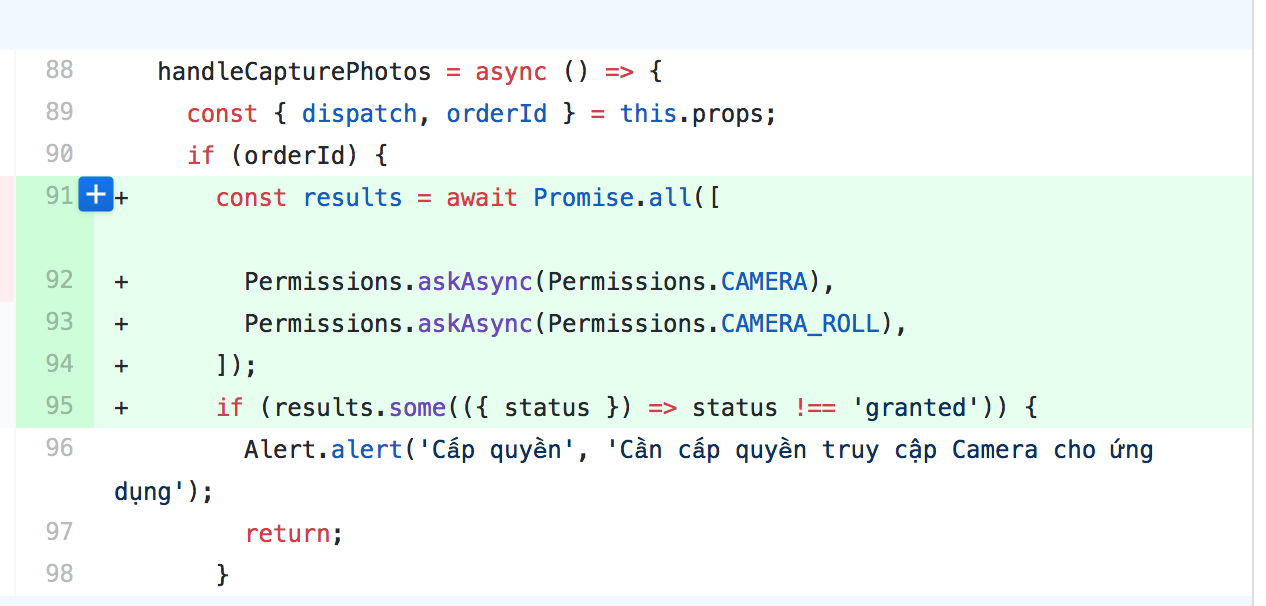 above code added by recommends from @aalices to fix same issues on Android.
Permissions.askAsync()to both permissions. But, sentry still reports this problem with iOS user.All you have to do is
@aalices I was going to do one better and create a reduced use case, but in doing so I noticed I couldn’t reproduce it either. That’s when I realized I had some code dismissing a separate modal, but it was dismissing the permissions modal instead. With a second modal still open, the UI was locked up. So, that’s no longer an issue. Thanks!
Here’s a link to the reduced case repo if you’re curious. Could be useful to point others to if they’re looking for example code of doing this. I think it’s pretty robust.
As for the intent, it doesn’t seem that critical any longer. Every time the user tries to access the camera or camera roll, I’m executing
hasPermissions(), which will re-prompt them if permissions haven’t yet been granted. But great to know about thedata URIrequired. Thanks for sleuthing that out! You’ve been super helpful!@aalices just built my standalone app with these permissions on app.json:
With these configuration both
Permissions.askAsyncandImagePicker.launchCameraAsyncworked as intended.I believe the docs should be updated to address the issues between the Permissions API and the app.json
"permissions", because right now there’s no way to know the cause of this weird behaviour by just reading them.Also, if possible, maybe an error should be thrown when the Permissions API asks for permissions that are not explicitly set in app.json?
I’m still facing the issue after upgrading to Expo v27. OMG, someone please help (‘crying’)
In my case this did the trick:
and setting permissions in app.json:
@dale-french you also have to add
"WRITE_EXTERNAL_STORAGE"because the photo is saved to your device’s gallery.@geirman can you make a gif showing your issue? I cannot reproduce 😦 Re: IntentLauncher - the intent you’re trying to run requires additional parameter: https://developer.android.com/reference/android/provider/Settings#action_application_details_settings but I also found this: https://expo.canny.io/feature-requests/p/intentlauncherandroid-missing-intent-with-data-url-support so bad news - it might not work 😐
I also noticed that Android would crash sometimes when requesting permissions, so inspired by @vadimsg’s suggestion, I rewrote my
hasPermissionsfunction like so…It’s much cleaner, easier to understand, and also prompts the user only when attempting to access the camera or gallery rather than on screen load. All upsides.
On iOS though, I noticed that it works great so long as permissions are granted straight away, but if initially denied then enabled through settings, the permissions prompt displays for a split second, dissappears, then the UI becomes unresponsive forcing me to restart the app. I cannot get it working unless I uninstall/reinstall and accept all permissions. (sad trombone)
Also, thanks @bruno-edo for confirming that the solution by @aalices works. I’ve updated my
app.jsonin the same way as yours and that seems to be working for me as well…@aalices I did try
ACTION_APPLICATION_DETAILS_SETTINGSas well, but the result was the exact same asACTION_MANAGE_APPLICATIONS_SETTINGSbut I’m guessing that changes once I deploy as a stand-alone app. Would you agree?Confirmed. I force-updated by setting the following dependency:
"expo": "^24.0.3",which resolves to that exact version. Why it didn’t before is beyond me.
After installing
24.0.3you’ll see a modal to grant/deny camera roll permissionsI was having the same issue using the ImagePicker Camera on Android using the expo client v2.5.0. I downgraded the app version back to v2.4.0 and it worked as expected.
Also agree here, would be nice to see some stability releases happening.
@geirman : After pressed to the button that shows ImagePicker, iOS show an alert to asking permissions from User. But after I press OK to accept the permission, nothing to happen then. An exception thrown in the background and Sentry still report it:
Missing camera or camera roll permission.