expo: idToken undefined in result.authentication (authSession with Google)
Summary
When getting a response back from promptAsync using AuthSession with Google, I get an authentication value with an undefined id_token. I know I can get the id_token by itself but I’m looking for both an access token and id_token in the same response because I can’t think of an elegant workaround to get both separately using this library (each would have to prompt the user with a popup, and worse you would have to trigger popups by asking the user to click two buttons or disable pop up blocker)
Managed or bare workflow? If you have ios/ or android/ directories in your project, the answer is bare!
managed
What platform(s) does this occur on?
Web
SDK Version (managed workflow only)
40
Environment
Expo CLI 4.2.1 environment info: System: OS: Linux 5.4 Ubuntu 20.04.2 LTS (Focal Fossa) Shell: 5.0.17 - /bin/bash Binaries: Node: 12.18.1 - ~/.nvm/versions/node/v12.18.1/bin/node Yarn: 1.22.5 - /usr/local/bin/yarn npm: 6.14.5 - ~/.nvm/versions/node/v12.18.1/bin/npm Watchman: 4.9.0 - /usr/bin/watchman npmPackages: expo: ~40.0.0 => 40.0.1 react: 16.13.1 => 16.13.1 react-dom: * => 17.0.2 react-native: https://github.com/expo/react-native/archive/sdk-40.0.1.tar.gz => 0.63.2 react-native-web: ~0.13.12 => 0.13.18 react-navigation: latest => 4.4.4 npmGlobalPackages: expo-cli: 4.2.1 Expo Workflow: managed
Reproducible demo or steps to reproduce from a blank project
Just using the same code as in the docs – but not doing it on snack (since you can’t even enter your credentials there with google sign in). Other people have also seen this bug, see these links: https://stackoverflow.com/questions/66966772/expo-auth-session-providers-google-google-useauthrequest and https://forums.expo.io/t/expo-auth-session-google-useauthrequest-returns-googles-idtoken-value-as-undefined/49510
About this issue
- Original URL
- State: closed
- Created 3 years ago
- Reactions: 15
- Comments: 31 (3 by maintainers)
Same here: There seems to be a bug in the
expo-auth-session/providers/googlev 3.2.3 package that returns idToken as undefined when callingGoogle.useAuthRequest. I’m testing on Expo Go, everything configured correctly as documentation says, web proxy credentials, everything. The only solution that worked for me to getidTokenis this code provided by howard:This code is a workaround to get
idToken(in the “params” key) and no other data.The old package
expo-google-app-authseems to be returning idToken correctly along with other data.Edit: I’ve found
Google.useIdTokenAuthRequestthat can be used instead ofGoogle.useAuthRequestbut seems to do the same thing than the code above. Maybe by design in the package it’s not possible to get idToken and other information at the same time. Also thisGoogle.useIdTokenAuthRequesthook is undocumented except when you click on the firebase tab in the code example of this pageHi @giacomoalonzi and @kapilpau , I encountered the same issue as you described. After some investigation I discovered my implementation wasn’t correct. Maybe you have the same.
When running on native iOS/Android then the response type is always
code(see also Google.ts#L259). Theid_tokenin the response from thepromptAsyncmethod will then be empty. Instead, you need to use theid_tokenparameter in theparamsfrom thefullResultvariable. See Google.ts#L342.Here a short example:
UPDATE: it works on iOS and Expo, but after some more testing on Android I now encounter an issue that the flow ends with
{"type":"dismiss"}. See also https://github.com/expo/expo/issues/10860 and https://github.com/expo/expo/issues/12044Same issues as others. I’m trying to upgrade from expo-google-app-auth -> expo-auth-session. I am not getting both the accessToken and idToken.
I’m using Firebase and it seems as though it doesn’t actually need the idToken, I’m just passing it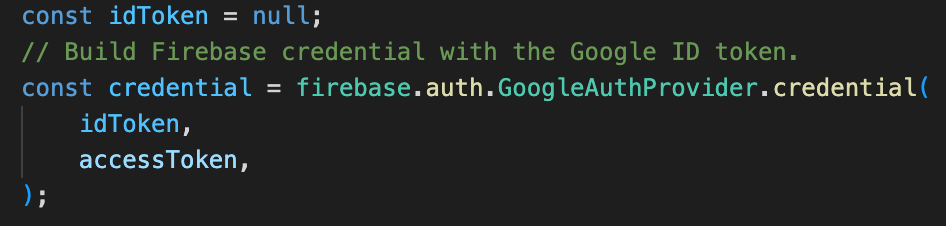
null. Seems to be working as expected so far.Same issue here. Using Google.useAuthRequest and the idToken on the response object is undefind.
This worked for me pretty well
same problem
I tried it but all i got is idToken only dont’know why…
Incurred in the same issue guys, anyone solved the issue?
this is the response that I get from google
as you can see the URL field contains the schema, and if I paste that URL on safari, safari can open my app. So I don’t know if this can help to solve the issue.
How I did it was by using shouldAutoExchangeCode see my comment at: https://github.com/expo/expo/issues/18270#issuecomment-1483945639
Thanks to browniefed on this PR
I managed to get both id_token and access_token by adding the following to useAuthRequest config
import { generateHexStringAsync } from “expo-auth-session”;
+1 to the question above: is there a way to get the scope (like email, name, etc.) using
useIdTokenAuthRequest?@remcorakers hero! That has worked, thank you!
Hi,
I am using
useIdTokenAuthRequestand it works perfectly when using Expo Go, however, when I build an APK (usingeas build), params.id_token and authentication are both null. I am providing a validandroidClientIdandresponseType: "id_token". If anyone has any ideas how to fix this, I’d really appreciate it.I am also encountering this issue (idToken undefined in result.authentication (authSession with Google) ).
Using managed workflow with expo and expo-auth-session below (the latest ones):
"expo": "~43.0.2", "expo-auth-session": "~3.4.2",Hello there.
Try sticking to using
Google.useIdTokenAuthRequeste.g.In your app.json file try add a
"scheme":like so…If you dont add a scheme. Your stand alone app wont get any data back.
This was mentioned in the AuthSession Documentation but not in the Authentication Guide .