expo: @expo/vector-icons not showing after adding metro.config.js file in project root folder
Summary
Expo vector icons are not rendering after deployment.
As I’m using Expo Router, I’m using metro.
I installed @expo/metro-config and this is my metro.config.js file:
const { getDefaultConfig } = require("@expo/metro-config");

const defaultConfig = getDefaultConfig(__dirname);

module.exports = {
  resolver: {
    assetExts: [...defaultConfig.resolver.assetExts, "db"],
  },
};
Expected behaviour:

What actually happens

What platform(s) does this occur on?
Web
SDK Version
48
Environment
expo-env-info 1.0.5 environment info: System: OS: Linux 5.19 Ubuntu 22.04.1 LTS 22.04.1 LTS (Jammy Jellyfish) Shell: 5.1.16 - /bin/bash Binaries: Node: 16.17.0 - /usr/local/bin/node npm: 8.15.0 - /usr/local/bin/npm npmPackages: expo: ^48.0.4 => 48.0.5 react: 18.2.0 => 18.2.0 react-dom: 18.2.0 => 18.2.0 react-native: 0.71.3 => 0.71.3 react-native-web: ~0.18.7 => 0.18.12 npmGlobalPackages: expo-cli: 6.3.2 Expo Workflow: managed
Minimal reproducible example
About this issue
- Original URL
- State: open
- Created a year ago
- Reactions: 2
- Comments: 47 (12 by maintainers)
Finally solved it! I was deploying my webapp with firebase hosting and it ignores
node_modulesby default which we should contain.I made a fix not to ignore
assets/node_modules/**and everything is working again 🎉Take a look at working webapp if interested. https://dooboo.io
@jeltehomminga This info might help since you are also using firebase.
Also I think this issue can be closed now.
Same issue for me. Using expo locally it works fine but when I build for Android the icons are not showing.
I tried expo versions 46.0.0, 47.0.0, 48.0.0 (with matching deps) and all had the same issue. It was definitely working previously with v46.0.0.
iOS builds and works as expected. It is only an issue on Android
@robertherber, I used the following script after
expo export -p webto move assets from the node_modules directory and update URIs in the js bundle file. We have metro output defined as single, so this hack is fine. For other output targets, you need to modify the command to crawl each file.@Martijncvv You can remove the highlighted in the firebase.json line to let Firebase know not to ignore the node_modules in dist.
Removing this solves my issue and the icons appear in my Firebase deployed web app.
When closing and re-opening our app on iOS (not tested Android) we notice that occasionally the icons do not load (perhaps 10% of the time). This looks like a similar issue to this one so adding my comments here.
When this error occurs, our sentry.io captures an exception:
I’ve seen the same error just for
MaterialIcons.ttftoo.This is a managed expo project which uses eas build and has some custom native code: expo | 49.0.6 @expo/vector-icons | 13.0.0 “expo-font”: “~11.4.0”
We do not use a
useFontscall in our app code, so I assume auseFontscall is done by the @expo/vector-icons library as otherwise I do not understand how the pasted error would include the “for font ‘material-community’” line.Does anyone have a solution or explanation?
Ps, if useful, the app also fails to show any static images when this error described above occurs. Does this suggest that sometimes a file system has not completed being mounted / linked before the app reaches its next step of the boot process?
I fixed this issue on Android by importing the icon fonts I need in my App.js file.
My current dirty workaround on
package.jsonwhile the fix is released:I fix the issue by removing expo insight you can see why here : https://github.com/expo/expo/issues/21885 @rrufus @jj-apps
The same for me only on iPhone No problem on iPad or Android or Web
But I make a call to useFont and the problem is that when I get this error, I can’t access my customFont either.
PS : No problem in dev mode only on preview or testflight or prod app
I am facing the same issue. When i am running my app on expo the icons are coming up fine but when i am building for production, all the vector icons are missing. Is there a solution for this?
This is happening to me as well, only locally using metro for both android and ios.
Thanks, it worked for me as well! 👍
Has anyone gotten around this in a smooth way on Cloudflare Pages? Haven’t found a way to override the default behaviour which seems to be ignoring anything called
node_modules.Maybe there’s a way to rewrite the path (i.e. rename it to something different than node_modules)?
where and how should I implement this fix that Firebase doesn’t ignore that specific path 😛
I have ditched MaterialCommunityIcons and now using Ionicons which comes bundled with expo. It is working for me now.
I’m having the same problem. I’m using Expo Router with a mono repo (turbo repo) and when exporting for web the icons don’t show up. I’m using expo version 48.0.16 and the error is still there.
Here is an screen shot of my list folder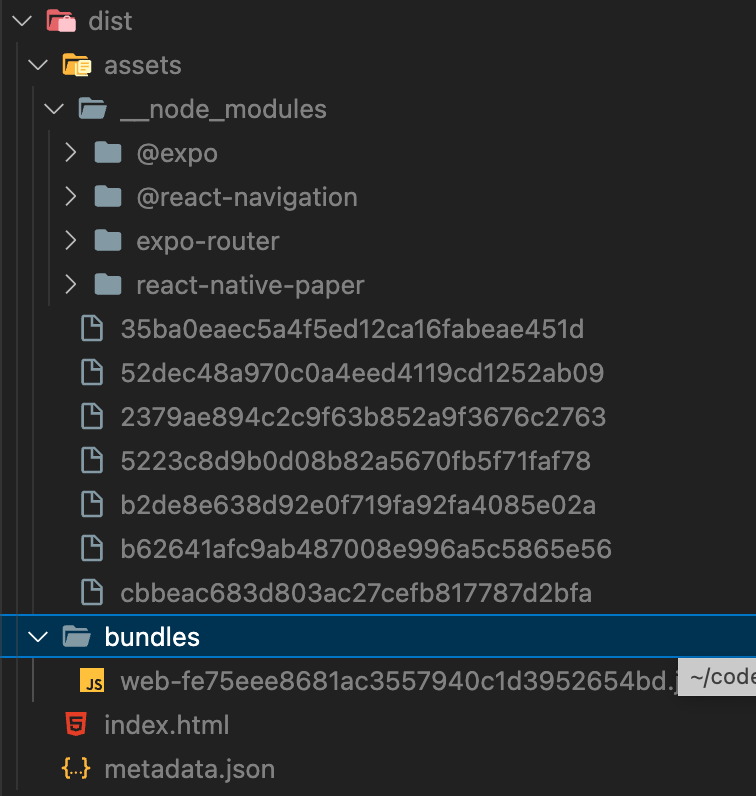
and here is how I see the page when running
npx serve --singlefrom dedistfolder:@EvanBacon in which expo version is your fix #22094 gonna be applied? 😃
It will be better to import little svg images as if they were icons lol Thanks for helping
Then it is maybe a bundling problem. Try changing your bundler and if that doesn’t work, then i dont know what will
If you are experiencing issues with Expo vector icons not rendering after deployment, you may need to add some additional configuration to your project.
Firstly, make sure that you have installed react-native-vector-icons and expo-font packages. You can do this by running the following command in your project directory:
npm install react-native-vector-icons expo-fontext, you will need to add the following code to your App.js file to load the icon fonts:
Make sure to replace Ionicons with the name of the icon font that you want to load. You can find the names of the available icon fonts in the node_modules/@expo/vector-icons/build/vendor/react-native-vector-icons/Fonts directory.
Finally, you may need to add additional configuration to your metro.config.js file. Here’s an example of how you can configure Metro to resolve icon fonts:
This should resolve any issues you are experiencing with Expo vector icons not rendering after deployment.