expo: expo-modules-core can't run Gradle task downloadBoost
Summary
When building a project with the latest version of expo (that uses expo-modules-core), the task :expo-modules-core:downloadBoost fails with:
Execution failed for task ':expo-modules-core:downloadBoost'.
> A failure occurred while executing de.undercouch.gradle.tasks.download.internal.DefaultWorkerExecutorHelper$DefaultWorkAction
   > javax.net.ssl.SSLPeerUnverifiedException: Certificate for <jfrog-prod-usw2-shared-oregon-main.s3.amazonaws.com> doesn't match any of the subject alternative names: [*.s3.amazonaws.com, s3.amazonaws.com]
What platform(s) does this occur on?
Android
Environment
expo-env-info 1.0.5 environment info:
    System:
      OS: Windows 10 10.0.22621
    Binaries:
      Node: 16.18.0 - C:\Program Files\nodejs\node.EXE
      Yarn: 1.22.19 - ~\AppData\Roaming\npm\yarn.CMD
      npm: 7.11.2 - C:\Program Files\nodejs\npm.CMD
    npmPackages:
      expo: ^47.0.13 => 47.0.13
      react: 18.2.0 => 18.2.0
      react-native: 0.70.6 => 0.70.6
    Expo Workflow: bare
Minimal reproducible example
A project being upgraded from RN 0.69.3 (using an old version of expo without expo-modules-core) to RN 0.70.6 with the latest expo version.
EDIT: Now we’ve learned the problem is actually adding the kotlin-gradle-plugin with a version higher than 1.6.x (e.g. 1.7.x or 1.8.x) to the project android/build.gradle (for example, when following guides for react-native-navigation or Detox)
About this issue
- Original URL
- State: open
- Created a year ago
- Reactions: 3
- Comments: 37 (9 by maintainers)
Commits related to this issue
- Fix conflict between expo-modules-core and https://github.com/expo/expo/issues/20821 — committed to island-is/island.is by eirikurn 2 months ago
- chore(app): Configure native app CD with codemagic (#14612) * chore(app): Codemagic app CD * Add codegen. Fix working directories. Remove redundant plist change. * QA corepack issues * Fix scheme ... — committed to island-is/island.is by eirikurn 2 months ago
@Kudo Unfortunately I have the same issue and this solution doesn’t work for me, I already have 4.1.2 version in expo-modules core. Didn’t change anything in project last one week but have this errors now.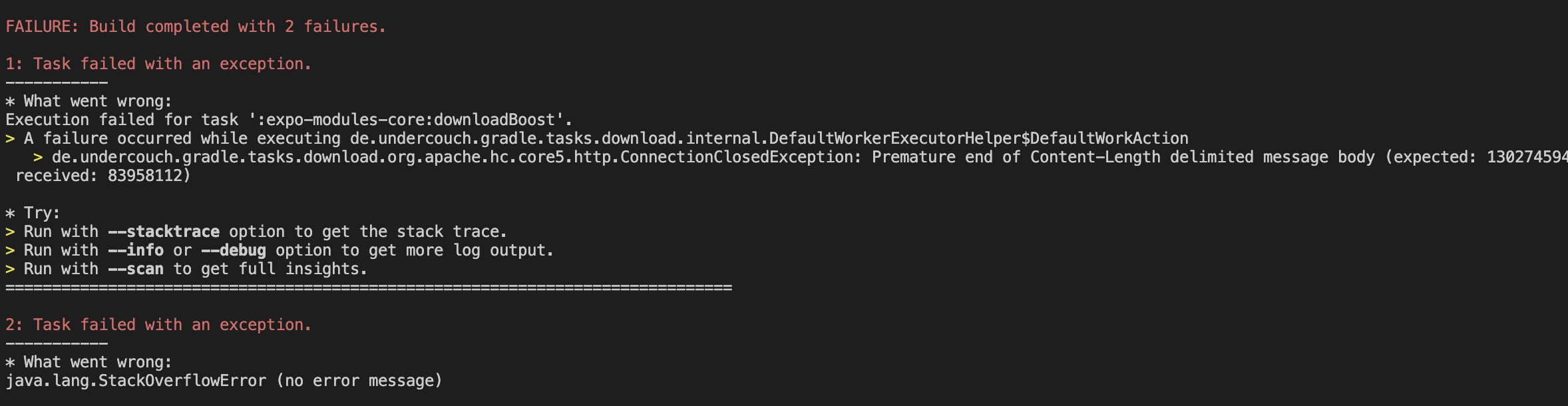
got the exact same error too, 3 days ago i was able to build my app, today the error appear when i try to rebuild
Hi, do we have any news on that fix? We need to use kotlin 1.9.0 for a library so I can’t downgrade it. Tried to change the de.undercouch:gradle-download-task version but nothing works
I solved the problem with kotlin_version=1.7.0
android/build.gradle:
@thanksyouall you are right for the official docs. i should investigate more for the root cause.
the download-plugin will be removed in expo-modules-core in the future. in the meantime as a workaround, you can downgrade the download-plugin.
@thanksyouall If you need to at least build the app, you can:
node_modules/expo-modules-core/android/build.gradleand change thedownloadBoosttask to begin withenabled = false(maybe even create a patch for it withpatch-package), like:boostfromhttps://boostorg.jfrog.io/artifactory/main/release/1.76.0/source/boost_1_76_0.tar.gzand place it undernode_modules/expo-modules-core/android/build/downloads(create the directories if they don’t exist).great work @thanksyouall! i can repro the problem. though is pretty strange to me where adding the
kotlin-gradle-pluginto cause the problem. will investigate more. thanks!https://github.com/thanksyouall/expo-test/commit/8314a8651af1e4a2d0dd382a3d1390668000b94f commit when the problem occurs.
It worked until I added kotlin.
I have the same error for the last two days.