expo: [expo-firebase-analytics] setCurrentScreen method does not set page title
🐛 Bug Report
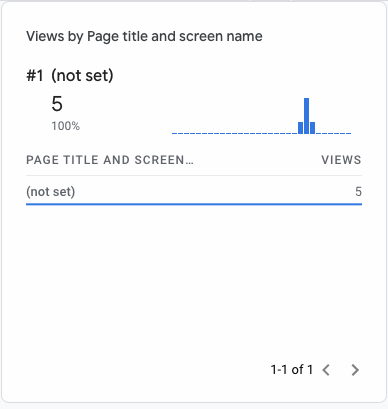
Google Analytics shows (not set) as a page title when using setCurrentScreen method.
Summary of Issue
I use expo-firebase-analytics and react-navigation to log the name of the current screen using setCurrentScreen method on each route change.
On the Google Analytics side the event is received, but the page title is (not set).
Environment - output of expo diagnostics & the platform(s) you’re targeting
Targeting platforms - Android and IOS.
 Expo CLI 3.22.3 environment info:
    System:
      OS: macOS Mojave 10.14.6
      Shell: 3.2.57 - /bin/bash
    Binaries:
      Node: 12.16.3 - ~/.nvm/versions/node/v12.16.3/bin/node
      Yarn: 1.22.4 - /usr/local/bin/yarn
      npm: 6.14.4 - ~/.nvm/versions/node/v12.16.3/bin/npm
    IDEs:
      Android Studio: 4.0 AI-193.6911.18.40.6626763
      Xcode: 11.3.1/11C505 - /usr/bin/xcodebuild
    npmPackages:
      expo: ^37.0.0 => 37.0.12
      react: 16.9.0 => 16.9.0
      react-dom: 16.9.0 => 16.9.0
      react-native: https://github.com/expo/react-native/archive/sdk-37.0.1.tar.gz => 0.61.4
    npmGlobalPackages:
      expo-cli: 3.22.3
Steps to Reproduce
- Follow the guide: https://docs.expo.io/versions/latest/sdk/firebase-analytics/.
- Install and configure
react-navigationto log events on each route change: https://reactnavigation.org/docs/screen-tracking/.
Basically, react-navigation is configured properly, the proper route name is passed to the setCurrentScreen function and it is invoked.
So the problem seems to be in the library itself.
The code:
const previousRouteName = routeNameRef.current;
const currentRouteName = navigationRef.current.getCurrentRoute().name

    if (previousRouteName !== currentRouteName) {
        screenTracker.trackRoute(currentRouteName);
    }
}

<NavigationContainer
    onStateChange={onRouteChange}
>
...
// screenTracker.ts
import * as Analytics from "expo-firebase-analytics";

export const trackRoute = (route: string) => {
    Analytics.setCurrentScreen(route);
};
One thing to note, as I was looking at the source code and found out that what it does is sending the following event:
await this.logEvent('screen_view', {
    screen_name: screenName,
});
So I tried to replace the setCurrentScreen with this code bit it still did not work:
// screenTracker.ts
import * as Analytics from "expo-firebase-analytics";

export const trackRoute = (route: string) => {
    Analytics.logEvent('screen_view', { screen_name: route });
};
But when I added page_title to the parameters it started working, but only if I send events from my local machine using IOS or Android emulator.
After doing QA build (not set) is still visible:
// screenTracker.ts
import * as Analytics from "expo-firebase-analytics";

export const trackRoute = (route: string) => {
    Analytics.logEvent('screen_view', { screen_name: route, page_title: route });
};
Could you please give some advices on how to handle that?
Expected Behavior vs Actual Behavior
Expected behavior: page title is displayed.
Actual behavior: page title is (not set).
About this issue
- Original URL
- State: closed
- Created 4 years ago
- Reactions: 8
- Comments: 17 (6 by maintainers)
This seems to be an upstream problem with Firebase https://firebase.googleblog.com/2020/08/google-analytics-manual-screen-view.html
We’ve got it working using EAS + Expo Config Plugins and just disabled logging via Javascript SDK in Expo Go clients. It would be good if this is included as an option in the expo-firebase-analytics package.
Make sure you are logging the events manually
Hi! The
page_titlefield is a web specific field which you will typically not see when using native logging. Your workaround usingpage_titlemight work in the standard Expo client because it uses a JavaScript based implementation of Google Analytics. However when you create a release version, your app will use the native Firebase Analytics SDKsetCurrentScreen, method which only takes thescreen_nameandscreen_classas arguments.Also seem to be having this issue,
(not set)is our top screen view in FirebaseAFAIK it should be working because it’s just manual logging even though I haven’t caught up with the updates. If you have pushed events before adding the change it might have confused you (it did for me) in the analytics report (e.g. you might want to filter out older events).
Some things I’ve tried:
I hope that helps.
@jeloagnasin - sdk 40 is not the latest version though, it’s sdk 41.
@nicib83 - you could create a config plugin to do that with eas build: https://docs.expo.io/guides/config-plugins/ - note that config plugins do not run on
expo buildthey only run oneas buildmore info on the differences in these blog posts