expo: [expo-apple-authentication] Sign In With Apple won't work on Expo Go and Firebase due to wrong audience (aud) in identityToken JWT as `"aud": "host.exp.Exponent"` returned by Apple after signInAsync()
Summary
Tools like Firebase that manage authentication for you only allow for one Service ID in the project (as shown below)
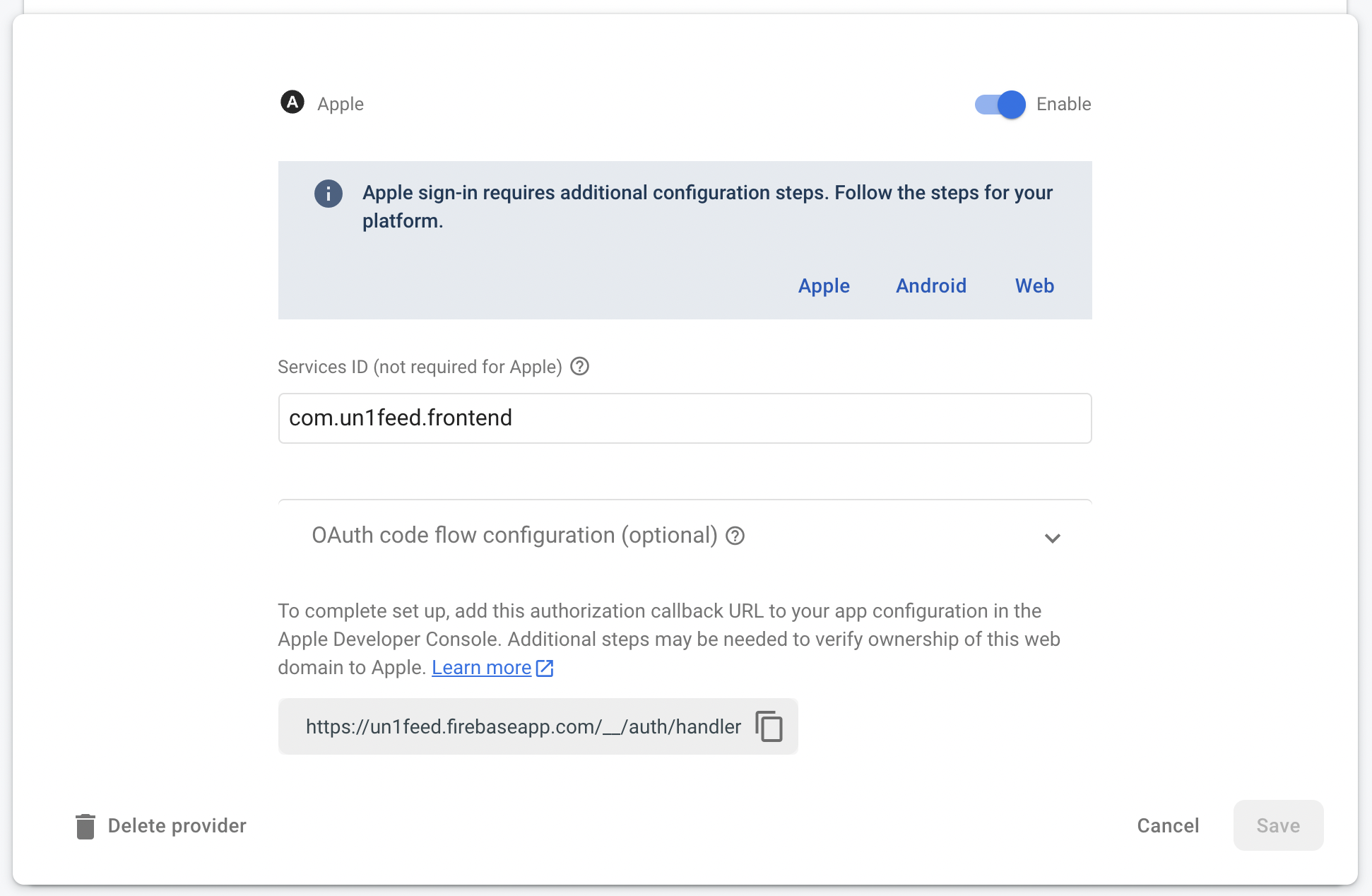
However, the Service ID when testing on an React Native Expo Managed project is host.exp.Exponent as Sign in with Apple is registered via Expo. But, it should be com.myapp.name instead. However, due to Firebase’s limitation, I have to choose to make my app work only in testing or production, or create different apps for testing and production, which is absurd. If I don’t do that I’ll get the error like the one below:

Not sure whether to post this here or somewhere else but the Firebase web UI is not open-sourced so they don’t have a Github.
Managed or bare workflow? If you have ios/ or android/ directories in your project, the answer is bare!
managed
What platform(s) does this occur on?
iOS
SDK Version (managed workflow only)
44
Environment
>> expo diagnostics

Expo CLI 5.0.3 environment info:
    System:
      OS: macOS 12.1
      Shell: 5.8 - /bin/zsh
    Binaries:
      Node: 14.18.1 - ~/.nvm/versions/node/v14.18.1/bin/node
      Yarn: 1.22.17 - ~/.nvm/versions/node/v14.18.1/bin/yarn
      npm: 6.14.15 - ~/.nvm/versions/node/v14.18.1/bin/npm
    Managers:
      CocoaPods: 1.11.2 - /usr/local/bin/pod
    SDKs:
      iOS SDK:
        Platforms: DriverKit 21.2, iOS 15.2, macOS 12.1, tvOS 15.2, watchOS 8.3
    IDEs:
      Xcode: 13.2.1/13C100 - /usr/bin/xcodebuild
    npmPackages:
      expo: ~44.0.0 => 44.0.5
      react: 17.0.1 => 17.0.1
      react-dom: 17.0.1 => 17.0.1
      react-native: 0.64.3 => 0.64.3
      react-native-web: 0.17.1 => 0.17.1
    npmGlobalPackages:
      eas-cli: 0.38.3
      expo-cli: 5.0.3
    Expo Workflow: managed
Reproducible demo
  const signInWithApple = async () => {
    const nonce = Math.random().toString(36).substring(2, 10);

    try {
      const hashedNonce = await Crypto.digestStringAsync(Crypto.CryptoDigestAlgorithm.SHA256, nonce);
      const appleCredential = await AppleAuthentication.signInAsync({
        requestedScopes: [
          AppleAuthentication.AppleAuthenticationScope.FULL_NAME,
          AppleAuthentication.AppleAuthenticationScope.EMAIL
        ],
        nonce: hashedNonce
      });
      const { identityToken } = appleCredential;
      const provider = new OAuthProvider('apple.com');
      const credential = provider.credential({
        idToken: identityToken!,
        rawNonce: nonce
      });
      signInWithCredential(firebaseAuth, credential);
    } catch (error: any) {
      Alert.alert(error.name, error.message)
    }
};
About this issue
- Original URL
- State: closed
- Created 2 years ago
- Reactions: 1
- Comments: 25 (1 by maintainers)
One workaround in a development environment is to do this:
From: https://martinliptak.medium.com/thanks-for-the-article-ec172f979048
@charlestbell It’s done under Firebase’s “project settings”. I only use Expo Go during development and for that purpose adding the additional “app” with Expo Go’s bundle ID worked for me.
Another option is to simply add another iOS app to the Firebase project with Bundle ID
host.exp.Exponent. That way Firebase will accept the bundle ID as a valid audience. I don’t know if this solution has any downsides.I’ve also been able to make it work with Supabase only by adding host.exp.Exponent to the allowed client ID’s. I imagine for dev and prod environments, I’ll just have two separate Supabase projects to handle that, even tho it would be annoying to have all configurations duplicated…
I did neither of them. I just sucked it up and didn’t do anything.
On Sun, Apr 24, 2022 at 3:59 PM, Pedro Netto < @.*** > wrote:
Right now,
expo-apple-authentication’s signInAsync() function returns an object that contains the identityToken which is what we really need to authenticate using Firebase. This identityToken is just a simple JWT with the payload data for the"aud": "host.exp.Exponent". This is the problem. There is no way to change the data sent to signInAsync() or any option to customize whataud(audience) is received by Apple. So when Apple gets our sign in request, they just return the sameaud(audience) back to us in the identityToken. However, one fix from Expo’s side could be is to help us define theaudor Service ID in app.json and that way signInAsync() can use that instead of using “host.exp.Exponent”. This is a good fix since using “host.exp.Exponent” does not seem like a good idea anyway since user data will be going through Expo’s Service ID and Expo’s account on Apple Developer.Worked for me too. Also you shouldn’t have to change it if you use a different firebase project for prod vs test.
this is documented here: https://docs.expo.dev/versions/latest/sdk/apple-authentication/#development-and-testing
you may want to use expo-dev-client instead to customize this further: https://docs.expo.dev/versions/latest/sdk/apple-authentication/#configuration
Regarding
devandprodwith Supabase, for local development apparently you need to puthost.expo.Exponentfor allowed client ID’s, but when onTestFlightyou need to put your App bundle ID ( for examplecom.app.myapp), you can comma separate them.Like below 👇
Thank you! I was missing this part
by adding host.exp.Exponent to the allowed client ID's.Hello, My apple sign in work fine on Expo Go and Simulator but when i want to connect with TestFlight, nothing happens. So Apple send me a review that : " We discovered one or more bugs in your app. Specifically, the app stays on the login screen when attempting to log in using Sign in with Apple. ". I don’t know why this happen. My code : const loginWithApple = () => { const nonce = Math.random().toString(36).substring(2, 10);
Did I missing something ? Thanks to all in advance.
That’s what I did. Didn’t realize that’s what you are asking for. But essentially you will have to change that each time you want to run dev mode or prod.
On Mon, Apr 25 2022 at 05:29, Pedro Netto < @.*** > wrote: