expo: exp build:android fails
Running exp build:android errors fails. I am experiencing this on both Windows and OS X.
This solution is working as a temporary work around. Expo version is 56.0.0.
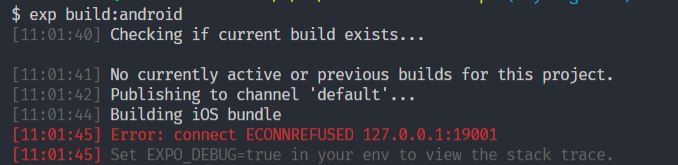
$ exp build:android
[11:01:40] Checking if current build exists...

[11:01:41] No currently active or previous builds for this project.
[11:01:42] Publishing to channel 'default'...
[11:01:44] Building iOS bundle
[11:01:45] Error: connect ECONNREFUSED 127.0.0.1:19001
[11:01:45] Set EXPO_DEBUG=true in your env to view the stack trace.
Environment
Environment:
  OS: Windows 10
  Node: 8.11.1
  Yarn: 1.9.4
  npm: 5.6.0
  Watchman: Not Found
  Xcode: N/A
  Android Studio: Not Found

Packages: (wanted => installed)
  expo: ^29.0.0 => 29.0.0
  react: 16.3.1 => 16.3.1
  react-native: https://github.com/expo/react-native/archive/sdk-29.0.0.tar.gz => 0.55.4

Diagnostics report:
  https://exp-xde-diagnostics.s3.amazonaws.com/skempin-e8172ba2-6e87-419c-b5dd-7eb273b98cbf.tar.gz
Steps to Reproduce
- Run
exp build:androidfrom a fresh terminal.
Expected Behavior
The APK should be built.
Actual Behavior
The build fails.
A temporary solution is to run exp start first and then run exp:build:android.
About this issue
- Original URL
- State: closed
- Created 6 years ago
- Reactions: 39
- Comments: 60 (7 by maintainers)
This works.
exp startctrl cexp build:android.This is work for me.
I don’t know why but I do the same way with
expo-cliand it’s working!No need to hassle. Just delete .expo folder and
expo build:androidorexpo build:ios, works like a charm.Issue still occurs
Probably the bundler didn’t close correctly. So you cannot run another one on the same port. Maybe
expo startkills the old process?Can this be reopened? This happens to me on a regular basis, and its frankly just annoying. The workarounds seem to work, but it would be cool to address the underlying issue.
Another solution is open in a different tab the expo server running
yarn start(ornpm start) if the project was created undercreate-react-native-appsee this forum comment. https://forums.expo.io/t/error-when-trying-to-run-exp-publish/223/12?u=jorgews.dev
For me on Windows this worked:
This works.
exp start Cancel ctrl c then do exp build:android.
Wao…! it really works…
Some info:
expo startnow uses 19002 port but theexpo publishandexpo buildstill look for the bundler in 19001. is this related to the latest v33 release?I’m still experiencing the same issue with expo-cli 2.3.5 Upgrading to expo sdk 31 broke our pipeline because the packager is not started automatically anymore.
the commands recently got changed with the new update
exp build:androidtoexpo build:androidReference: Expo Building Standalone Apps
Had the same issue on OSX . Was resolved by:
Experiencing same issue with
expo-cli@2.6.5, solution above helped.I am building an android app with expo and encountered this issue as well. Thanks for the solution guys. I just want to share what caused the error. The build requires a Metro Bundler running in port
19001where this is not running by default as we type inexpo build:androidand this caused this errorso starting the Metro Builder first by typing
expo startthen start building using a different cmd or tab by typingexpo build:androidor I haven’t try this yet but share us the result when you does thanks! Add-ctoexpo build:<platform>example:expo build:android -cCheers!
Why is this still an issue?
The workaround with CTRL + C doesn’t help in my case. Luckily, deleting the .expo folder works. Why is it doing an iOS bundle while I want to build Android?
Solved the issue the following way: 1-expo start 2-opening a new terminal window (same project dir) => expo build <platform code>
Thanks ‘expo start’ worked
and then with metro bundler opened I tried ‘expo build:android’
My build pipeline started throwing this error after I accidentally commited .expo/packager-info.json and settings.json. Removing them from the repository fixed the issue.
try run command
Closing since it sounds like this has been resolved in expo-cli