expo: EAS - iOS App Store build fails with `react-native-maps`
Summary
Hey! First of all, thank you to the expo team!
Here is the issue, I encounter —sorry in advance if it’s on the wrong repo 😅
with
"dependencies": {
  "expo": "^46.0.0",
  "react-native": "0.69.4",
  "react-native-maps": "0.31.1",
}
running
eas build --platform=ios --profile=preview
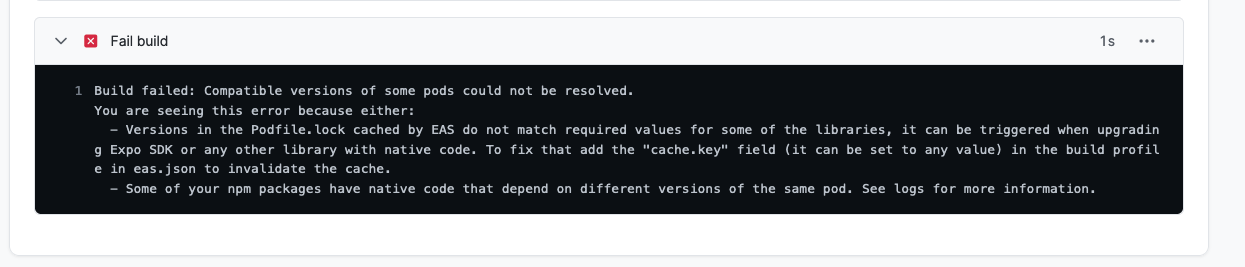
Uploads, but installing Pods fail during the build
Adding spec repo `trunk` with CDN `https://cdn.cocoapods.org/`

[!] CocoaPods could not find compatible versions for pod "GoogleMaps":
  In snapshot (Podfile.lock):

    GoogleMaps (= 5.1.0)
  In Podfile:
    react-native-google-maps (from `/Users/expo/workingdir/build/node_modules/react-native-maps`) was resolved to 0.31.1, which depends on
      GoogleMaps (= 6.1.1)


with
"dependencies": {
  ...
  "react-native-maps": "1.3.0",
}
I have the same results

What platform(s) does this occur on?
iOS
Environment
not sure if it’s helpful because the builds fail with eas-cli
  expo-env-info 1.0.5 environment info:
    System:
      OS: macOS 12.4
      Shell: 5.8.1 - /bin/zsh
    Binaries:
      Node: 16.13.1 - ~/.nvm/versions/node/v16.13.1/bin/node
      Yarn: 1.23.0-20220130.1630 - ~/.nvm/versions/node/v16.13.1/bin/yarn
      npm: 8.6.0 - ~/.nvm/versions/node/v16.13.1/bin/npm
      Watchman: 2022.06.06.00 - /opt/homebrew/bin/watchman
    Managers:
      CocoaPods: 1.11.3 - /Users/cerebra/.rbenv/shims/pod
    SDKs:
      iOS SDK:
        Platforms: DriverKit 21.4, iOS 15.5, macOS 12.3, tvOS 15.4, watchOS 8.5
      Android SDK:
        API Levels: 28, 30, 31
        Build Tools: 28.0.3, 29.0.2, 30.0.2, 30.0.3
        System Images: android-28 | Intel x86 Atom_64, android-29 | Google Play ARM 64 v8a, android-29 | Google Play Intel x86 Atom, android-30 | ARM 64 v8a, android-30 | Google APIs ARM 64 v8a, android-30 | Google APIs Intel x86 Atom, android-30 | Google Play ARM 64 v8a, android-30 | Google Play Intel x86 Atom, android-30 | Google Play Intel x86 Atom_64, android-31 | ARM 64 v8a, android-31 | Intel x86 Atom_64, android-31 | Google Play ARM 64 v8a
    IDEs:
      Android Studio: 2021.1 AI-211.7628.21.2111.8309675
      Xcode: 13.4.1/13F100 - /usr/bin/xcodebuild
    npmPackages:
      babel-preset-expo: ~9.2.0 => 9.2.0
      expo: ^46.0.0 => 46.0.3
      react: 18.0.0 => 18.0.0
      react-dom: 18.0.0 => 18.0.0
      react-native: 0.69.4 => 0.69.4
    npmGlobalPackages:
      eas-cli: 0.59.0
      expo-cli: 6.0.5
    Expo Workflow: managed
Minimal reproducible example
use https://github.com/react-native-maps/react-native-maps
npx create-expo-app my-app
expo install react-native-maps
eas build

the cli suggest using an old version if we check the release notes
About this issue
- Original URL
- State: closed
- Created 2 years ago
- Comments: 16 (11 by maintainers)
@mvrahas A GREAT THANKS YOU! iOS App Store builds successfully
Following the documentation, I added to
package.jsonAnd on
app.config.jsI am using a managed workflow with EAS build.
You can use the last expo SDK, have a look at this PR, it builds successfully
@brentvatne I will close this issue. —for some reason, my production project was built with an old iOS
deploymentTargetand I guess the new projects use 13+ by default.