expo: Constants.manifest.extra is undefined in web
Summary
Constants.manifest.extra is undefined in web only. Possibly a regression of https://github.com/expo/expo/issues/4784
Managed or bare workflow? If you have ios/ or android/ directories in your project, the answer is bare!
managed
What platform(s) does this occur on?
Web
SDK Version (managed workflow only)
40.0.0
Environment
Expo CLI 4.3.4 environment info: System: OS: Linux 5.11 Arch Linux Shell: 5.8 - /usr/bin/zsh Binaries: Node: 14.16.0 - ~/.nvm/versions/node/v14.16.0/bin/node Yarn: 1.22.10 - /usr/bin/yarn npm: 6.14.11 - ~/.nvm/versions/node/v14.16.0/bin/npm npmPackages: @expo/webpack-config: ~0.12.45 => 0.12.64 expo: ~40.0.0 => 40.0.1 react: 16.13.1 => 16.13.1 react-dom: 16.13.1 => 16.13.1 react-native: https://github.com/expo/react-native/archive/sdk-40.0.1.tar.gz => 0.63.2 react-native-web: ~0.13.12 => 0.13.18 npmGlobalPackages: expo-cli: 4.3.4 Expo Workflow: managed
Reproducible demo or steps to reproduce from a blank project
https://github.com/ericwooley/rolledex/tree/d2f911885b5afef68e76e89a2ff85abc4f54dfc4
This is a bit of an advanced setup, with Nx.dev. Nothing too crazy though. webpack.config.js is modified as well.
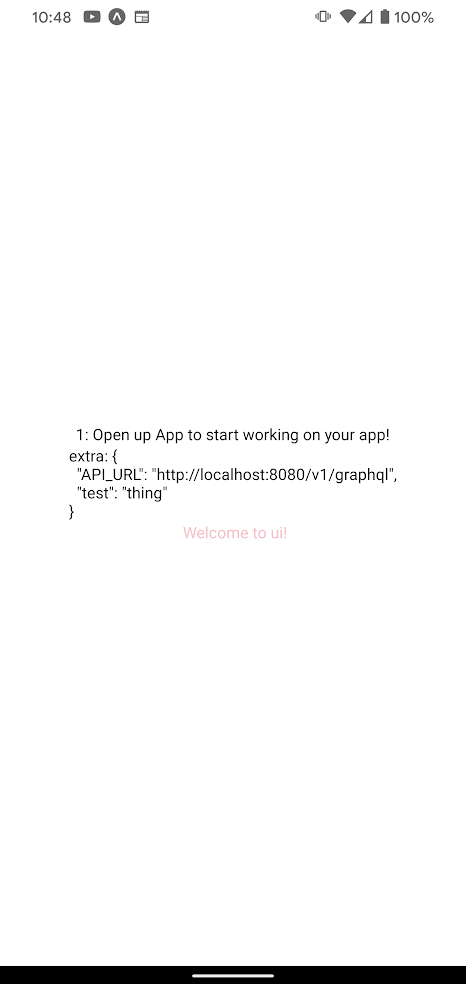
web
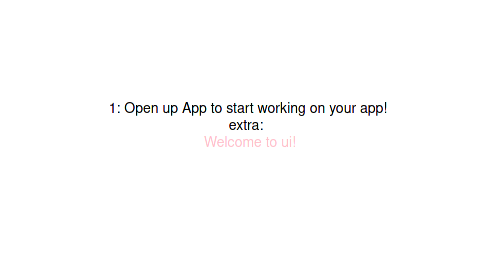
android
About this issue
- Original URL
- State: closed
- Created 3 years ago
- Reactions: 5
- Comments: 29 (5 by maintainers)
As far as I know, this is still an issue…
I’m on 49 and I still getting the same error
Still an issue. The only solution I have found is to customize the webpack configuration, using dotenv to set your variables there.
Expo v48, having the same issue on web. However i’m using metro instead of webpack
Just ran into the same issue. Anybody found a fix or workaround for this yet? iOS and Android works as intended, on web
Constants.manifestis empty.Constants manifest does not work in the following web-cases:
@expo/webpack-config.I don’t use it anymore, but it seems like this is still open
Managed to resolve the issue on web using the following babel plugin:
getAppManifest() is a function that reads my app.json, third party files and assembles the final merged manifest (like in app.config.ts). I won’t paste it here
@EvanBacon I’m finding that
Constants.manifest,Constants.manifest2andConstants.expoConfigare all empty ({}) using the default Webpack configuration (@expo/webpack-config) in Expo47.I am using the
transform-inline-environment-variablesapproach to using environment variables in Expo. If I don’t use this and use the method of getting environment variables inside of my dynamic app config, then the problem goes away.This strongly suggests there is an issue with the
transform-inline-environment-variablesapproach on web.Update: thanks to this obscure comment I was able to get it to work by explicitly including the variables we want like this (in
babel.config.js):If I don’t explicitly
includethe variables I am using, my entireConstants.[manifest|manifest2|expoConfig]is empty.Got my answer here https://github.com/expo/eas-cli/issues/1265#issuecomment-1301525320 I do wish expo simplified/cleaned their documentation a bit and made like one simple example which just works out of the box instead of providing tons of information where it’s so easy to miss Constants.expoConfig vs Constants.manifest
Thanks, @robertoyoc 👍
I used your approach combined with dotenv to load env vars from
.envthe way they do in thetsconfigversion of this Expo guide.Got it working by using a combination of: app.config.ts and webpack.config.js
in app config I do:
Then you need to pass them by running
API_URL="myapi" expo start --webMy webpack config file is the one you generate with
expo customize:web@benlutz I wrote up what I did last year here. Basically I avoided using Constants & just used env https://finnternet.com/dev/blog/expo-starter-initial-setup I was wrong about the webpack config. The babel inline dotenv setup will work with web as long as you don’t customize your webpack config.
Then, for my staging & production builds, I use EAS and configure the env through the project console, adding them all as secrets for the build.