expo: Bug with datetimepicker in ios 14 (local env)
🐛 Bug Report
Summary of Issue
When I run in a local datetimepicker looks as wheels -
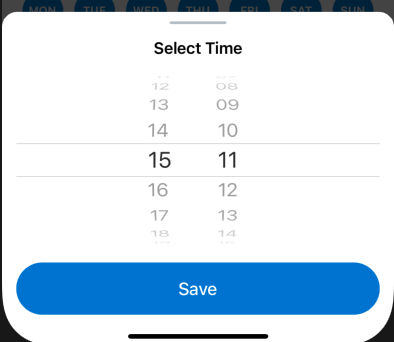
But when I compile (expo build:ios) it looks with new ios 14 styles -
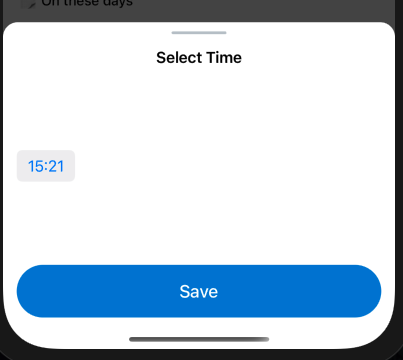
Environment
Expo Workflow: managed Platform: iPhone 12 Pro Max simulator iOS 14.2
“expo”: “^39.0.0”, “@react-native-community/datetimepicker”: “3.0.0”,
Example code:
 <DateTimePicker
    testID="dateTimePicker"
    value={date}
    is24Hour
    mode="time"
    locale="en_GB"
    display="default"
    onChange={console.log}
/>
I have 2 questions.
- How set up a local environment with ios 14 views for datetimepicker?
- How to turn on wheels view for datetimepicker in ios 14?
About this issue
- Original URL
- State: closed
- Created 4 years ago
- Reactions: 8
- Comments: 15 (8 by maintainers)
run
EXPO_BETA=1 expo client:install:iosto install the beta version of expo client that is built using xcode 12, so you can test this locally without doing a standalone app build.also note that you need to specify a width - ‘100%’ should work for most cases.
Is there a solution for this? Encountering the same issue, and changing to “spinner” didn’t solve it.
@hehex9 What your solutions?
@NozhenkoD set display to
spinnerinstead ofdefaultshould resolve this