expo: Android app rejected because of Segment version
On Friday, June 10, 2022, we began to receive reports that apps submitted to the Google Play Store were in some cases being rejected due to the inclusion of com.segment.analytics.android:analytics 4.9.4. This impacted all classic builds (expo build:android - more info on why), bare apps that use expo-analytics-segment, and EAS Build apps that use expo-analytics-segment.
See submission error message
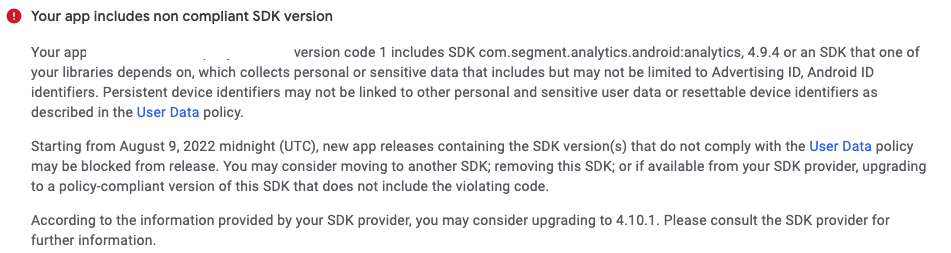
On Monday, June 13, we deployed expo-analytics-segment version 11.2.1 to resolve the issue for SDK 45 bare apps and apps using EAS Build. We also updated classic builds for SDK 45 to include this fix. Please run expo install expo-analytics-segment (if you use the library) in your project to install this new version. After updating the version, bump your app version, rebuild, and resubmit.
~We will deploy fixes to older SDK versions once affected users have confirmed that the issue has been resolved for them. Please confirm in this thread that the above instructions unblock your submission on SDK 45 apps with expo-analytics-segment.~
On Wednesday, June 15, we deployed expo-analytics-segment updates for SDK 44 and SDK 43. We also update classic builds for SDK 44 and 43 to include this fix. Please run expo install expo-analytics-segment (if you use the library) in your project to install this new version. After updating the version, bump your app version, rebuild, and resubmit.
About this issue
- Original URL
- State: closed
- Created 2 years ago
- Reactions: 10
- Comments: 61 (21 by maintainers)
Hi sir the new update is working for SDK 45 but i want update for SDK 44 please
Thanks
thanks @npdbilal this is much appreciated. i will go ahead and backport the fix to sdk 44 now
@srossidev - it is already established in the original post that this will occur for some folks at the moment. I have deployed a possible fix for SDK 45. We will deploy fixes to older SDK versions once affected users have confirmed that the issue has been resolved on SDK 45.
@npdbilal - it is deployed for sdk 44 now. Please run
expo install expo-analytics-segmentin your project to install this new version. After updating the version, bump your app version, rebuild, and resubmit.When do you think the SDK 44 update will be published? Thanks!
@brentvatne Hey sir SDK 43
Expo-analytics-segments 11.0.4 also working perfectly…
what if i dont use the expo-analytics-segment library? should i still run expo install expo-analytics-segment anyway in sdk 43 classic build?
@corradodiba - rebuild and resubmit. classic builds (
expo build), unlike EAS Build, include all modules when you build, which is part of why we are moving away from it. more context in this blog post: https://blog.expo.dev/expo-managed-workflow-in-2021-5b887bbf7dbbit should not be necessary to update old builds but you should contact google play support if you have any further concerns, we aren’t privy to the nuance of how they handle this policy
you do not need to install it, no. the reason you would have seen this warning bfore is that if you use classic builds (to be sunset at the end of the year,
expo build:android) then it will include the entire expo sdk in the run time (https://blog.expo.dev/expo-managed-workflow-in-2021-5b887bbf7dbb). so just do a new build now and it should be fine.@davidcort - if you share your project privately with me on github i can look into it further but your problem isn’t actionable without a reproducible example
Dear sir i confirmed that it is fixed for SDK 44
THANK YOU SO MUCH FOR YOUR COOPERATION 🙏🙏
I use SDK 44, I have not installed
expo-analytics-segmentin my project, yet I get the same error. What should I do?@davidcort - can you dm me on the expo discord? this is pretty off topic with this thread because i’m fairly certain your issue is unrelated to expo-segment-analytics
@davidcort - you have an android directory in your project though. this is clear because there is no
prebuildphase on eas build. runnpx expo-env-infoin your project and share the output