expo: Android - KeyboardAvoidingView is not behaving properly (Even with SDK 38 and softwareKeyboardLayoutMode: pan)
🐛 Bug Report
Summary of Issue
I am trying to lift a TextInput I have just a tiny bit above the keyboard using KeyboardAvoidingView. On iOS it works just fine, on Android it won’t behave properly, regardless of the behavior prop I pass to it. Changing “softwareKeyboardLayoutMode” to “pan” makes no difference, neither locally nor when building a standalone app. Reproducible in a blank app.
Environment
Expo CLI 3.24.2 environment info: System: OS: Windows 10 10.0.18362 Binaries: Node: 10.15.0 - C:\Program Files\nodejs\node.EXE Yarn: 1.22.4 - C:\Users\Ron Belkin\AppData\Roaming\npm\yarn.CMD npm: 6.14.5 - C:\Program Files\nodejs\npm.CMD IDEs: Android Studio: Version 4.0.0.0 AI-193.6911.18.40.6626763 npmPackages: expo: ^38.0.9 => 38.0.9 react: 16.11.0 => 16.11.0 react-native: https://github.com/expo/react-native/archive/sdk-38.0.2.tar.gz => 0.62.2 react-navigation: ^3.8.1 => 3.13.0
Tested on a Huawei Mate 20 Pro
Reproducible Demo
Create a new app with expo init using the blank template in managed workflow, edit App.js to be:
import React from 'react';
import {KeyboardAvoidingView, StyleSheet, TextInput, View, ScrollView}  from 'react-native';

export default function App() {
  return (
    <View style={styles.container}>
        <KeyboardAvoidingView  keyboardVerticalOffset={20} behavior="padding">
         <TextInput style={{width: 200, height: 50, borderRadius: 10, borderWidth: 1}}/>
        </KeyboardAvoidingView>
    </View>
  );
}

const styles = StyleSheet.create({
  container: {
    flex: 1,
    position: 'relative',
    backgroundColor: '#fff',
    alignItems: 'center',
    justifyContent: 'flex-end',
    paddingBottom: 90
  },
});
The app.json file looks like that:
{
  "expo": {
    "name": "kav-test",
    "slug": "kav-test",
    "version": "1.0.0",
    "orientation": "portrait",
    "icon": "./assets/icon.png",
    "splash": {
      "image": "./assets/splash.png",
      "resizeMode": "contain",
      "backgroundColor": "#ffffff"
    },
    "android": {
      "softwareKeyboardLayoutMode": "pan"
    },
    "updates": {
      "fallbackToCacheTimeout": 0
    },
    "assetBundlePatterns": [
      "**/*"
    ],
    "ios": {
      "supportsTablet": true
    },
    "web": {
      "favicon": "./assets/favicon.png"
    }
  }
}
Steps to Reproduce
Use an Android device. Focus the TextInput on the screen, notice the behavior (explained below).
Expected Behavior vs Actual Behavior
Expected behavior:
Input should be slightly higher than the keyboard
Actual behavior:
When passing no “behavior” prop, input is lifted but still is partially hidden by the keyboard
With “padding” behavior, input gains excess padding until I type a character, then it positions itself as expected
With “height” behavior, input is indeed lifted properly (when you tweak the keyboardVerticalOffset prop), but when you type a character, it returns to the position of the first case (when behavior is unspecified)
Honestly, with behavior “position” it kinda does what I want in the demo app, but in my app the three last cases behave exactly like the case where behavior is “padding”
The "softwareKeyboardLayoutMode": "pan" makes no difference in this scenario whatsoever.
Is there any workaround I haven’t managed to find?
About this issue
- Original URL
- State: closed
- Created 4 years ago
- Reactions: 9
- Comments: 20 (8 by maintainers)
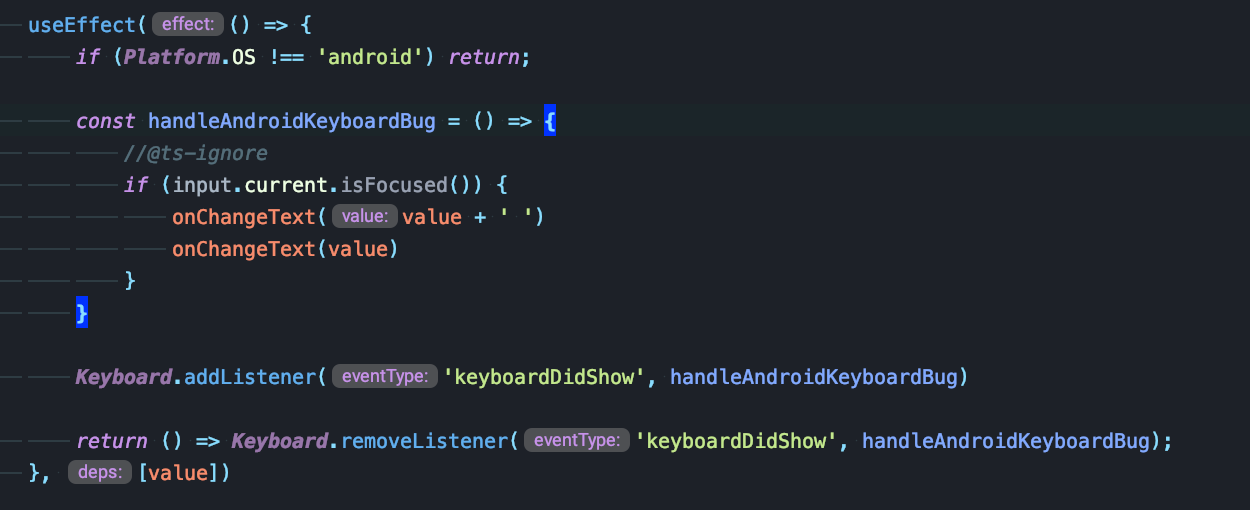
I tried playing with minheight, height values but nothing helped, so i did this: