create-react-native-app: Failed building JavaScript bundles, stuck on 99% and do not show the changes in the app. No detailed message of error.
Please make our job easier by filling this template out to completion. If you’re requesting a feature instead of reporting a bug, please feel free to skip the Environment and Reproducible Demo sections.
Description
1-2 sentences describing the problem you’re having or the feature you’d like to request
Expected Behavior
What action did you perform, and what did you expect to happen?
Observed Behavior
What actually happened when you performed the above actions?
If there’s an error message, please paste the full terminal output and error message in this code block:
Error text goes here!
Environment
Please run these commands in the project folder and fill in their results:
npm ls react-native-scripts:npm ls react-native:npm ls expo:node -v:npm -v:yarn --version:watchman version:
Also specify:
- Operating system:
- Phone/emulator/simulator & version:
Reproducible Demo
Please provide a minimized reproducible demonstration of the problem you’re reporting.
Issues that come with minimal repro’s are resolved much more quickly than issues where a maintainer has to reproduce themselves.
About this issue
- Original URL
- State: closed
- Created 6 years ago
- Reactions: 4
- Comments: 39 (1 by maintainers)
Having the same issue.
react-nativeshould print any compilation errors to the console, otherwise it’s very hard to debugIt would be really nice if the errors got thrown up into the console. Debugging these issues are unbearable.
I’m getting the same problem.
There is probably a syntax error somewhere in my new code, and previously expo would display this syntax error. Now it doesn’t display the error and it makes it difficult to track it down. I don’t know if this problem lies in expo, create react native app, or whatever is building the javascript bundle.
Expo shows me the most recent working version of the code.
I strongly agree with @iosdev-republicofapps, “just use Expo XDE” is not an acceptable solution to this problem. In order to use Expo XDE, I have to first modify composer.json from what is produced by
react-create-native-appfollowing these directions. Then, when I discover what the problem is with Expo XDE and want to further debug my program, the output it produces is extremely mess compared to what the CLI offers, so I have to close that down and relaunchyarn startvia the CLI.It’s a really clunky experience, and I’d really like to see this improve.
For me the error happened because of some bad syntax in one of my files. I have a component file Input.js. I was testing the app using yarn run ios and on the simulator it would crash expo and give me the “Failed building JavaScript bundles” at 99%. There was no further error code. I ran it on my iphone by using the QR code given and there it gave me the errors which pointed me to incorrect syntax.
@iosdev-republicofapps Sorry, what I meant to say is not a particular IDE but the other tool (not the CLI) expo provides to run the project. From their page:
Take a look at this example. I generated an error in one of my component to illustrate. Terminal: No clue about the error.
However with Expo XDE you can open the existing project and launch it from there. In this case this was the result:
No clue about the error.
However with Expo XDE you can open the existing project and launch it from there. In this case this was the result:
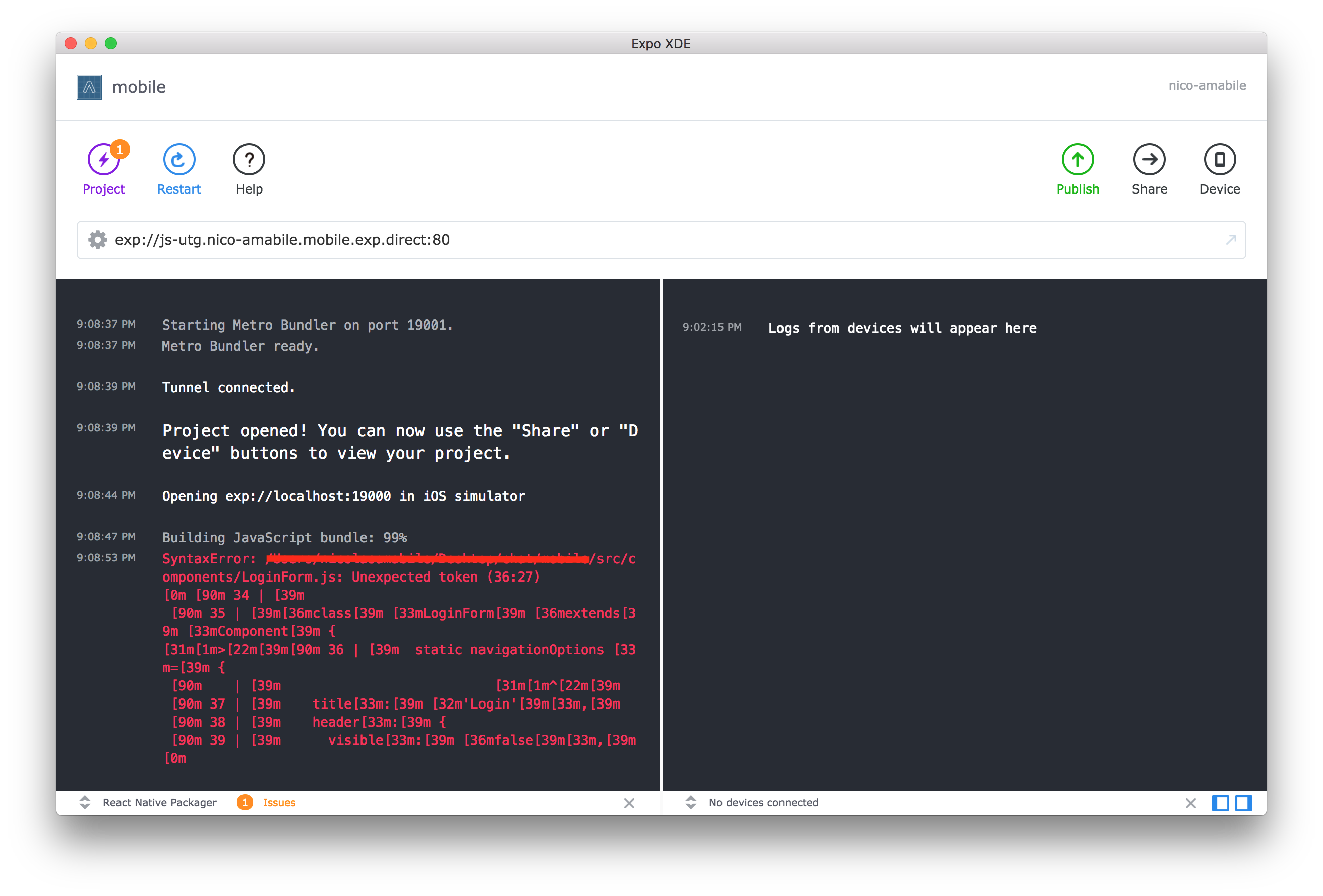
Give it a try and let us know how did it go 😉
This is also happening to me. Since debugging errors is one of the main activity of development and being able to see what is happening is fundamental to that, this is something that is taking me probably more than one hour of development time in just one day. Expo is a fantastic tool ant having this fixed would be really wonderful to keep up with the great productivity that expo allows us.
I have this problem regularly. Mostly it works just restarting expo, otherwise removing expo on the ios sim to force a reinstall. In some cases even that doesn’t work: all I get is “Failed building Javascript bundle” in the console and Expo launching on the phone, then crashing with black screen showing briefly.
In those cases, I’ve had to do a
git stashto go back to a project without errors, relaunch the app in the simulator, then do agit stash apply. The project recompiles and shows the error in a red screen on the simulator. Adding this note here in case other people can use this workaround.npm ls react-native-scripts:
-- react-native-scripts@1.10.0' npm ls react-native:– react-native@0.52.0 npm ls expo: `-- expo@25.0.0 node -v: v8.9.4 npm -v: 4.6.1 watchman is not installedOperating system: Windows 10 64 bit Phone: Lenovo
Uploaded my, it is showing my previous development, but updating fresh changes, Not able to build javascript bundle is the only error I’m getting in cmd.
Even trying @Tvrqvoise solution, I still get the issue. Right now I’m creating a second CRNA app to run from scratch and then copy my code into so I can figure out what the error actually is. This is a big problem. Definitely that if you launch
npm startand your code has a bug in it already, it will not tell you where the bug is. And if you can’t track down where the bug is manually without help from an error message, you’re screwed.I installed a linter as mentioned above and I have 0 issues in any of my code according to Atom.
Thanks @nicolas-amabile . But a lot of us aren’t using Expo XDE, we’re using another IDE like VSCode. So “use Expo XDE” can’t be the answer here …
Hey @terribleben, @brentvatne or @jesseruder - any ideas on this? This is becoming a real blocker for a lot of us using Expo and personally I’m thinking of ejecting just to avoid this issue. Any help would be much appreciated! 😃
@Haegin I branched my RN app and ejected from expo then all the errors became visible. After reading the message I switch back to my expo branch.
For me the error happened because of some bad syntax in one of my files. The solution for me was force stop Expo app and try to run again the project. After that, I could see the error.