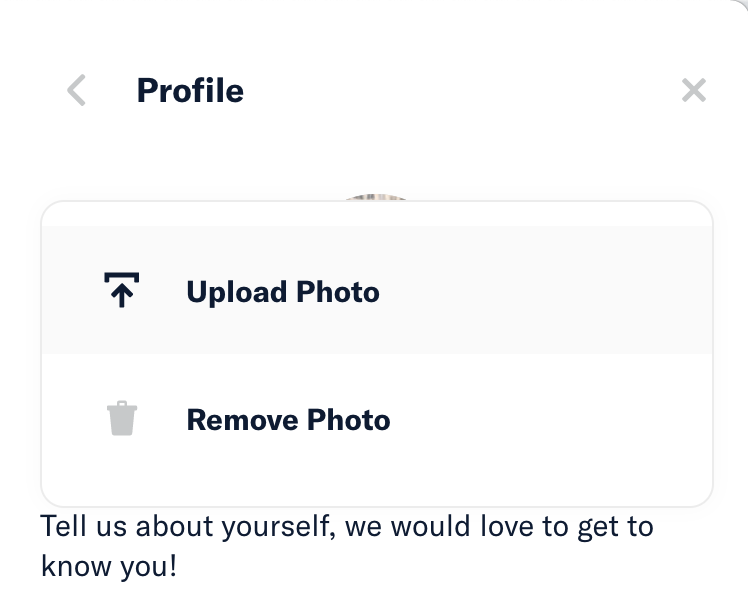
App: Web: “Edit Photo” dropdown menu in `Settings > Profile` does not launch from the bottom of the button and ends up covering the profile photo
If you haven’t already, check out our contributing guidelines for onboarding and email contributors@expensify.com to request to join our Slack channel!
Action Performed:
- Open Expensify.cash on web browser (or desktop app)
- Click on profile photo
- Click on Profile
- Click
Edit Photo.
Expected Result:
The dropdown should open top to bottom below the Edit Photo button.
Actual Result:
The edit menu obscures the profile photo
Workaround:
N/A (display issue)
Platform:
Web ✔️ iOS Android Desktop App ✔️ Mobile Web
Version Number: 1.0.75-5
Logs: https://stackoverflow.com/c/expensify/questions/4856
Notes/Photos/Videos: Any additional supporting documentation
Expensify/Expensify Issue URL:
From Slack: https://expensify.slack.com/archives/C01GTK53T8Q/p1625597860486800
ISSUE: the “Edit Photo” dropdown menu in Settings > Profile does not launch from the bottom of the button and ends up covering the profile photo
About this issue
- Original URL
- State: closed
- Created 3 years ago
- Reactions: 1
- Comments: 15 (11 by maintainers)
Ah, good shout. But I would suggest that this menu just launches below the new “Edit” button near the photo now (on desktop, since mobile just launches from bottom of screen).
Oops, I think I skipped some Triage steps here… re-labeled, reviewer @cead22 should review and add the
Externallabel if it is suitable for a contributor.I had already created this on Upwork here, but we’ll hold off on hiring until this issue has gone through internal review.
Thanks @parasharrajat, hired you for the job in Upwork!
Please assign this to me, helps me keep track of things.
You’ll probably notice this @parasharrajat but heads up this has been moved to
AvatarWithImagePickercomponent and now has two usages.