App: [HOLD for payment 2023-05-25] [$1000] Dev: console error when emoji suggestions list open
If you haven’t already, check out our contributing guidelines for onboarding and email contributors@expensify.com to request to join our Slack channel!
Action Performed:
1.go to any chat
2. type text and use semi colon syntax to show emoji suggestions(like 😄)
Expected Result: should not show any console error
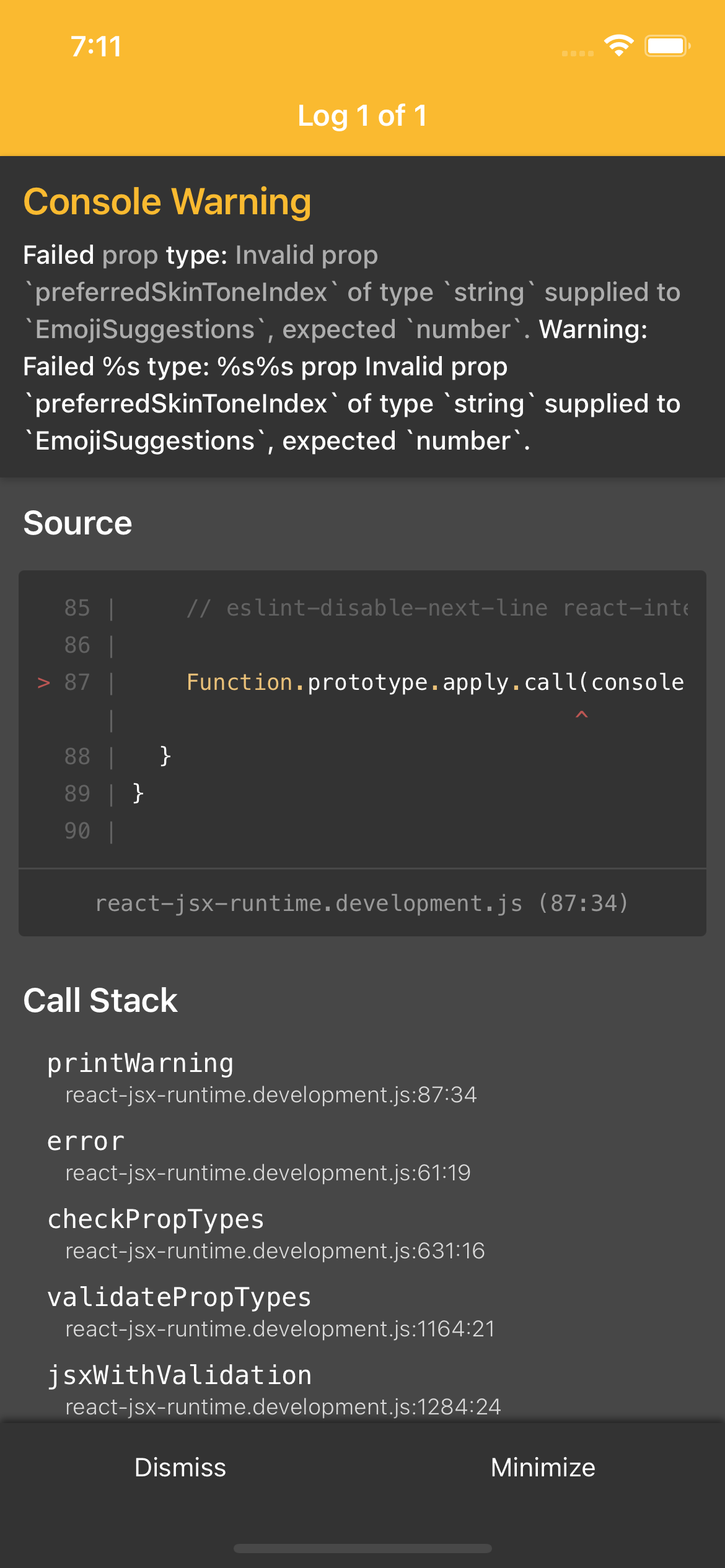
Actual Result: shows console error(Invalid prop preferredSkinToneIndex of type string supplied to EmojiSuggestions, expected number. )
Expected Result:
should not show any console error
Actual Result:
shows console error(Invalid prop preferredSkinToneIndex of type string supplied to EmojiSuggestions, expected number. )
Workaround:
Can the user still use Expensify without this being fixed? Have you informed them of the workaround?
Platforms:
Which of our officially supported platforms is this issue occurring on?
- Android / native
- Android / Chrome
- iOS / native
- iOS / Safari
- MacOS / Chrome / Safari
- MacOS / Desktop
Version Number: dev
Reproducible in staging?: n/a
Reproducible in production?: n/a
If this was caught during regression testing, add the test name, ID and link from TestRail:
Email or phone of affected tester (no customers):
Logs: https://stackoverflow.com/c/expensify/questions/4856
Notes/Photos/Videos: Any additional supporting documentation
Expensify/Expensify Issue URL: Issue reported by: @gadhiyamanan Slack conversation: https://expensify.slack.com/archives/C049HHMV9SM/p1683294088031149
Upwork Automation - Do Not Edit
- Upwork Job URL: https://www.upwork.com/jobs/~01c039b897065c50fb
- Upwork Job ID: 1656323428664475648
- Last Price Increase: 2023-05-10
About this issue
- Original URL
- State: closed
- Created a year ago
- Comments: 25 (8 by maintainers)
No offending PR.
The regression step should be enough.
Propose regression step
@gadhiyamanan @tienifr @mollfpr - offers sent
@mollfpr can you complete to above check list?
Proposal
Please re-state the problem that we are trying to solve in this issue.
It shows console error(Invalid prop preferredSkinToneIndex of type string supplied to EmojiSuggestions, expected number. ) when opening emoji suggestions list.
What is the root cause of that problem?
In here https://github.com/Expensify/App/blob/1d951e6812a30376eaed21ee792c370626e82d89/src/components/EmojiSuggestions.js#L47 we require
preferredSkinToneIndexto be a number.While the
preferredSkinTonethat we get from Onyx could sometimes bedefault, causing the prop type mismatch error.defaultvalue for thepreferredSkinTonewas legacy, it’s not a good practice to let a value being of two different types (string and number). We recently have made the move to standardize thepreferredSkinToneto -1, as can be seen here https://github.com/Expensify/App/blob/1d951e6812a30376eaed21ee792c370626e82d89/src/CONST.js#L677, also if we select the default skin tone in theEmojiPicker, it will also update to-1, which is correct.But it seems that when a new account is created, the
preferredSkinToneis still initially set todefault, causing this issue.What changes do you think we should make in order to solve the problem?
Since this is due to legacy logic, we shouldn’t penetrate this legacy type into the codebase by modifying the type of the
preferredSkinToneIndex. We should instead get rid of it at the boundary where we retrieve the data from Onyx.A similar scenario has been done earlier in here https://github.com/Expensify/App/blob/main/src/libs/actions/Report.js#L44-L46 where the
preferredSkinToneis converted to-1if it’s nully or'default'. The code comment there also further explains the situation with the'default'value:We should do the same here. We need to introduce this common method to get the correct number value of
preferredSkinTonefrom the legacy value.Then use it as the selector here https://github.com/Expensify/App/blob/1d951e6812a30376eaed21ee792c370626e82d89/src/pages/home/report/ReportActionCompose.js#L1204 where we retrieve value from Onyx
We should do it from the boundary like this to avoid rerendering in the component.
This should be enough to fix the issue here, some further cleanups can be considered:
withOnyxin other functions can use theselectorabove as well to limit the legacypreferredSkinTonevalue at the boundary-1as thepreferredSkinToneinstead ofdefault, thus limiting the legacy'default'value to only old accounts.What alternative solutions did you explore? (Optional)
NA
Hi @muneebkhan4, could you update your proposal with our PROPOSAL_TEMPLATE.md? Thanks!
✅ Contributor details stored successfully. Thank you for contributing to Expensify!
📣 @muneebkhan4! 📣 Hey, it seems we don’t have your contributor details yet! You’ll only have to do this once, and this is how we’ll hire you on Upwork. Please follow these steps: