App: [HOLD for payment 2022-02-08] When you enter wrong password on VBA page, incorrect error displayed - reported by @Tushu17
If you haven’t already, check out our contributing guidelines for onboarding and email contributors@expensify.com to request to join our Slack channel!
Action Performed:
- Open app
- Navigate to Workspace > Add bank account or Settings > Payment > Add Payment > Add bank account
- Select Plaid > Wells Fargo & login
- Select Savings account and enter incorrect account password
Expected Result:
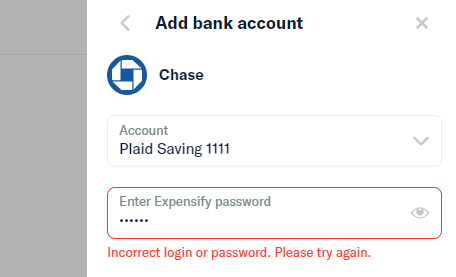
Error should only show incorrect password not incorrect login.
Actual Result:
On bank account page when you enter wrong password it shows Incorrect login or password. Please try again.
Workaround:
Can the user still use Expensify without this being fixed? Have you informed them of the workaround?
Platform:
Where is this issue occurring?
- Web
- iOS
- Android
- Desktop App
- Mobile Web
Version Number: 1.1.30-0
Reproducible in staging?: Y
Reproducible in production?:
Logs: https://stackoverflow.com/c/expensify/questions/4856
Notes/Photos/Videos: Any additional supporting documentation
Expensify/Expensify Issue URL: Issue reported by: @Tushu17 Slack conversation: https://expensify.slack.com/archives/C01GTK53T8Q/p1642111626448100
About this issue
- Original URL
- State: closed
- Created 2 years ago
- Comments: 16 (10 by maintainers)
Paid out all contracts. All done!
Oh I forgot to assign it to you, go ahead!