App: [HOLD for payment 2021-11-04] Routing number error on incorrect step
The step to add manually a bank account has a more relaxed validation on the routing number compared to the validation performed during the company step.
Ideally, the error should appear during the manually add account step.
Test data:
Routing number: 123456789
Account number: 123
Action Performed:
- Create and verify an account for NewDot
- In NewDot, create workspace and start VBA flow
- Click “Connect manually”
- Input: Routing number:
123456789, Account number:123 - Click “Save & continue”, it should let you continue to the Company Step
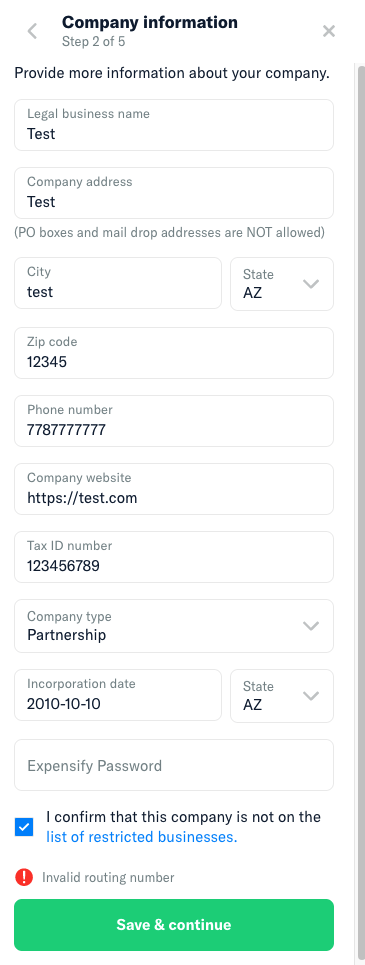
- Enter ““valid”” information in the Company Step form (see error screenshot below if you need sample data)
- Click “Save & Continue”
Expected Result:
I would have expected to move forward to the next step
Actual Result:
There is an error above the “Save & continue” telling me that the routing number is invalid. This error could have been notified on the previous step.
Workaround:
No workaround necessary, it just makes experience a little worse.
Platform:
Where is this issue occurring?
- Web
- iOS
- Android
- Desktop App
- Mobile Web
Version Number: Latest Reproducible in staging?: Yes Reproducible in production?: Yes
**Upwork URL: https://www.upwork.com/jobs/~012258c903b29a0f0d
About this issue
- Original URL
- State: closed
- Created 3 years ago
- Comments: 15 (8 by maintainers)
Hmm, I think we may be restricting VBA accounts in NewDot to the US. When you get to the company step, you cannot choose country, and you can only choose States and Zip codes from the US. Shouldn’t we just use the US routing validation?
PR in review, Melv.
@Santhosh-Sellavel I like your proposal, let’s go with that, making sure to use the algorithm we agreed on here.
I don’t think this is necessary, since the other validations in this function are validating other items (accounting number and
hasAcceptedTerms)Proposal
We can add a method
validateRoutingNumber, implementation of the algorithm in this file https://github.com/Expensify/App/blob/main/src/libs/actions/BankAccounts.jsAnd use it along the lines here to validate. https://github.com/Expensify/App/blob/8fd5aecc0cd0dfe35c4b037d2d888b26d72151c5/src/pages/ReimbursementAccount/BankAccountStep.js#L89-L91
Also we could move the regex also to
validateRoutingNumber, and just call it validate the number. cc: @Beamanator@aldo-expensify I was typing the same thing!
cc: @Beamanator what do you say?
I believe, our focus is on US-based accounts now. Check if the country of the bank account in the US So now, we can use this algorithm here: http://www.brainjar.com/js/validation/
@trjExpensify would you please make a new upwork issue for this job when you have a free moment? 😃