App: [HOLD for payment 2021-09-27] Do not show `Save & Continue` as a floating button in the VBA flow, only show it at the bottom of each step
If you haven’t already, check out our contributing guidelines for onboarding and email contributors@expensify.com to request to join our Slack channel!
Problem
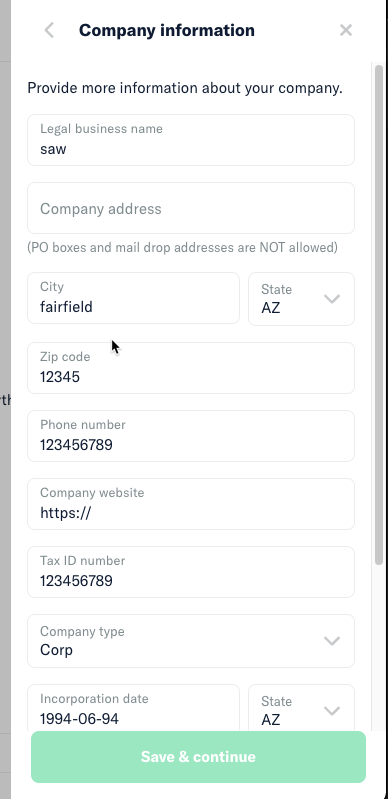
As a result of https://github.com/Expensify/App/issues/5182 , the Save & Continue button will be “active” at all times in the VBA flow, meaning a user can tap/click it at any time regardless of whether all required fields are complete. This means a user might think a step ends prematurely if they are seeing a floating button that can be tapped at any time to move forward. This will lead to unnecessary failures, where a user simply wasn’t aware that there were more required fields below an additional scroll.
Action Performed:
- Create Workspace
- Select Get Started
- Choose Connect Manually option to add bank account via routing/account number, continue
- See the
Save & Continueoption regardless of scroll position on theCompany Informationstep
Solution
Do not show Save & Continue as a floating button, and only show it at the bottom of each step in the VBA flow. This will prevent any confusion with the newly enabled Save & Continue button as a result of https://github.com/Expensify/App/issues/5182
Notes/Photos/Videos:
Note that Save & Continue exists on my screen while I am not scrolled all the way down in this step and other fields exist below the fold.
Slack conversation: link
About this issue
- Original URL
- State: closed
- Created 3 years ago
- Comments: 26 (22 by maintainers)
thanks @dylanexpensify Received.
@roryabraham Thank you very much. I can see Add Bank Account step now. Also Connect manually shows Add Bank account steps.
Attaching screenshots just to confirm that I am in right direction. Thank you again.