vscode-esp-idf-extension: Extension installes wrong binaries (VSC-1006)
OS
Linux
Operating System version
Linux RPi2 5.15.76-v7+ #1597 SMP Fri Nov 4 12:13:17 GMT 2022 armv7l GNU/Linux Linux RPi4 5.15.76-v7l+ #1597 SMP Fri Nov 4 12:14:58 GMT 2022 armv7l GNU/Linux
Visual Studio Code version
1.73.1-1667960052
ESP-IDF version
v4.4.3; release/v4.4; release/v5.0; master
Python version
3.9.2
Doctor command output
n/a
Extension
1.5.1
Description
i followed https://github.com/espressif/vscode-esp-idf-extension/blob/master/docs/tutorial/install.md
- my Raspberry Pi 2B and Raspberry Pi 4 B (4GByte) is with RaspOS Bullseye
- i installed VS Core 1.73.1 with
sudo apt install code - i installed all requirements with
sudo apt-get install git wget flex bison gperf python3 python3-venv cmake ninja-build ccache libffi-dev libssl-dev dfu-util libusb-1.0-0 - i installed the Espressif IDF Extension 1.5.1.
- i run the
ESP-IDF:Setup (ESP-IDF: Configure Extension), installed ESP-IDF, ESP-IDF-Tools, python env. - i copied the udev rule
60-openocd.rulesin place. - i enabled to trust all the subfolders of the projects folder.
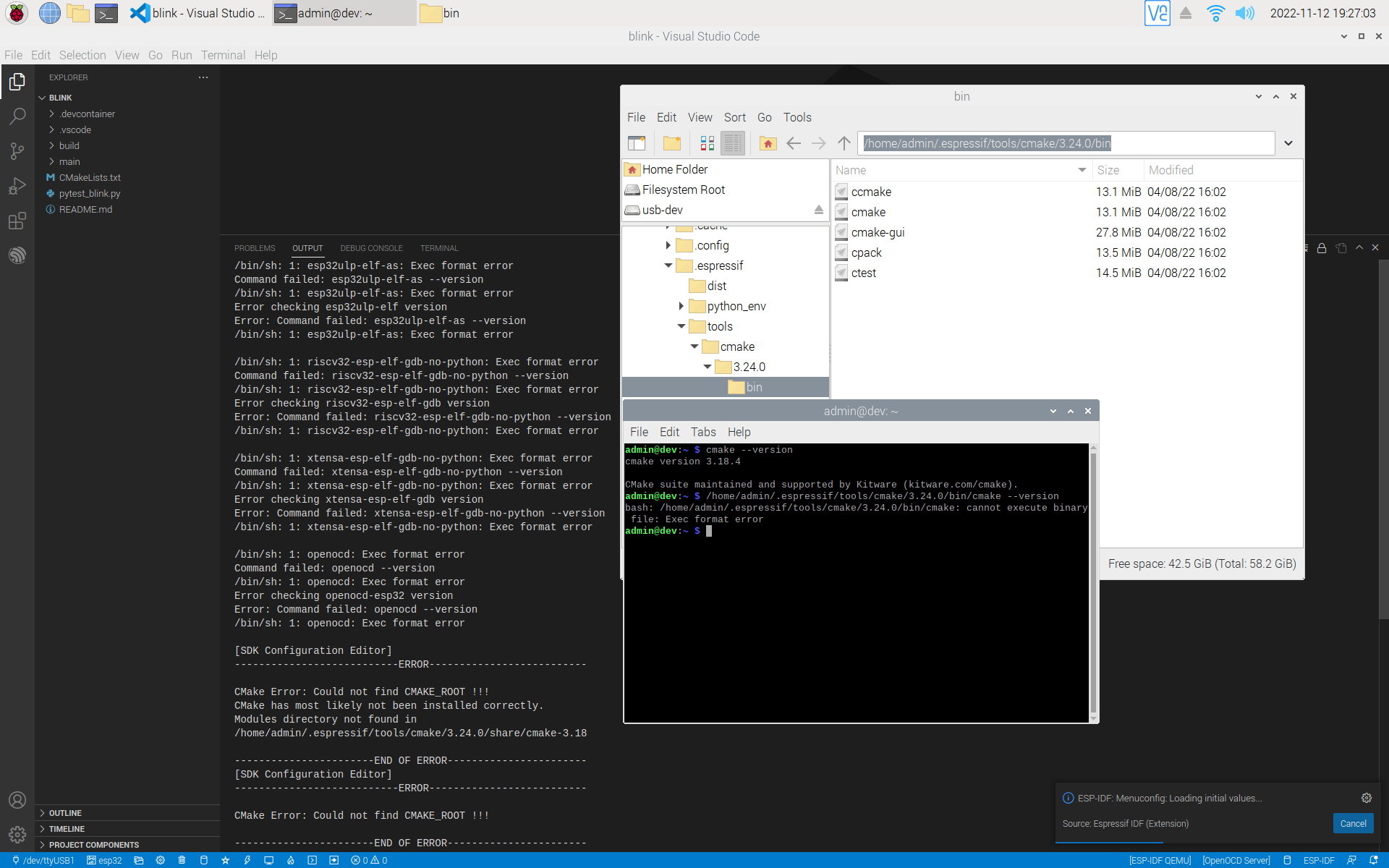
but when i run the ESP-IDF:Setup (ESP-IDF: Configure Extension), it installes some wrong binaries for amd64, x86_64 and linux64 on my Raspberry Pi that only can handle armhf binaries.
it happens in the Express and Advanced setup mode.
i tried v4.4.3, release/v4.4, release/v5.0 and master of esp-idf.
i also tried to clone the esp-idf manually (git clone --recursive https://github.com/espressif/esp-idf.git) and installed the tools manually (. ./install.sh) to get the correct armhf binaries,
but when i run the ESP-IDF:Setup (ESP-IDF: Configure Extension) in advanced mode (with Find ESP-IDF on your system) and selected all the existing esp-idf /home/admin/esp/esp-idf and tools /home/admin/.espressif pathes from my manual clone and installation, the setup still begin to download some tools in the amd64 version and overrides(?) the existing correct armhf ones or at least ignores the armhf ones and uses the wrong ones.
the result is the same - i can not config/build/flash/monitor any example in VS Core + Espressif IDF Extension.
for example, cmake i installed via apt, but VS Core tries to execute the cmake installed from the esp-idf in the tools path that is not armfh binaries - Downloading CMake build system; cmake-3.24.0-linux-x86_64.tar.gz has (45941) KB - so it is x86_64
Debug Message
n/a
Other Steps to Reproduce
No response
I have checked existing issues, online documentation and the Troubleshooting Guide
- I confirm I have checked existing issues, online documentation and Troubleshooting guide.
About this issue
- Original URL
- State: closed
- Created 2 years ago
- Comments: 24
The fix here is not published yet just merged to GitHub master branch. When the new release is publish the vscode will update to the new one in the marketplace automatically.