vscode-esp-idf-extension: [Bug Report]: ESP-IDF: size analysis of binaries command invalid (VSC-753)
Pre Bug Report Checklist Before reporting any bug please make sure of these points.
- Make sure you have searched for existing bugs and features request before you post an issue.
- This is a bug report for the ESP-IDF Visual Studio Code extension and not an ESP-IDF bug report.
- I’ve read the docs and found no information that could have helped solving the issue.
Describe the bug ESP-IDF: size analysis of binaries command is invalid after building the project
To Reproduce
- Build the project
- press F1 and select ESP-IDF: size analysis of binaries
Expected behavior ESP-IDF: size analysis of binaries command can work as expected
Screenshots

Environment (please complete the following information):
- OS Name & Version: win10
- VSCode Version: 1.60.0
- ESP-IDF Version: master branch
- Python Version: 3.8.7
NOTE: You can use the
ESP-IDF: Doctor commandto generate a report of your configuration.
Output
---------------------------------------------- ESP-IDF Extension for Visual Studio Code report ---------------------------------------------
OS win32 x64 10.0.19042
System environment variable IDF_PYTHON_ENV_PATH
 undefined
System environment variable PATH
 D:\Python39\Scripts\;D:\Python39\;%ALLEGRO_BRD2ODB%\nv\bin;C:\Program Files (x86)\Common Files\Oracle\Java\javapath;C:\windows\system32;C:\windows;C:\windows\System32\Wbem;C:\windows\System32\WindowsPowerShell\v1.0\;C:\windows\System32\OpenSSH\;C:\Program Files (x86)\NVIDIA Corporation\PhysX\Common;c:\Program Files (x86)\HP\HP Performance Advisor;D:\PuTTY\;C:\WINDOWS\system32;C:\WINDOWS;C:\WINDOWS\System32\Wbem;C:\WINDOWS\System32\WindowsPowerShell\v1.0\;C:\WINDOWS\System32\OpenSSH\;C:\Program Files\Intel\WiFi\bin\;C:\Program Files\Common Files\Intel\WirelessCommon\;C:\Program Files (x86)\IVI Foundation\VISA\WinNT\Bin\;C:\Program Files\IVI Foundation\VISA\Win64\Bin\;C:\Program Files (x86)\IVI Foundation\VISA\WinNT\Bin;D:\Git\cmd;C:\Program Files (x86)\STMicroelectronics\STM32 ST-LINK Utility\ST-LINK Utility;C:\Program Files (x86)\IVI Foundation\IVI\bin;C:\Program Files\IVI Foundation\IVI\bin;D:\CMake\bin;C:\Program Files\Nordic Semiconductor\nrf-command-line-tools\bin\;D:\doxygen\bin;D:\Mscgen;D:\stlink-1.3.0-win64\bin;C:\Program Files (x86)\Intel\Intel(R) Management Engine Components\DAL;C:\Program Files\Intel\Intel(R) Management Engine Components\DAL;C:\ProgramData\chocolatey\bin;D:\nodejs\;C:\Program Files\Docker\Docker\resources\bin;C:\ProgramData\DockerDesktop\version-bin;C:\Users\wireless_tech\AppData\Local\Microsoft\WindowsApps;D:\Microsoft VS Code\bin;C:\Users\wireless_tech\AppData\Roaming\npm
System environment variable PYTHON
 undefined
Visual Studio Code version 1.60.0
Visual Studio Code language en
Visual Studio Code shell C:\WINDOWS\System32\WindowsPowerShell\v1.0\powershell.exe
ESP-IDF Extension version 1.2.0
---------------------------------------------------- Extension configuration settings ------------------------------------------------------
ESP-ADF Path (idf.espAdfPath) ${env:ADF_PATH}
ESP-IDF Path (idf.espIdfPath) F:/BLE_WIFI/Espressif/SDK/esp-idf-c3/
ESP-MDF Path (idf.espMdfPath) ${env:MDF_PATH}
Custom extra paths (idf.customExtraPaths) F:\Tools\Espressif\IDF_Tools\.espressif\tools\xtensa-esp32-elf\esp-2021r1-8.4.0\xtensa-esp32-elf\bin;F:\Tools\Espressif\IDF_Tools\.espressif\tools\xtensa-esp32s2-elf\esp-2021r1-8.4.0\xtensa-esp32s2-elf\bin;F:\Tools\Espressif\IDF_Tools\.espressif\tools\xtensa-esp32s3-elf\esp-2021r1-8.4.0\xtensa-esp32s3-elf\bin;F:\Tools\Espressif\IDF_Tools\.espressif\tools\riscv32-esp-elf\esp-2021r1-8.4.0\riscv32-esp-elf\bin;F:\Tools\Espressif\IDF_Tools\.espressif\tools\esp32ulp-elf\2.28.51-esp-20191205\esp32ulp-elf-binutils\bin;F:\Tools\Espressif\IDF_Tools\.espressif\tools\esp32s2ulp-elf\2.28.51-esp-20191205\esp32s2ulp-elf-binutils\bin;F:\Tools\Espressif\IDF_Tools\.espressif\tools\cmake\3.20.3\bin;F:\Tools\Espressif\IDF_Tools\.espressif\tools\openocd-esp32\v0.10.0-esp32-20210401\openocd-esp32\bin;F:\Tools\Espressif\IDF_Tools\.espressif\tools\ninja\1.10.2;F:\Tools\Espressif\IDF_Tools\.espressif\tools\idf-exe\1.0.1;F:\Tools\Espressif\IDF_Tools\.espressif\tools\ccache\4.3\ccache-4.3-windows-64;F:\Tools\Espressif\IDF_Tools\.espressif\tools\dfu-util\0.9\dfu-util-0.9-win64
Custom extra vars (idf.customExtraVars) {"OPENOCD_SCRIPTS":"F:\\Tools\\Espressif\\IDF_Tools\\.espressif\\tools\\openocd-esp32\\v0.10.0-esp32-20210401/openocd-esp32/share/openocd/scripts","IDF_CCACHE_ENABLE":"1"}
Virtual env Python Path (idf.pythonBinPath) F:/Tools/Espressif/IDF_Tools/.espressif/python_env/idf4.4_py3.8_env/Scripts/python.exe
Serial port (idf.port) COM35
OpenOCD Configs (idf.openOcdConfigs) board/esp32c3-builtin.cfg
ESP-IDF Tools Path (idf.toolsPath) F:\Tools\Espressif\IDF_Tools\.espressif
Git Path (idf.gitPath) F:/Tools/Espressif/IDF_Tools/.espressif/tools/idf-git/2.30.1/cmd/git.exe
-------------------------------------------------------- Configurations access -------------------------------------------------------------
Access to ESP-ADF Path (idf.espAdfPath) false
Access to ESP-IDF Path (idf.espIdfPath) true
Access to ESP-MDF Path (idf.espMdfPath) false
Access to ESP-IDF Custom extra paths
Access to F:\Tools\Espressif\IDF_Tools\.espressif\tools\xtensa-esp32-elf\esp-2021r1-8.4.0\xtensa-esp32-elf\bin: true
Access to F:\Tools\Espressif\IDF_Tools\.espressif\tools\xtensa-esp32s2-elf\esp-2021r1-8.4.0\xtensa-esp32s2-elf\bin: true
Access to F:\Tools\Espressif\IDF_Tools\.espressif\tools\xtensa-esp32s3-elf\esp-2021r1-8.4.0\xtensa-esp32s3-elf\bin: true
Access to F:\Tools\Espressif\IDF_Tools\.espressif\tools\riscv32-esp-elf\esp-2021r1-8.4.0\riscv32-esp-elf\bin: true
Access to F:\Tools\Espressif\IDF_Tools\.espressif\tools\esp32ulp-elf\2.28.51-esp-20191205\esp32ulp-elf-binutils\bin: true
Access to F:\Tools\Espressif\IDF_Tools\.espressif\tools\esp32s2ulp-elf\2.28.51-esp-20191205\esp32s2ulp-elf-binutils\bin: true
Access to F:\Tools\Espressif\IDF_Tools\.espressif\tools\cmake\3.20.3\bin: true
Access to F:\Tools\Espressif\IDF_Tools\.espressif\tools\openocd-esp32\v0.10.0-esp32-20210401\openocd-esp32\bin: true
Access to F:\Tools\Espressif\IDF_Tools\.espressif\tools\ninja\1.10.2: true
Access to F:\Tools\Espressif\IDF_Tools\.espressif\tools\idf-exe\1.0.1: true
Access to F:\Tools\Espressif\IDF_Tools\.espressif\tools\ccache\4.3\ccache-4.3-windows-64: true
Access to F:\Tools\Espressif\IDF_Tools\.espressif\tools\dfu-util\0.9\dfu-util-0.9-win64: true
Access to Virtual env Python Path (idf.pythonBinPath) true
Access to CMake in environment PATH undefined
Access to Ninja in environment PATH undefined
Access to ESP-IDF Tools Path (idf.toolsPath) true
----------------------------------------------------------- Executables Versions -----------------------------------------------------------
Git version 2.30.1.windows.1
ESP-IDF version 4.4
Python version 3.8.7
Python's pip version 20.3.3
-------------------------------------------------- Python packages in idf.pythonBinPath ----------------------------------------------------
bitstring version: 3.1.7
Brotli version: 1.0.9
certifi version: 2021.5.30
cffi version: 1.14.5
charset-normalizer version: 2.0.3
click version: 8.0.1
colorama version: 0.4.4
construct version: 2.10.54
contextlib2 version: 21.6.0
cryptography version: 3.4.7
ecdsa version: 0.17.0
esp-windows-curses version: 0.1
Flask version: 0.12.5
Flask-Compress version: 1.9.0
Flask-SocketIO version: 2.9.6
future version: 0.18.2
gcovr version: 5.0
gdbgui version: 0.13.2.0
gevent version: 1.5.0
greenlet version: 1.1.0
idf-component-manager version: 0.2.100b0
idna version: 3.2
itsdangerous version: 2.0.1
Jinja2 version: 3.0.1
kconfiglib version: 13.7.1
lxml version: 4.6.3
MarkupSafe version: 2.0.1
pip version: 20.3.3
psutil version: 5.8.0
pycparser version: 2.20
pyelftools version: 0.27
pygdbmi version: 0.9.0.2
Pygments version: 2.9.0
pyparsing version: 2.3.1
pyserial version: 3.5
python-engineio version: 3.14.2
python-socketio version: 4.6.1
pywin32 version: 301
PyYAML version: 5.4.1
reedsolo version: 1.5.4
requests version: 2.26.0
requests-toolbelt version: 0.9.1
schema version: 0.7.4
semantic-version version: 2.8.5
setuptools version: 57.4.0
six version: 1.16.0
tqdm version: 4.61.2
urllib3 version: 1.26.6
websocket-client version: 1.2.1
Werkzeug version: 0.16.1
wheel version: 0.36.2
windows-curses version: 2.2.0
xmlrunner version: 1.7.7
---------------------------------------------------- Check ESP-IDF python requirements.txt -------------------------------------------------
Check ESP-IDF Python packages Python requirements from F:\BLE_WIFI\Espressif\SDK\esp-idf-c3\requirements.txt are satisfied.
---------------------------------------------------- Check extension requirements.txt ------------------------------------------------------
Check Extension Python packages Python requirements from c:\Users\wireless_tech\.vscode\extensions\espressif.esp-idf-extension-1.2.0\requirements.txt are satisfied.
---------------------------------------------------- Check ESP-IDF debug adapter requirements.txt ------------------------------------------
Check Debug AdapterPython packages Python requirements from c:\Users\wireless_tech\.vscode\extensions\espressif.esp-idf-extension-1.2.0\esp_debug_adapter\requirements.txt are satisfied.
---------------------------------------------------- Visual Studio Code launch.json --------------------------------------------------------
{
  "version": "0.2.0",
  "configurations": [
    {
      "type": "espidf",
      "name": "Launch",
      "request": "launch"
    }
  ]
}
---------------------------------------------------- Visual Studio Code c_cpp_properties.json ----------------------------------------------
{
    "configurations": [
        {
            "name": "ESP-IDF",
            "compilerPath": "F:\\Tools\\Espressif\\IDF_Tools\\.espressif\\tools\\riscv32-esp-elf\\esp-2021r1-8.4.0\\riscv32-esp-elf\\bin\\riscv32-esp-elf-gcc.exe",
            "cStandard": "c11",
            "cppStandard": "c++17",
            "includePath": [
                "${config:idf.espIdfPath}/components/**",
                "${config:idf.espIdfPathWin}/components/**",
                "${config:idf.espAdfPath}/components/**",
                "${config:idf.espAdfPathWin}/components/**",
                "${workspaceFolder}/**"
            ],
            "browse": {
                "path": [
                    "${config:idf.espIdfPath}/components",
                    "${config:idf.espIdfPathWin}/components",
                    "${config:idf.espAdfPath}/components/**",
                    "${config:idf.espAdfPathWin}/components/**",
                    "${workspaceFolder}"
                ],
                "limitSymbolsToIncludedHeaders": false
            },
            "compileCommands": "${workspaceFolder}/build/compile_commands.json"
        }
    ],
    "version": 4
}
--------------------------------------------------------------------------------------------------------------------------------------------
Logs
Additional context NULL
About this issue
- Original URL
- State: closed
- Created 3 years ago
- Comments: 28 (16 by maintainers)
Hi @brianignacio5 Bro,
To keep align with the other SoCs, can I consider them simply like this:
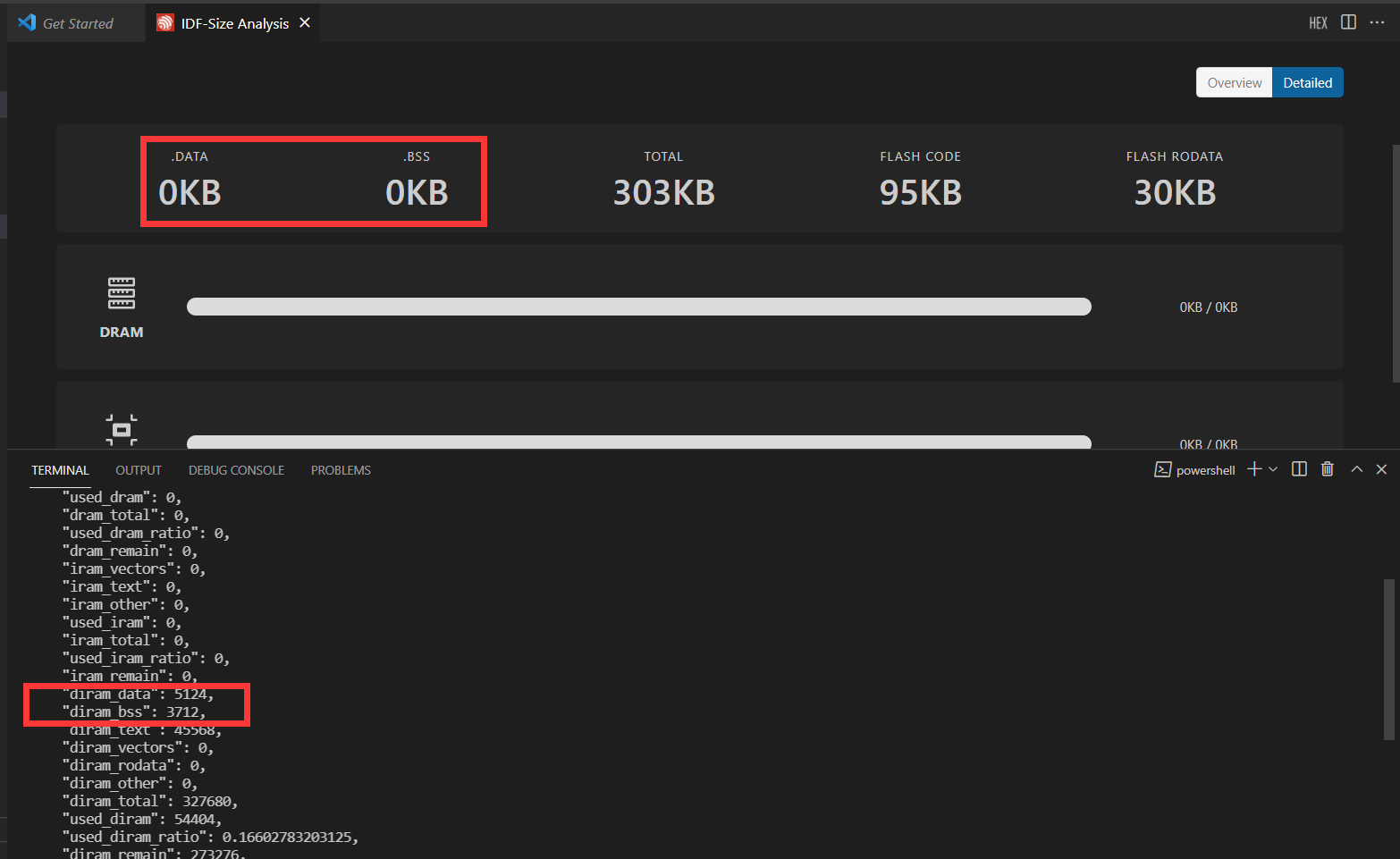
"used_flash_non_ram": 259976,"used_diram": 54404,Basically for chips with separated D- and I-RAM spaces (like ESP32)
dram*andiram*fields in the json output will be set. For chips with single region for both D- and I-RAM,diram*fields will be set.In the former case we can display the used RAM as two bars:
In the latter case we can display the used RAM as a single bar, because both data and code size occupy the same total amount of RAM:
(or something along these lines)
Hi @brianignacio5 Bro,
Indeed, the NaN has gone, but the .bss & .data are always 0KB, could you double-check? I used the blink example project for testing.